The Roku App (Official) icon

The Roku App (Official)

Entertainment

Related searches

Your New Best Friend for Binge-Watching: The Roku App

Your New Best Friend for Binge-Watching: The Roku App

Getting Your Roku App Up and Running

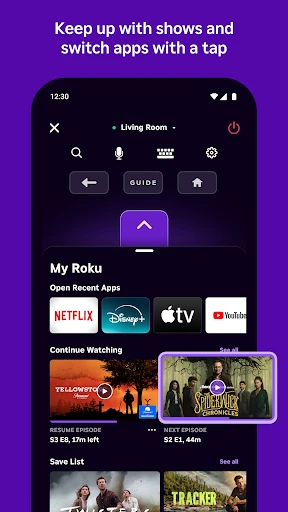
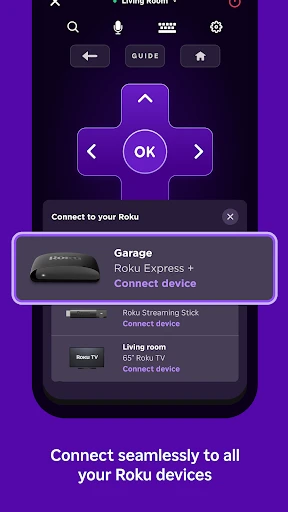
Getting started with the Roku app is super simple. Just head to your phone's app store to download it. Once it's installed, the app will automatically find your Roku device as long as your phone is on the same Wi-Fi network. Say goodbye to the hassle of searching for a lost remote; now your entertainment is right in your hand.

Cool Features You'll Love

One feature you'll use all the time is voice control. Just tap the microphone and tell your Roku what to do—search for a show, change the channel, or pause what you're watching. It feels like magic. Another awesome perk is private listening. Plug in your headphones to listen to your show without bothering anyone else. It’s perfect for late-night viewing.

Easy-to-Use Controls

Moving around the app feels natural. You can swipe and tap through menus just like you would on your phone. It has all the same buttons as your physical remote, so you'll know exactly what to do. Typing is also way easier because you can use your phone's keyboard to enter text, which is a huge time-saver.

Extra Bonuses for a Better Experience

Beyond being a remote, the app lets you send videos, photos, and music from your phone straight to your TV. You can also manage your channels directly from the app, adding new ones or removing ones you don't watch anymore. And if you can't decide what to watch, check out the "What's On" section for suggestions on popular and recommended shows.

Final Thoughts on the Roku App

All in all, the official Roku app is a powerful upgrade to your streaming setup. It combines the convenience of a remote with smart features like voice search and private listening. No matter how you like to watch, this app makes using your Roku easier and more fun. It’s definitely worth downloading to get the most out of your TV time.

The Roku App (Official) screenshot The Roku App (Official) screenshot The Roku App (Official) screenshot The Roku App (Official) screenshot The Roku App (Official) screenshot
Developer
Roku, Inc. & its affiliates
Version
12.5.2.5558560
Installs
50,000,000+
Android Version
8.0
Content Rating
Teen
Price
Free
Pros
  • Seamless integration with Roku devices.
  • User-friendly interface for easy navigation.
  • Supports voice commands for quick searches.
  • Allows private listening via headphones.
  • Free to download and use without ads.
Cons
  • Limited functionality without Roku device.
  • Occasional connectivity issues reported.
  • No offline viewing option available.
  • Requires stable internet for optimal use.
  • In-app purchases for premium features.

Ratings

4.7

Similar Apps

Morph&Mob Mod for MinecraftPE

Morph&Mob Mod for MinecraftPE

4.7
Get
Hulu: Stream TV shows & movies

Hulu: Stream TV shows & movies

4.5
Get
JoyReels - Enjoy Short Dramas

JoyReels - Enjoy Short Dramas

4.3
Get
Fandango at Home

Fandango at Home

4.4
Get
Fubo: Watch Live TV & Sports

Fubo: Watch Live TV & Sports

3.2
Get
Color Pop - Fun Coloring Games

Color Pop - Fun Coloring Games

4.3
Get
Twitch: Live Streaming

Twitch: Live Streaming

4
Get
Spranbox: Mix beats

Spranbox: Mix beats

3.6
Get
Prankster-Funny Prank Sounds

Prankster-Funny Prank Sounds

4.3
Get
Living Worlds – Mark Ferrari

Living Worlds – Mark Ferrari

4.7
Get

Frequently Asked Questions

What is The Roku App (Official) and how does it enhance my Roku streaming experience?

The Roku App (Official) is a mobile application designed to complement your Roku streaming device. It allows you to control your Roku player or Roku TV from your smartphone or tablet. With features like voice search, private listening with headphones, and the ability to cast content from your device to your TV, the app enhances your streaming experience by providing easy navigation and additional functionalities.

Is The Roku App (Official) free to download and use?

Yes, The Roku App (Official) is free to download from both the Google Play Store and the Apple App Store. While the app itself is free, keep in mind that streaming certain content may require subscriptions or purchases, depending on the channel or service you are accessing through your Roku device.

Can I use The Roku App (Official) to stream content directly from my mobile device to my TV?

Yes, The Roku App (Official) includes a feature known as "Play on Roku," which allows you to stream photos, videos, and music directly from your smartphone or tablet to your TV. This feature is particularly useful for sharing personal media with friends and family on a larger screen.

How does the private listening feature work on The Roku App (Official)?

The private listening feature on The Roku App (Official) allows users to listen to TV audio through their headphones connected to their mobile device. This feature is ideal for situations where you want to enjoy your content without disturbing others. Simply connect your headphones to your smartphone or tablet, and activate private listening within the app for an immersive audio experience.

What devices are compatible with The Roku App (Official)?

The Roku App (Official) is compatible with most iOS and Android devices, including smartphones and tablets. To ensure optimal performance, your device should be running iOS 11.0 or later or Android 5.0 or later. Additionally, the app works with all Roku players and Roku TV models, providing a seamless experience across different devices.