Twinkly
Twinkly is one of those apps that, at first glance, looks like a dazzling light show in your pocket. Picture this: You’ve just decked out your living room for the holidays, fairy lights twinkling away, and you realize you can control them all with just a swipe on your smartphone. That’s the magic of Twinkly. It’s not just an app; it’s a gateway to turning any space into a festive wonderland.
Twinkly is one of those apps that, at first glance, looks like a dazzling light show in your pocket. Picture this: You’ve just decked out your living room for the holidays, fairy lights twinkling away, and you realize you can control them all with just a swipe on your smartphone. That’s the magic of Twinkly. It’s not just an app; it’s a gateway to turning any space into a festive wonderland.
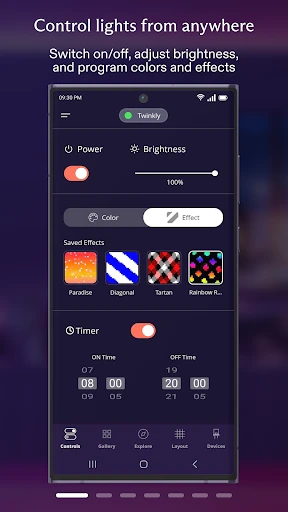
Getting your Twinkly lights up and running is super simple. After you download the app on your Android or iPhone, it walks you through the steps to connect your lights to your Wi-Fi. The process is really user-friendly, so you don't need to be a tech expert to figure it out.
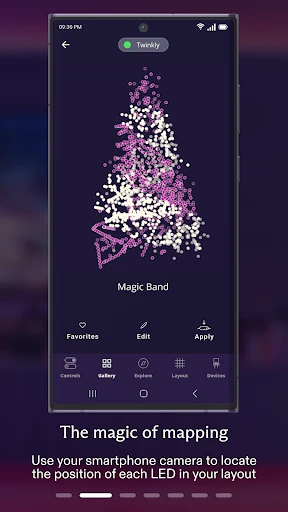
Once you're connected, you can dive into a bunch of ready-made lighting effects or get inventive and make your own. A cool trick the app has is using your phone's camera to map the lights, making sure every single bulb is perfectly placed in your display. It feels like you've got your very own lighting expert right there with you!
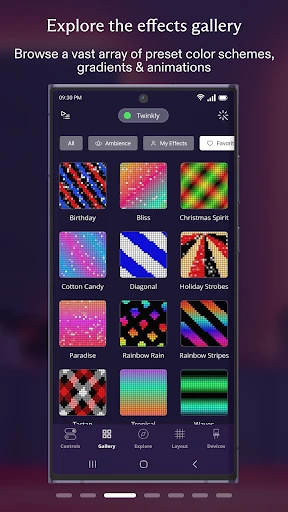
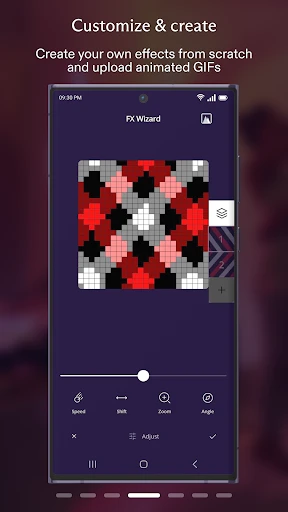
What really makes Twinkly special are all the ways you can personalize your lights. The app comes with a huge collection of effects, and you can even add your own animations. Feel like having your lights dance along to your favorite songs? Twinkly can sync with your music, which is awesome for parties or just adding some fun to a regular night in.
Another great thing is how well it works with other smart home gadgets. It teams up smoothly with Google Assistant, Amazon Alexa, and Apple HomeKit, which is perfect if you're into smart homes. You can just tell your lights what to do with your voice, and it honestly feels like you're living in the future.
From my own experience, the mapping feature is a real game-changer. It's not just for show—it actually makes setting up and playing with your lights way better. Making your own custom effects is easy, and it's super rewarding to see them work exactly how you pictured.
I did have a small connection problem when I first set it up, but turning my router off and on again sorted it right out. It's good to know that the app gets updates pretty often, which shows the people who made it are working to keep it running well.
In the end, Twinkly is a brilliant app for anyone wanting to spice up their home lighting. It's easy to get the hang of, and with so many options to make it your own, it's a top pick in the world of smart lights. Whether you're getting ready for a holiday or just want to brighten up your day, Twinkly is definitely worth trying. It's like carrying a tiny light show director in your pocket, ready to change the vibe of any room with just a few taps. So why not give it a shot? Your creative side will be glad you did

- Developer
- Twinkly
- Version
- 3.22.2
- Installs
- 500,000+
- Android Version
- 6.0
- Content Rating
- Everyone
- Price
- Free
- Easy to set up with intuitive interface.
- Wide variety of lighting effects available.
- Customizable animations and patterns.
- Seamless integration with smart home devices.
- Regular updates enhance functionality.
- Limited compatibility with older devices.
- Requires strong Wi-Fi for optimal use.
- Occasional app crashes reported.
- High battery consumption noted.
- In-app purchases can be expensive.