Dual Camera Sides
Dual Camera Sides: A New Way to Capture Your World
Dual Camera Sides: A New Way to Capture Your World
Hey there, photography fans! If you're anything like me, you're always hunting for the next great app to boost your photo skills. I recently found an app called Dual Camera Sides, and I have to say, it's a really clever tool for anyone who enjoys capturing moments from different viewpoints. Let me walk you through my time using this app.
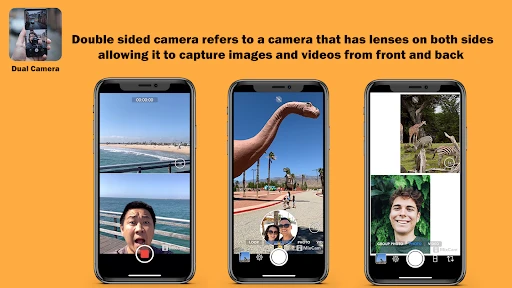
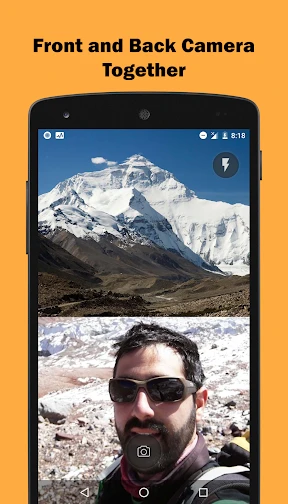
So, what's the big idea with this app? Imagine this: you have an amazing sight in front of you and another great moment happening behind you. Usually, you'd have to pick one, but with Dual Camera Sides, you can use both the front and back cameras at the same time! It’s the best of both worlds. Whether you're making a vlog, recording a journey, or just snapping pics with friends, this app gives a whole new angle to your photos and videos.
First steps with the app are simple. The layout is straightforward and easy to understand. Even if you're not super tech-savvy, you'll find it a snap to use. After you install the app, you just need to allow a few permissions, and you're all set. The main screen shows you what both cameras see, and you can switch between different layouts to find the one you like best.
One of the coolest things about Dual Camera Sides is how flexible it is. You can pick from several split-screen options, letting you decide how much of each camera's view you want in the shot. Whether you want a half-and-half split or to make one view bigger than the other, it's totally up to you.
Plus, the app comes with some handy editing features. It's not a professional editor, but you can add filters, change the brightness, and adjust the contrast right inside the app. This means you can touch up your photos before posting them online. And yes, the app works for video as well! You can record video with both cameras running at once – ideal for vloggers and people who create content!
When it comes to how well it works, I found Dual Camera Sides to be quite reliable. There's very little delay when you change camera modes, and the app doesn't use up your battery quickly like some other camera apps can. It's built to work efficiently, which I really appreciate. I tried it on both Android and Apple phones, and it worked well on both.
Just one thing to keep in mind: how well the app runs can depend a bit on your phone's hardware. If you have a older model phone, you might notice a slight slowdown, particularly when recording video. But for most newer phones, it should work perfectly.
So, should you download Dual Camera Sides? For sure, especially if you love telling a complete story with your media. It's an enjoyable, imaginative tool that creates new opportunities for both photos and videos. Best of all, it's free to get, so you've got nothing to lose by trying it out.
In a time when social media is all about sharing your life, Dual Camera Sides gives you a unique way to do that. So download it, and start capturing those moments from two perspectives at once. Once you try it, you'll be hooked

- Developer
- kahlochSto
- Version
- 7.0
- Installs
- 100,000+
- Android Version
- 7.0
- Content Rating
- Everyone
- Price
- Free
- Simultaneous front and back camera use
- Easy-to-navigate interface
- High-quality video output
- Real-time video switching
- Compatible with most smartphones
- Consumes a lot of battery power
- Limited editing features
- May lag on older devices
- Requires good lighting conditions
- Large file sizes