
TP-Link Tapo
Let me tell you about this nifty little app called TP-Link Tapo that I recently stumbled upon.
Let me tell you about this nifty little app called TP-Link Tapo that I recently stumbled upon.
A Beginner's Guide to the Tapo App
First things first, let’s talk about setting it up. To be honest, I was a bit skeptical about how smooth the installation process would be. But lo and behold, it was a breeze! All you need is your smartphone, the Tapo app, and a bit of Wi-Fi magic. Once you download the app and create an account, it walks you through the setup like a personal tech buddy. I was up and running in no time, and trust me, I’m no tech wizard.
Handy Features You'll Actually Use
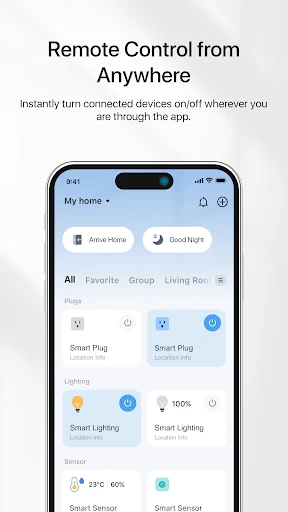
Now, onto the juicy bits - the features! This app is like the Swiss Army knife for your smart home devices. Once you have it linked with your Tapo smart plugs, cameras, or bulbs, you can control them all from the app. Want to turn off that pesky light you left on upstairs? Just tap away on your phone. It’s almost like having superpowers.
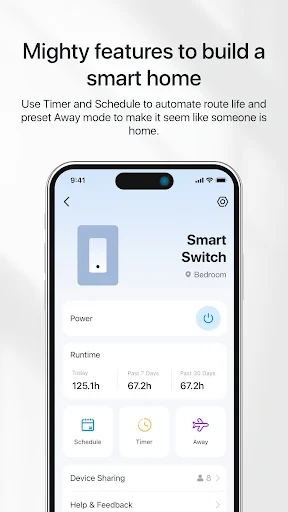
One feature that caught my eye was the scheduling option. You can set times for your devices to turn on or off, which is perfect if you’re someone who’s always on the go. Imagine waking up to your coffee maker already brewing your morning cup. Pure bliss!
Keeping Your Home Safe and Sound
The security aspect of Tapo is also worth mentioning. You could be sipping piña coladas on a beach, and with just a few taps, check in on your home through the Tapo cameras. The live video quality is impressive, and it even has night vision. So, whether it’s day or night, you get a clear view. Plus, there’s motion detection, which sends alerts straight to your phone if anything unusual is going on. It’s like having a mini security team right in your pocket.
Another cool feature is the Away Mode. You can make it look like someone’s home by having your lights turn on and off at random times. Perfect for those extended vacation trips when you want to deter any unwanted visitors.
Wrapping It All Up
All in all, TP-Link Tapo is a gem for anyone looking to dip their toes into the world of smart home tech without breaking the bank. The app is intuitive, user-friendly, and packed with features that genuinely make life easier and more secure. Whether you’re a tech enthusiast or just someone who loves the idea of controlling your home with a smartphone, Tapo is definitely worth checking out.
So, if you’re keen to transform your living space into a smarter, more connected home, give TP-Link Tapo a try. It might just become your new favorite app!


- Developer
- TP-LINK SYSTEMS INC.
- Version
- 3.10.513
- Installs
- 10,000,000+
- Android Version
- 7.0
- Content Rating
- Everyone
- Price
- Free
- User-friendly interface
- easy to navigate.
- Seamless integration with other smart devices.
- Reliable performance with minimal lag.
- High-quality video streaming capabilities.
- Limited compatibility with older devices.
- Occasional connectivity issues reported.
- Requires stable internet for optimal use.
- Privacy concerns with data sharing policies.
- Limited customer support options available.