
Shuffles by Pinterest
Ever Wondered How to Bring Your Pinterest Pins to Life?
Ever Wondered How to Bring Your Pinterest Pins to Life?
So, what's the deal with Shuffles by Pinterest? Basically, it’s like your personal mood board on steroids. The app allows you to create, well, shuffles - which are dynamic, animated collages. Imagine taking your favorite pins and giving them a breath of fresh air with animations and music. Yes, it’s as cool as it sounds.
When I first downloaded the app, I was a bit skeptical. I mean, how different could it be from the regular Pinterest experience, right? But boy, was I wrong. The interface is sleek and intuitive, making it super easy to dive right in and start creating. You’re greeted with a vibrant home screen that showcases trending shuffles to get your creative juices flowing.
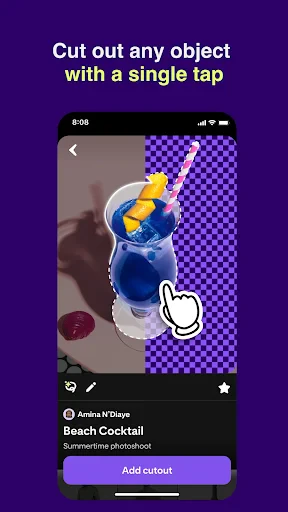
Creating a shuffle is as simple as selecting a few of your favorite pins. The app provides a variety of templates, or you can start from scratch if you’re feeling extra creative. You can mix photos, text, and stickers to craft something uniquely yours. What I love most is the ability to add animations to your collage. It’s like watching your vision come to life, and trust me, it’s incredibly satisfying.
On top of that, the app allows you to add music to your shuffles. Yes, you can create the perfect vibe to match your creation. I found myself lost for hours, tinkering with different combinations of visuals and sounds. It's almost like being a mini director of your own creative masterpiece!
Once you’re happy with your shuffle, sharing it is a breeze. You can send it directly to your friends or post it on social media for the world to see. The app integrates seamlessly with other platforms, making it easy to show off your creative prowess. I shared one of my shuffles on Instagram, and the feedback was amazing. People were genuinely impressed by the creativity and the unique format.
Another cool feature is the community aspect of the app. You can browse through other users’ shuffles, get inspired, and even remix their creations. It’s a fantastic way to connect with other creative minds and keep the inspiration flowing. I’ve discovered so many talented creators through this feature, and it’s genuinely inspiring to see how others interpret their ideas.
Overall, Shuffles by Pinterest is a vibrant playground for anyone who loves to create and share. It’s a refreshing twist on the traditional Pinterest experience, offering more depth and interactivity. Whether you’re an artist, a dreamer, or just looking for a new hobby, this app has something for everyone. So why not give it a try? You might just find yourself hooked on this delightful, creative journey.
In a world where expressing oneself has become more digital, apps like Shuffles are a testament to how technology can enhance creativity rather than stifle it. So go on, unleash your inner artist, and see where your imagination takes you!




- Developer
- Version
- 0.40.28
- Installs
- 1,000,000+
- Android Version
- 8.0
- Content Rating
- Teen
- Price
- Free
- Integrates seamlessly with Pinterest.
- User-friendly interface design.
- Offers creative collage tools.
- Strong community sharing features.
- Regular updates and new features.
- Limited offline functionality.
- May consume significant device memory.
- Requires Pinterest account to use.
- In-app purchases can be pricey.
- Occasional app crashes reported.