
Friendly For Twitter/X
My Experience with Friendly For Twitter/X: A Breath of Fresh Air for Social Scrolling
My Experience with Friendly For Twitter/X: A Breath of Fresh Air for Social Scrolling
Why I Gave This New App a Shot
Hey there! So, I recently got my hands on this app called Friendly For Twitter/X, and let me tell you, it’s been quite the ride! If you’re looking for a fresh way to engage with Twitter or X, this app might just be your new best friend. Let’s dive into what makes it tick.
Like many of you, I spend a fair amount of time scrolling through Twitter. I mean, who doesn’t love a good meme or breaking news update, right? But sometimes, the official app just doesn’t cut it. That’s when I stumbled upon Friendly For Twitter/X. I was intrigued by the promise of a more customizable, ad-free experience, so I thought, why not give it a shot?
The Cool Features That Stood Out
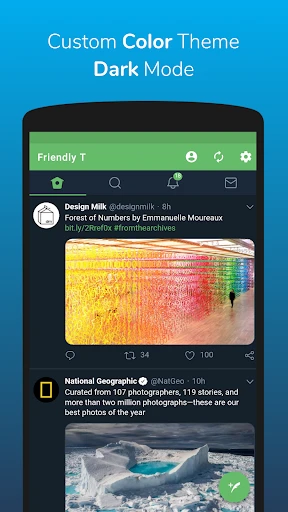
One of the first things I noticed about this app is how lightweight it is. It doesn’t take up much space on my phone, which is a huge plus. It’s like that friend who doesn’t eat all your snacks when they come over! More importantly, it offers a range of customization options. From changing themes to adjusting font sizes, it lets you tailor your experience just the way you like it.
Another cool feature is its ability to manage multiple accounts seamlessly. If you’re like me and juggle personal and professional accounts, you’ll find this feature incredibly handy. No more logging in and out repeatedly—just a simple swipe, and you’re good to go!
What It Was Actually Like to Use
Using Friendly For Twitter/X felt like a breath of fresh air. The interface is clean and intuitive, making it easy to navigate through tweets, DMs, and notifications. I also appreciated the ad-blocking feature, which means fewer interruptions and more content consumption. It’s like finally getting to the bottom of your to-do list without any pop-up distractions!
However, it’s not all sunshine and rainbows. There were a few hiccups along the way. Occasionally, the app would lag, especially when loading media-heavy tweets. But hey, no app is perfect, and the developers seem committed to rolling out updates to iron out these kinks.
My Overall Takeaway
All in all, Friendly For Twitter/X is a solid alternative to the official Twitter app. It offers a personalized, clutter-free experience that’s hard to beat. If you’re tired of the mundane and looking for something that puts you in control of your social media journey, give this app a whirl. You might just find it’s exactly what you’ve been missing!
So, there you have it—a peek into my experience with Friendly For Twitter/X. Have you tried it yet? Let me know what you think




- Developer
- Friendly App Studios
- Version
- 4.2.1
- Installs
- 500,000+
- Android Version
- 5.0
- Content Rating
- Teen
- Price
- Free
- User-friendly interface
- Customizable themes
- Ad-free experience
- Efficient use of data
- Multiple account support
- Limited features in free version
- Occasional bugs
- No offline mode
- Lacks advanced search options
- Requires frequent updates