
Microsoft Family Safety
Your Digital Co-Pilot for Family Safety: A Look at Microsoft Family Safety
Your Digital Co-Pilot for Family Safety: A Look at Microsoft Family Safety
Have you ever wished for a simple way to make sure your family is protected in our digital world? Let me introduce you to Microsoft Family Safety—a complete app built to help you guard what's most important. As a parent trying to keep up with technology, I can say this app feels like having a helpful guide for your family's online life.
Getting Your Family's Digital Safety Net Ready
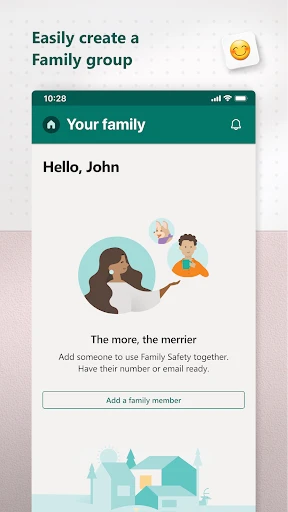
First, you need to get the app set up. I'll be honest, I thought, "Great, another complicated app to figure out." But I was wrong. It's really straightforward. All you need is a Microsoft account, and you're pretty much set. The layout is simple, so even if you're not a tech expert, you won't get lost.
Handy Tools for Modern Families
Now, let's talk about what it can do. The screen time controls are a lifesaver. You can decide how much time your kids spend on their devices. It works like a charm—it puts an end to the constant begging for "just a little more time."
Then there's the location sharing. You can check where your family is, and they can see where you are. It's not about secretly watching them; it's about feeling secure. I've found it super useful when my kids are out riding bikes or at a friend's house.
A Watchful Eye on the Digital World
The web filtering is great for keeping an eye on what your kids are looking at online. I was really impressed with how well it keeps inappropriate content away, which lets me relax, knowing my kids are safer from the internet's risky parts.
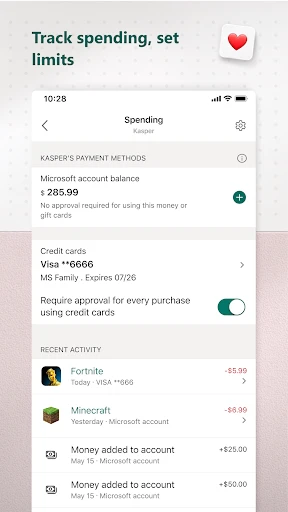
Another great tool is the spending tracker. If your kids tend to make surprise purchases with your card, this will help a lot. You can create budgets and get alerts when they buy something.
The Difference It Makes Day-to-Day
Using Microsoft Family Safety has really changed our family's routine. My kids are now better at mixing screen time with other things, which was a huge victory for us. They also like the location feature because it shows we trust them to be out in the world.
Before this app, handling our digital life felt like a constant chore. Now, I can honestly say Microsoft Family Safety has made a big difference. It's like having a digital helper that makes keeping my family safe much easier.
In a time when technology can be both good and bad, it's comforting to have something like Microsoft Family Safety. It's not just an app; it's like a teammate in parenting, helping you deal with the challenges of the digital era. So if you're thinking about trying it, I'd say go for it—it could be the reassurance you need.


- Developer
- Microsoft Corporation
- Version
- 2.0.2.1058
- Installs
- 5,000,000+
- Android Version
- 9
- Content Rating
- Everyone
- Price
- Free
- Comprehensive parental control features.
- Real-time location sharing for family.
- Screen time limits and app blocking.
- Activity reports and alerts.
- Cross-platform compatibility.
- Requires Microsoft account login.
- Limited free features available.
- Some features need premium subscription.
- May affect device performance.
- Complex initial setup process.