Bark - Parental Controls
Ever felt like keeping tabs on your kids’ online activity is a full-time job? Well, I’ve been there, and that’s why I was thrilled to stumble upon Bark - Parental Controls. It’s like having an extra set of eyes that are always on the lookout for anything fishy going down on your child’s smartphone. So, let’s dive into what makes Bark tick and whether it’s the right fit for your family.
Ever felt like keeping tabs on your kids’ online activity is a full-time job? Well, I’ve been there, and that’s why I was thrilled to stumble upon Bark - Parental Controls. It’s like having an extra set of eyes that are always on the lookout for anything fishy going down on your child’s smartphone. So, let’s dive into what makes Bark tick and whether it’s the right fit for your family.
Getting Started is a Total Breeze
First things first, getting Bark up and running is a breeze. I mean, who has time to fiddle around with complicated setups? All you gotta do is download the app, create an account, and link your child’s device. Voilà! You’re all set. The user interface is pretty intuitive, so you don’t have to be a tech whiz to navigate through it. I found the setup instructions clear and concise, which is a major plus in my book.
What This App Can Actually Do
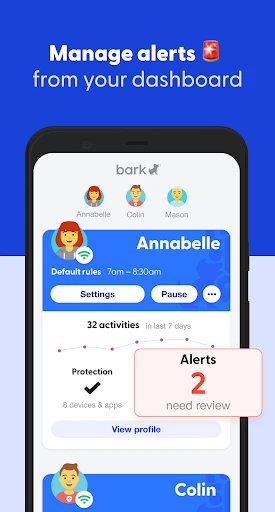
What sets Bark apart from other parental control apps is its ability to monitor a wide range of apps and social media platforms. We’re talking about Instagram, Snapchat, YouTube, and even email. It’s like having a digital watchdog that alerts you to potential issues like cyberbullying, inappropriate content, or even signs of depression. The app sends real-time alerts, so you’re always in the loop.
Another feature I found super handy is the location tracking. Ever worried about where your kid is hanging out after school? With Bark, you can get a real-time map view of their location. It’s not about being a helicopter parent; it’s about making sure they’re safe.
Balancing Safety with Personal Space
Now, let’s talk privacy. I get it, nobody wants to feel like Big Brother is watching. Bark strikes a nice balance by letting you keep an eye on things without being overly intrusive. It doesn’t give you full access to every single message but rather flags the ones that might raise a red flag. That way, your kiddos still have their privacy, but you’re in the know about anything potentially harmful.
Breaking Down the Price Tag
Here’s the million-dollar question: Is Bark worth the investment? In my opinion, absolutely. For a small monthly fee, you get peace of mind knowing that your child’s digital world is being monitored. Plus, Bark offers a seven-day free trial, so you can test the waters before committing.
Sure, there are free apps out there, but they often don’t offer the comprehensive coverage that Bark does. So, if you ask me, the price is a small trade-off for your child’s safety and your peace of mind.
Wrapping It All Up
In today’s digital age, keeping up with your child’s online activity can feel like an uphill battle. Bark makes it manageable, offering a sense of security without invading your child’s privacy. It’s user-friendly, effective, and honestly, a must-have for any parent navigating the complexities of raising kids in a tech-savvy world.
So, if you’re tired of playing catch-up with your child’s online life, give Bark a whirl. It might just be the helping hand you’ve been looking for.



- Developer
- Bark Technologies, Inc.
- Version
- 5.4.3
- Installs
- 500,000+
- Android Version
- 6.0
- Content Rating
- Everyone
- Price
- Free
- User-friendly interface
- Comprehensive activity reports
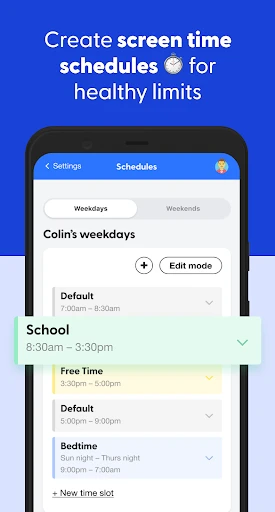
- Customizable screen time limits
- Real-time location tracking
- Supports multiple devices
- Limited free version
- Potential privacy concerns
- Occasional app crashes
- Complex initial setup
- Requires internet connection