Samsung Email
The Unsung Hero of Your Samsung Device: A Look at Samsung Email
The Unsung Hero of Your Samsung Device: A Look at Samsung Email
When it comes to managing emails on your Samsung device, Samsung Email is often the unsung hero. If you’re like me and constantly bombarded with an influx of emails, a reliable email client is essential. I’ve been using Samsung Email for a while now, and I must say, it’s been quite the experience.
A Smooth and Simple Start
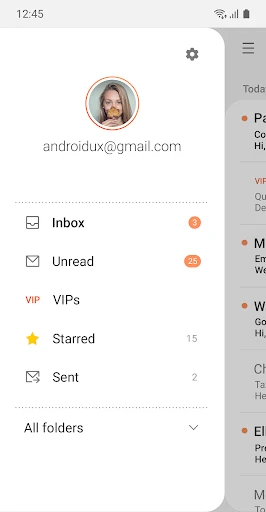
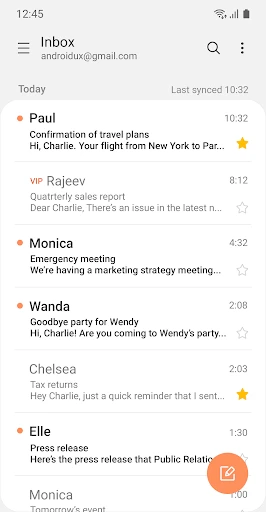
The first thing you’ll notice about Samsung Email is how well it fits with Samsung devices. It feels like it was built just for Galaxy users, which, of course, it kind of was. The app runs without any stutters, and the layout is neat and straightforward to use. I really like how everything is placed right where you'd expect it, making handling your emails super simple.
Making It Your Own
One thing that really stands out is how much you can change things up. Whether you're tweaking how often the app checks for new mail or sorting your messages into different folders, Samsung Email lets you set things up just how you like. You can make sure you see the most important emails first and decide exactly how you get notified. It's all designed to make things easier for you.
Keeping Your Messages Safe
These days, keeping your information private is a big deal, and Samsung Email takes this seriously. It comes with strong security features to keep your emails away from people who shouldn't see them. With encryption working in the background, you can feel confident your data is protected. On top of that, the app works with lots of different email services, so you can handle all your accounts from one spot without any security worries.
Another cool trick is how well it deals with junk and scam emails. Samsung Email is great at weeding out the stuff you don't want, so your main inbox stays nice and tidy. It's like having your own security guard for your email.
Power and Performance
When it comes to how well it works, Samsung Email is a real champ. It manages several accounts without any trouble, and I've never had it freeze or shut down unexpectedly. The app works with common email systems like POP3, IMAP, and Exchange ActiveSync, which is perfect if you use different email providers for work and personal stuff.
The search feature is also a highlight. It's fast and works really well, helping you track down any email in seconds. Whether you're looking for an old message from last year or a specific file someone sent you, the search tool in Samsung Email will find it for you.
In conclusion, Samsung Email is a robust email client that provides everything you need to manage your emails efficiently. Its user-friendly interface, coupled with strong security features and customizable settings, make it a top choice for Samsung users. If you haven’t given it a go yet, I’d highly recommend checking it out. It’s more than just an email app; it’s a comprehensive tool designed to enhance your productivity and keep your digital correspondence in check.


- Developer
- Samsung Electronics Co., Ltd.
- Version
- 6.2.01.1
- Installs
- 1,000,000,000+
- Android Version
- 9
- Content Rating
- Everyone
- Price
- Free
- Seamless integration with Samsung devices
- Multiple account support
- Advanced email filtering options
- User-friendly interface
- Secure data encryption
- Limited customization options
- Occasional sync issues
- Heavy battery usage
- Not available on all Android devices
- No dark mode option