eDrawings
Discovering eDrawings: A Handy Tool for Designers and Engineers
Discovering eDrawings: A Handy Tool for Designers and Engineers
If you're into 3D modeling and design, you've probably heard of the app eDrawings. I recently took it for a test drive, and it was a really interesting experience. Whether you're a professional engineer or just a hobbyist who likes playing with 3D models, eDrawings likely has something useful to offer you.
Getting Started with the App
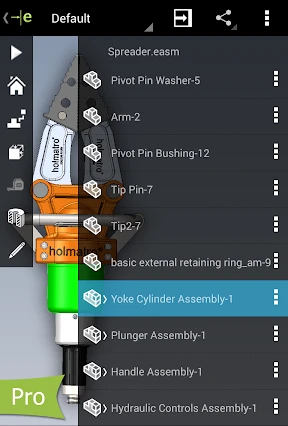
When I first opened the app, the interface was sleek and easy to understand. It's always nice to use an app that doesn't confuse you right away. The layout is simple, and all the tools are where you'd expect them. If you regularly use CAD software, you'll find eDrawings to be a refreshing change of pace.
Key Features That Impressed Me
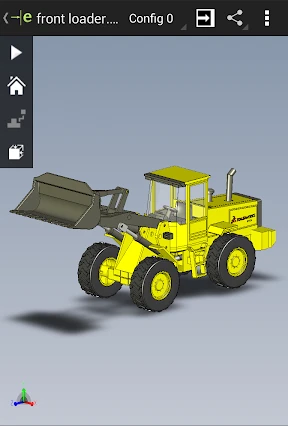
One feature I really appreciated was its wide file format support. It works with files from SolidWorks, AutoCAD, and many others, making it super flexible. This is especially helpful if you use different software or are working on a team project.
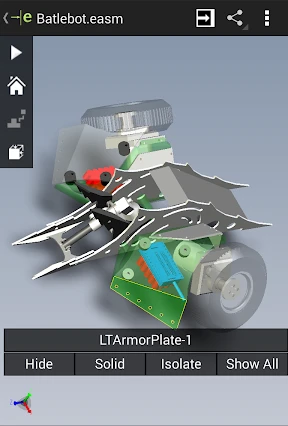
The markup tools are another great feature. They're perfect for reviewing designs and giving feedback. You can add notes, highlight specific parts, and take measurements right inside the app. It's like carrying a tiny design workshop in your pocket!
How It Performs and Handles
Now, about performance. I tried eDrawings on both Android and iOS, and it worked smoothly on both. I didn't experience any lagging or crashes, which is a big advantage. The app is quick to respond, and viewing 3D models is a great experience. You can easily zoom in, rotate, and move around the models.
In terms of usability, eDrawings is quite straightforward. You don't need to be a tech expert to find your way around. The app is easy to learn, so you can start working on your projects almost immediately.
Simplifying Teamwork
Teamwork is essential in design and engineering, and eDrawings handles this well. Sharing your designs with others is simple. You can email files or use cloud services, and your team can view and comment on them even without the app. This is a major benefit for remote work and projects involving different teams.
Wrapping Up My Review
So, is eDrawings a good use of your time? Definitely! Whether you're a career engineer or a 3D modeling enthusiast, this app has features that can improve your process. It's easy to use, adaptable, and makes working with others simple. Plus, being able to review and annotate designs from anywhere is incredibly useful.
All in all, eDrawings is a reliable option for anyone in design and engineering. If you haven't tried it, I recommend checking it out to see if it fits your needs. It might just become your favorite app for 3D projects!


- Developer
- SolidWorks
- Version
- 33.0.5031
- Installs
- 100,000+
- Android Version
- 10
- Content Rating
- Everyone
- Price
- $1.99
- User-friendly interface suitable for all ages.
- Supports a wide range of file formats.
- Allows for 3D model interaction and markup.
- Accessible on both mobile and desktop platforms.
- Offline access to previously opened files.
- Limited free version features.
- Occasional lag with large files.
- Requires internet for real-time collaboration.
- Premium version is relatively expensive.
- Limited editing capabilities.