Disney Cruise Line Navigator icon

Disney Cruise Line Navigator

Travel & Local

Related searches

Your Trusty First Mate: The Disney Cruise Line Navigator App

Your Trusty First Mate: The Disney Cruise Line Navigator App

Ahoy there! If you're getting ready for a Disney Cruise, the Disney Cruise Line Navigator app is like your best buddy on the high seas. I just got back from a Disney cruise, and let me tell you, this app was my absolute must-have for everything on the ship. Whether you're great with technology or just want to keep your vacation simple and organized, this app is here to help you out.

Your Pocket-Sized Guide to Fun

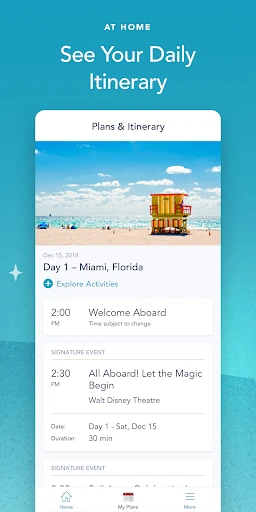
From the second you step on the ship, the Navigator app is your all-access pass to the magic. The daily schedule is a total game-changer. It gives you a complete list of everything happening on board, from hanging out with your favorite characters to watching amazing live shows. I was looking at it all the time to make sure I didn't miss a single fun activity.

Keep in Touch with Your Crew

One of the best parts is the free onboard messaging. It's perfect for staying connected with your family and friends while you're all exploring the ship. You don't have to worry about your phone bill because the app lets you send messages using the ship's Wi-Fi for free. I used it constantly to figure out where to meet my friends next.

Another super helpful tool is the deck plans. I would have been totally turned around without them! The app has easy-to-use maps of the entire ship, so getting from the waterslide back to your room is simple. And if you enjoy a little friendly competition, the app even has fun interactive trivia games you can play!

Your Personal Dining Assistant

Now, let's chat about the food—because let's be real, eating is a huge part of the cruise fun. Having the dining menus right in the app is a lifesaver. You never have to wonder what's for dinner; you can just scroll through all the choices and even see what the dress code is for the restaurant. I really liked knowing my options so I could get excited for each meal.

You can also use the app to book a table at the special adult-only restaurants. It was so easy to reserve a spot at Palo without needing to stand in a long line. And a little tip from me: you have to try the chocolate soufflé. It's incredible!

Why This App is a Game-Changer

All in all, the Disney Cruise Line Navigator app made my vacation so much better. It's like having a little helper in your pocket that keeps you in the loop and helps you get the most from your trip. If a Disney cruise is in your future, you should definitely download this app before you go. It makes everything smooth sailing

Disney Cruise Line Navigator screenshot Disney Cruise Line Navigator screenshot Disney Cruise Line Navigator screenshot Disney Cruise Line Navigator screenshot Disney Cruise Line Navigator screenshot
Disney Cruise Line Navigator icon
Disney Cruise Line Navigator
Developer
Disney
Version
5.34.0
Installs
500,000+
Android Version
10
Content Rating
Everyone
Price
Free
Pros
  • User-friendly interface for easy navigation
  • Real-time updates on cruise events
  • Detailed deck plans available
  • Personalized itinerary management
  • Access to dining and activity reservations
Cons
  • Limited offline functionality
  • Frequent login requirements
  • Occasional syncing issues
  • Requires constant internet access
  • Some features are region-specific

Ratings

4.1

Similar Apps

FlightAware Flight Tracker

FlightAware Flight Tracker

3.9
Get
The Official MTA App

The Official MTA App

4.3
Get
ایران چارتر - بلیط هواپیما سیس

ایران چارتر - بلیط هواپیما سیس

4
Get
Celebrity Cruises

Celebrity Cruises

4.5
Get
Omio: Book Train, Bus, Flights

Omio: Book Train, Bus, Flights

4.6
Get
Moon Calendar Watch

Moon Calendar Watch

3.2
Get
The Dyrt: RV & Free Camping

The Dyrt: RV & Free Camping

4.6
Get
Booking.com: Hotels & Travel

Booking.com: Hotels & Travel

4.8
Get
Vacation Rentals - HomeToGo

Vacation Rentals - HomeToGo

4
Get
Airalo: eSIM Travel & Internet

Airalo: eSIM Travel & Internet

4.4
Get

Frequently Asked Questions

What features does the Disney Cruise Line Navigator app offer?

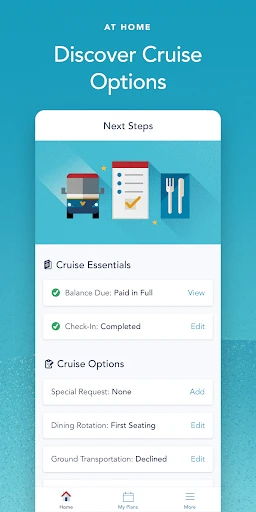
The Disney Cruise Line Navigator app provides a comprehensive guide for your cruise experience. It features a daily itinerary with all the activities and entertainment options available on the ship, dining menus, and restaurant opening hours. The app also includes a deck plan to help you navigate the ship, as well as the ability to chat with other guests using the onboard messaging feature. Additionally, you can view your reservation details and check in online, making it an essential tool for planning and maximizing your cruise experience.

Is the Disney Cruise Line Navigator app available for both Android and iOS devices?

Yes, the Disney Cruise Line Navigator app is available for both Android and iOS devices. It can be downloaded from the Google Play Store for Android users and the Apple App Store for iOS users. The app is designed to enhance your cruise experience by providing all the necessary information and tools to make the most of your time on board. Ensure that your device meets the minimum system requirements for optimal performance.

Can I use the Disney Cruise Line Navigator app without purchasing a Wi-Fi package on the ship?

Yes, you can use the Disney Cruise Line Navigator app without purchasing a Wi-Fi package. The app is designed to work offline while you are on board, allowing you to access the daily schedule, dining options, and other features without needing an internet connection. However, certain features, such as updating your itinerary or accessing new messages, may require a Wi-Fi connection. It's advisable to connect to the ship's Wi-Fi network for the latest updates, though basic functionality remains accessible offline.

How secure is my personal information on the Disney Cruise Line Navigator app?

Disney Cruise Line takes the security and privacy of your personal information seriously. The app is equipped with robust security measures to protect your data, including encryption and secure logins. User data is handled in accordance with Disney's privacy policy, ensuring that your information is safeguarded against unauthorized access. It's important to keep your app updated to benefit from the latest security enhancements and features. Always use a secure password and be cautious when accessing your account on shared devices.

Are there any costs associated with using the Disney Cruise Line Navigator app on board?

The Disney Cruise Line Navigator app itself is free to download and use while on board. However, you may incur charges if you choose to purchase a Wi-Fi package for additional features such as internet browsing or streaming. The app provides essential cruise information at no cost, allowing you to plan your activities, explore dining options, and stay connected with other guests. Any optional purchases or premium services should be reviewed for associated costs, ensuring you have a clear understanding of potential charges.