MX Player
MX Player: A Real Game-Changer in Video Playback
MX Player: A Real Game-Changer in Video Playback
Ever found yourself stuck on a long commute or just chilling at home, scrolling endlessly for the perfect video player app? Well, let me introduce you to MX Player, a real game-changer in the world of video playback apps. Trust me, as someone who binge-watches series like there’s no tomorrow, MX Player has been a lifesaver.
Effortless Navigation and Control
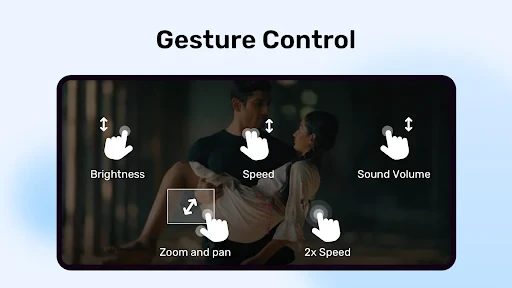
First things first, let's talk about how easy it is to use. The app’s interface is sleek and super user-friendly. I remember the first time I opened it; I was impressed by how everything was just a tap away. Whether you’re tech-savvy or not, navigating through MX Player is a breeze. The app supports multitouch gestures which means you can zoom in and out of videos, swipe to adjust brightness or volume, and even lock the screen to avoid interruptions. It’s like the app just gets you, you know?
Plays Virtually Any Video File
One of the coolest things about MX Player is its ability to handle a wide range of video formats. From MP4 to AVI, and even MKV, this app plays it all. I’ve lost count of the number of times I’ve downloaded a video only to find it won’t play on my regular player. But with MX Player, those days are long gone. It’s like having a Swiss Army knife for video files right in your pocket.
Smoother Playback with Hardware Boost
Now, if you’re a bit of a tech geek like me, you’ll appreciate the advanced hardware acceleration feature. This basically means the app uses your device’s hardware to enhance video playback, offering smoother and faster performance. I’ve noticed a significant difference in how my videos play compared to other apps. Less buffering, more watching. What more could you want?
Customizable Subtitles for Everyone
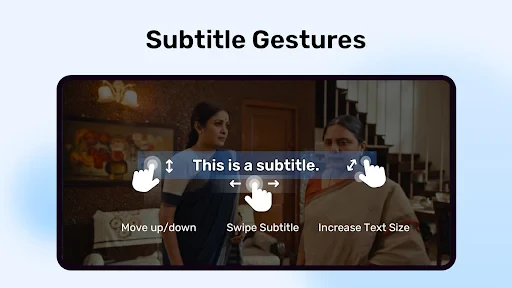
For all the international series lovers, MX Player’s subtitle support is a blessing. You can download subtitles for almost any video directly through the app. Plus, you can adjust the font, color, and even the speed of the subtitles. Personally, I love watching foreign films, and having customizable subtitles has made the experience so much more enjoyable.
Peace of Mind with Kids Lock
If you have kids around, the Kids Lock feature is a godsend. It prevents little ones from accidentally pausing or skipping through videos. I’ve had my fair share of nephew and niece visits, and let me tell you, this feature is a lifesaver. Just hand over your phone without worrying about them exiting the app or messing up your settings.
Final Verdict: Your Go-To Video App
In the grand scheme of things, MX Player stands out as a must-have app for anyone who loves watching videos on their device. It’s reliable, versatile, and packed with features that cater to almost every need. Whether you’re a casual viewer or a hardcore binge-watcher, this app is bound to enhance your viewing experience. So, if you haven't tried it yet, do yourself a favor and give MX Player a shot. You won’t regret it!

- Developer
- Amazon India.
- Version
- 1.94.4
- Installs
- 1,000,000,000+
- Android Version
- 5.0
- Content Rating
- Everyone
- Price
- Free
- Supports a wide range of video formats.
- Smooth playback with hardware acceleration.
- Gesture controls for volume and brightness.
- Subtitle support in multiple languages.
- Kids lock to prevent unintended actions.
- Ads can be intrusive during use.
- Some features require in-app purchases.
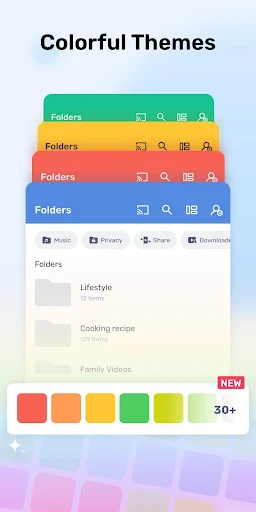
- Limited customization for interface.
- Not all codecs available for free.
- May consume significant battery power.