AndroPods - Airpods on Android icon

AndroPods - Airpods on Android

Music & Audio

Related searches

Using AirPods with an Android Device

Using AirPods with an Android Device

Have you ever been curious about using AirPods with your Android phone? Let's clear that up right now! I want to tell you about AndroPods—an app made to give Android users that smooth AirPods experience. As someone who loves trying out new tech, I just had to check this app out and see how it worked.

Getting Started with AndroPods

The first thing that struck me after installing AndroPods was how simple everything looked. The app starts up with a neat, uncluttered layout and straightforward directions that pretty much anyone can follow. It felt like the app was walking me through each step. Pairing my AirPods with my Android device was surprisingly easy, all thanks to the app's smart and simple setup process.

Features and Functionality

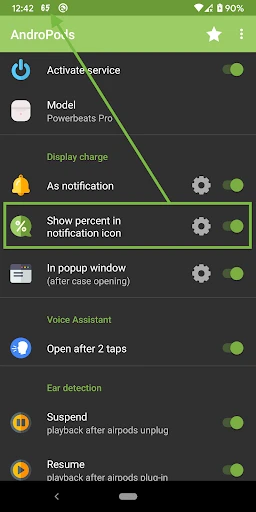
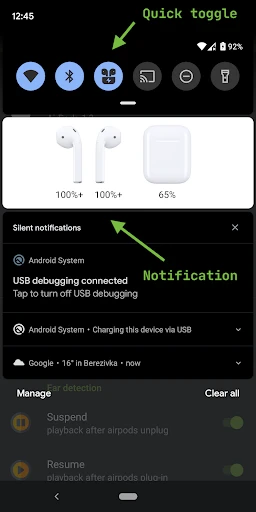
A feature that really stands out in AndroPods is how it shows your AirPods' and the charging case's battery levels. For Android users who used to just guess how much battery was left, this is a total game-changer. The app gives you live updates directly on your phone, so you're never surprised by a dead battery.

What's more, the in-ear detection works really well. It automatically stops your music when you remove one of the AirPods and starts it again when you put it back in. It's these little touches that make listening so much more pleasant and hassle-free.

Why AndroPods is a Must-Have

If you're like me and music is a big part of your everyday life, whether you're out for a run or relaxing at home, having a dependable app like AndroPods makes a huge difference. The app doesn't just make things more compatible; it actually improves the whole experience of using AirPods with an Android phone. It’s like getting the advantages of both systems without having to choose one over the other!

And we can't overlook the customization features. AndroPods provides a range of settings so you can adjust the app to fit your preferences. You can change what the double-tap gesture does or tweak your notification settings—it's all about letting you set things up just the way you want.

Final Thoughts

In a tech world where Android and iOS often feel like they're on opposing teams, AndroPods acts as a link that connects them. Whether you're an Android user who admires the slick Apple experience or you simply want to get more from your AirPods, this app is definitely worth a try.

To sum it up, AndroPods isn't just another app; it's a useful tool that improves how we use our devices. So if you're looking to step up your audio experience and enjoy a more connected feel with your AirPods, give AndroPods a try. You might just find that it becomes a essential part of your everyday life

AndroPods - Airpods on Android screenshot AndroPods - Airpods on Android screenshot AndroPods - Airpods on Android screenshot AndroPods - Airpods on Android screenshot AndroPods - Airpods on Android screenshot
AndroPods - Airpods on Android icon
AndroPods - Airpods on Android
Developer
Parkhomenko Vitalii
Version
1.5.27
Installs
5,000,000+
Android Version
6.0
Content Rating
Everyone
Price
Free
Pros
  • Seamless connectivity with Android devices.
  • User-friendly interface for easy navigation.
  • Automatic battery level notifications.
  • Customizable touch controls.
  • Supports voice assistant integration.
Cons
  • Limited compatibility with non-AirPod devices.
  • Occasional connectivity drops reported.
  • Lacks advanced sound customization.
  • Requires Android 6.0 or higher.
  • In-app ads might be intrusive.

Ratings

4.2

Similar Apps

J4T Multitrack Recorder

J4T Multitrack Recorder

4.4
Get
Volume Bass Booster, Equalizer

Volume Bass Booster, Equalizer

4.8
Get
TREBEL: Music, MP3 & Podcasts

TREBEL: Music, MP3 & Podcasts

4.8
Get
Lark Player:Music Player & MP3

Lark Player:Music Player & MP3

4.6
Get
iSyncr: iTunes to Android

iSyncr: iTunes to Android

4.3
Get
TuneIn Radio Pro - Live Radio

TuneIn Radio Pro - Live Radio

4.6
Get
Bose QC Earbuds

Bose QC Earbuds

4.7
Get
Music Download Mp3

Music Download Mp3

4.1
Get
Phonk Music - Song Remix Radio

Phonk Music - Song Remix Radio

4.6
Get
Volume Booster - Equalizer

Volume Booster - Equalizer

4.8
Get
DJ Music mixer - DJ Mix Studio

DJ Music mixer - DJ Mix Studio

4.2
Get
Easy Piano Keyboard - Piano88

Easy Piano Keyboard - Piano88

3.8
Get

Frequently Asked Questions

What is AndroPods and how does it work with AirPods on Android?

AndroPods is an app designed to enhance the functionality of your AirPods when connected to an Android device. It provides features similar to those available on iOS, such as battery level display for AirPods and the case, as well as connectivity status. This app bridges the gap between Apple's AirPods and the Android operating system, ensuring users enjoy a seamless experience.

Is AndroPods compatible with all models of AirPods and Android devices?

AndroPods is compatible with most models of AirPods, including AirPods Pro and AirPods Max. However, compatibility can vary based on the Android device's version and manufacturer-specific modifications. It's recommended to check the app's compatibility notes on the Google Play Store before downloading to ensure it works with your specific devices.

What features does AndroPods offer to enhance the AirPods experience on Android?

AndroPods offers a range of features to improve AirPods usability on Android, including automatic battery level notifications, in-ear detection, and customizable tap controls. These features aim to closely mimic the seamless integration found on iOS devices, providing Android users with a similar experience when using AirPods.

Does AndroPods require any special permissions or settings on my Android device?

Yes, AndroPods may require certain permissions to function optimally, such as Bluetooth access, notification access, and possibly location services. These permissions are necessary to provide real-time updates and notifications about your AirPods' status. Ensure you grant these permissions during setup to fully utilize the app's capabilities.

Is there a cost associated with using AndroPods, or is it free?

AndroPods offers both a free version and a premium version with additional features. The free version includes basic functionalities like battery monitoring and connectivity status. However, the premium version, available as an in-app purchase, unlocks advanced features such as in-ear detection and customizable tap controls, offering a more enhanced user experience.