AR Drawing - Trace Drawing App
Unleashing the Artist Within
Unleashing the Artist Within
Alright, let's dive into the world of creativity with AR Drawing - Trace Drawing App. This nifty little app brings a whole new dimension to drawing, quite literally! It’s like having a magical stencil that lets you trace over anything you see through your phone. So, whether you're a budding artist or just someone looking to kill some time in a fun way, this app is definitely worth a try.
Your Pocket-Sized Art Tutor
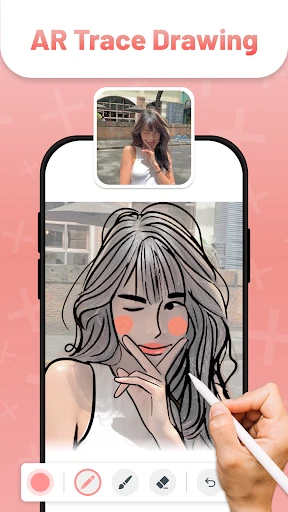
Alright, picture this: you’re sitting at home, staring at a blank piece of paper, and wishing you could draw something awesome. But every time you try, it just doesn’t look right. Enter AR Drawing - Trace Drawing App. With this app, you can choose any image from the internet or your own gallery, and display it on your phone screen. The app uses augmented reality to project the image onto a real surface, like a piece of paper. All you have to do is trace over it. It’s like having a drawing tutor right in your pocket!
The Magic Behind the Screen
First things first, you download the app and let it access your camera. Don’t worry, it’s all safe and secure! Once the app is up and running, you select an image you’d like to draw. The app then overlays this image onto whatever surface you point your camera at. It’s a bit like those old-school overhead projectors, but way cooler. You can adjust the size, orientation, and transparency of the image to fit your needs. So whether you’re working on a small sketch or a big masterpiece, the app has got you covered.
Fun for the Whole Family
One of the things I love most about AR Drawing is how accessible it is. Whether you’re a kid wanting to draw your favorite cartoon character or an adult trying to recreate a complex design, the app caters to all skill levels. It’s also a fantastic way for parents to bond with their kids, as they can draw together and create memories. Plus, it’s a great tool for educators looking to make art classes more interactive and fun.
More Than Just Tracing
What’s really cool about this app is that it doesn’t just stop at tracing. As you get more comfortable, you can start experimenting with your own designs. The app encourages you to add your own flair to the traced images, turning a simple outline into a personalized piece of art. It’s a fantastic way to boost your creativity and confidence in your drawing skills.
Final Thoughts
In conclusion, AR Drawing - Trace Drawing App is a delightful blend of technology and creativity. It’s simple to use, incredibly fun, and offers endless possibilities for artistic expression. Whether you’re looking to improve your drawing skills or just want a new hobby, this app is a fantastic choice. So grab your phone, download the app, and start tracing your way to artistic greatness!


- Developer
- TechStar Utilities
- Version
- 1.6.3
- Installs
- 1,000,000+
- Android Version
- 7.0
- Content Rating
- Everyone
- Price
- Free
- Easy to use for beginners.
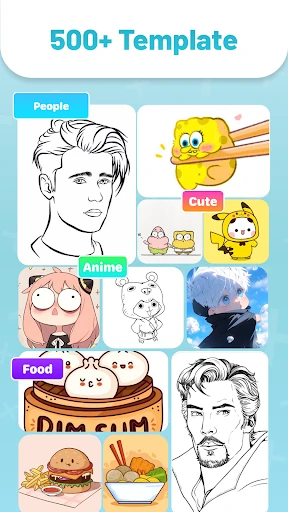
- Wide variety of drawing templates.
- Intuitive tracing feature.
- Supports multiple file formats.
- Regular updates and new features.
- Requires a stable internet connection.
- Limited free features.
- Occasional app crashes.
- Ads in the free version.
- Subscription can be pricey.