

Auto Clicker - Auto Tap
Automate Your Screen Taps: A Look at Auto Clicker - Auto Tap
Automate Your Screen Taps: A Look at Auto Clicker - Auto Tap
Ever found yourself wishing you could automate those repetitive taps on your screen? Well, say hello to Auto Clicker - Auto Tap, your new best friend for automating touch input on your Android device. This app is a game-changer, especially if you're into games or apps that require incessant tapping. Let me take you through my experience with this handy tool.
Getting the App Up and Running
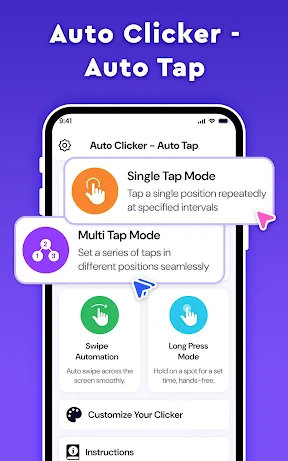
First things first, downloading and setting up Auto Clicker - Auto Tap is a breeze. Available on the Play Store, it installs quickly and doesn't demand any complex permissions, which is a relief. Once installed, you're greeted with a simple and intuitive interface. Even if you're not tech-savvy, you’ll find it easy to navigate.
What Makes It Special
The app is packed with features that make it versatile for a variety of uses. You can set up single or multiple click points and adjust the click intervals to suit your needs. Whether you're farming in a game or testing an app, Auto Clicker has got you covered. It even allows for swiping actions, which adds a layer of functionality not all auto-clickers offer.
One of my favorite features is the ability to save configurations. This means you can set up a tapping sequence for one app and save it for later use without having to reconfigure everything. It’s a real time-saver!
The App in Action
In practical use, the app performs exceptionally well. I tested it on several click-intensive games and it worked like a charm. The app runs smoothly in the background, and I didn’t notice any lag or battery drain, which is often a concern with such tools.
Moreover, the app offers a floating control panel, making it easy to start and stop the auto-clicking as needed. This is particularly useful when you need to quickly adjust settings on the fly.
Should You Get It?
If you frequently find yourself tapping your screen more than you'd like, then yes, this app is definitely worth a try. It’s not just for gamers; anyone who needs to automate screen taps can benefit from it. Plus, the app's lightweight nature and efficient performance make it a standout choice in the sea of auto clickers available.
In conclusion, Auto Clicker - Auto Tap is a robust tool that delivers on its promises. It’s easy to use, packed with features, and performs reliably. Whether you're looking to automate game actions or streamline app testing, this app is a solid choice. Give it a go, and you might just find it becomes an indispensable part of your digital toolkit.


- Developer
- Oregon Coast App LLC
- Version
- 1.9
- Installs
- 1,000,000+
- Android Version
- 7.0
- Content Rating
- Everyone
- Price
- Free
- Easy to set up and use
- Customizable click intervals
- Supports multiple click points
- No root required
- Lightweight and fast
- May drain battery quickly
- Limited features on free version
- Ads can be intrusive
- Not compatible with all games
- Potential risk of account bans


