
Avenza Maps: Offline Mapping
Discovering the World with Avenza Maps: Offline Mapping
Discovering the World with Avenza Maps: Offline Mapping
Hey there, fellow adventurers! If you're like me and love exploring the great outdoors, then you're probably always on the lookout for tools to make your adventures smoother and more enjoyable. Enter Avenza Maps: Offline Mapping, a handy app designed to keep you on track even when you're off the grid. Let me take you through my journey with this nifty app and why it might just become your new adventure buddy.
Getting the App Ready to Go
First things first, downloading and setting up Avenza Maps was a breeze. Available on both Android and iOS, the app doesn't take up much space, which is great because I like to keep my phone clutter-free. Once installed, you're greeted with a clean and straightforward interface. No unnecessary bells and whistles here, just what you need to get going.
One of the standout features right off the bat is the ability to download maps for offline use. This is a lifesaver for those times when you're trekking through areas with spotty cell service. The map store has an impressive collection of maps, from topographic to thematic, and even specialized maps for specific parks and trails. Whether you're hiking, biking, or just exploring, there's something for everyone.
A Closer Look at the App's Tools
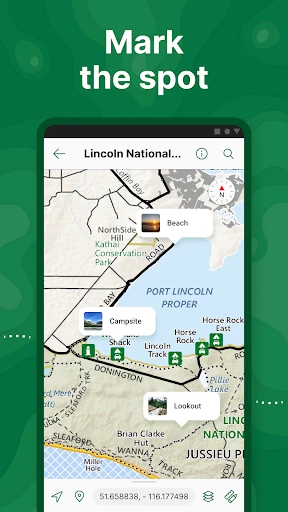
Now, let’s dive into the features. I was particularly impressed with the GPS tracking capabilities. Avenza Maps allows you to track your location in real-time, which is crucial when you're navigating unfamiliar territory. The app also lets you drop pins to mark important locations. This came in handy when I wanted to mark a particularly scenic spot to revisit later.
Another feature that stood out was the ability to import and export maps. If you're someone who likes to plan your routes meticulously, you’ll appreciate this feature. You can import maps from other sources or export your current map data to share with friends. It’s these little touches that make Avenza Maps a cut above the rest.
How It Feels to Use Day-to-Day
Using Avenza Maps is a seamless experience. The app is intuitive, and I found that I didn’t need to spend a lot of time figuring out how things work. The offline maps load quickly, so there's no waiting around when you're ready to hit the trail. Plus, the app's performance is stellar, with no noticeable lag even when I'm zooming in and out of detailed maps.
One thing I really appreciated was the app’s battery consumption. Unlike some other mapping apps that drain your phone's battery faster than you can say "lost in the woods," Avenza Maps is surprisingly efficient. This means more time adventuring and less time worrying about finding a charging station.
Wrapping Up My Experience
So, would I recommend Avenza Maps: Offline Mapping to my fellow explorers? Absolutely! It’s a reliable companion that’s got your back when you’re out in the wild. Its user-friendly interface, extensive map collection, and robust features make it a must-have for anyone serious about their outdoor adventures.
Whether you're a seasoned hiker or just someone who loves a weekend nature walk, Avenza Maps can enhance your experience and give you the confidence to explore further. So go ahead, download the app, and see where the trails take you. Happy exploring




- Developer
- Avenza Systems Inc.
- Version
- 5.4.1
- Installs
- 5,000,000+
- Android Version
- 10
- Content Rating
- Everyone
- Price
- Free
- Offers detailed offline maps for remote areas.
- User-friendly interface with easy navigation.
- Allows map import from various sources.
- Customizable map markers and annotations.
- Supports GPS tracking without internet.
- Limited free features; premium required for full access.
- Map downloads can consume significant storage.
- Occasional app crashes reported by users.
- Battery drain due to continuous GPS use.
- Some maps lack real-time traffic updates.






![Navigation [Huawei watches]](https://appnexusworld.com/wp-content/uploads/2025/11/image166304831526595115.webp)