Baby Language
Baby Language: A Parent's Honest Review
Baby Language: A Parent's Honest Review
Have you ever wished your little one could just tell you what’s on their mind? I know I have. That's why I decided to test out Baby Language, an app that says it can help you understand your non-verbal baby. As a new parent, I was both doubtful and curious. Here’s my experience from giving it a go.
Can You Really Understand Baby Sounds?
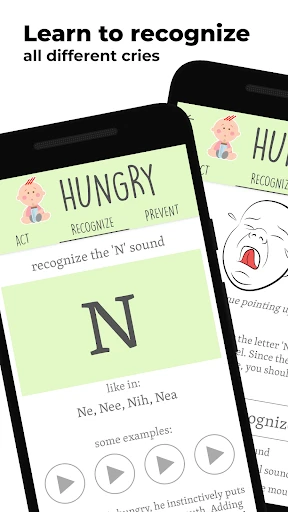
First things first, the concept of this app is pretty brilliant. When I opened it, I found a simple and user-friendly layout. It walks you through the meanings of different cries, coos, and gurgles. The app gives you clear details and even plays audio clips of common baby noises, suggesting it can tell you if your baby is hungry, sleepy, or needs a fresh diaper. Honestly, the idea is just cool.
A Closer Look at the App's Tools
After getting everything set up, I jumped into the main features. Baby Language has a recording tool that lets you record your baby’s sounds for instant analysis. It's designed to listen to the cry patterns and offer a likely reason. I tested this during a major crying session, and the app said it was a hunger cry. I offered a bottle, and the crying stopped. Was it just luck? Possibly. But it definitely felt like a win.
Another great part of the app is the built-in parent community. It’s like having a support network right on your phone, where moms and dads exchange stories and advice. I spent some time reading through it and found some really useful tips. It’s nice to know other people are going through the same parenting chaos.
Putting the App to the Test
So, the big question: does Baby Language actually work? From my time with it, I’d say it’s a useful aid, but not a magic solution. Sometimes the app's guess wasn't quite right for what my baby actually wanted. Still, it made me listen more carefully to the small differences in my baby’s sounds and body language, which is a good thing. Anything that helps me feel closer to my baby gets a thumbs up from me.
The app also includes learning materials about baby development stages and milestones. I found this part really useful because it gave me confidence about my baby’s progress and what might be coming next. Being in the know is so important when you're new to being a parent.
My Overall Conclusion
To wrap it up, Baby Language won’t make you an expert in baby communication instantly, but it is a helpful resource for parents. It’s straightforward, educational, and provides a community feeling that’s priceless for new moms and dads. If you want to feel more connected to what your baby needs, it's certainly worth a shot. Just keep in mind that while technology can help, your own gut feeling as a parent is still the best guide you have



- Developer
- Enbyin
- Version
- 4.264
- Installs
- 1,000,000+
- Android Version
- 5.0
- Content Rating
- Everyone
- Price
- Free
- Intuitive interface for easy navigation.
- Comprehensive database of baby sounds.
- Real-time translation of baby cries.
- Supports multiple languages for parents.
- Provides helpful parenting tips.
- Requires internet connection for full features.
- Some translations may not be accurate.
- Limited free features available.
- Ads can be intrusive at times.
- Not all baby sounds are included.