Da Fit
Your Pocket-Sized Fitness Coach: A Look at the Da Fit App
Your Pocket-Sized Fitness Coach: A Look at the Da Fit App
If you’re on the lookout for a budget-friendly fitness app that doesn’t skimp on features, let me introduce you to Da Fit. It’s like having a personal trainer and an all-knowing smartwatch right on your wrist, without burning a hole in your pocket. Let’s dive into what makes Da Fit a go-to choice for fitness enthusiasts and casual users alike.
Getting Your Da Fit App Up and Running
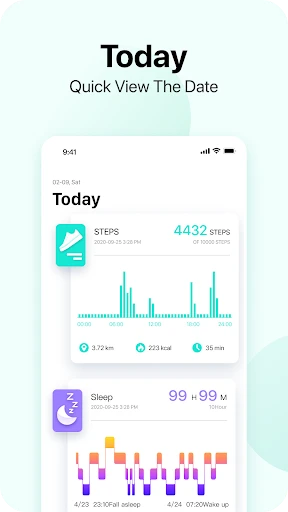
First things first, setting up Da Fit was a breeze. After a quick download from the app store, I paired it with my smartwatch in seconds. The user interface is clean and straightforward, which means you won’t need a degree in tech to navigate through it. Whether you’re tracking your steps, monitoring your heart rate, or analyzing your sleep patterns, everything is just a tap away.
The Cool Tools You'll Actually Use
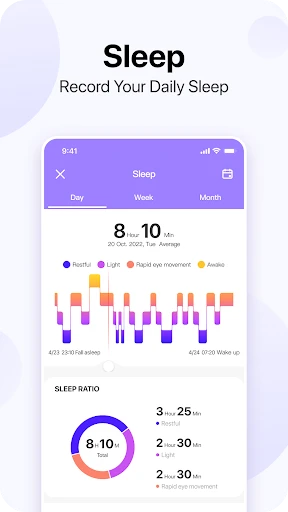
Now, let’s talk features. Da Fit offers a plethora of options that cater to both fitness novices and seasoned athletes. From step counting to calorie tracking, it covers all the basics. But what really caught my eye was the sleep monitor. It not only tells you how long you’ve slept but also breaks it down into deep, light, and REM sleep. It’s like getting a personal sleep study every night!
Making Your Watch Your Own
Another cool feature is the customizable watch faces. You can switch up the look to match your style or mood. Whether you’re feeling sleek and professional or vibrant and fun, there’s a face for every occasion. It’s a small touch, but it makes the experience more personal and enjoyable.
Keeping a Close Eye on Your Well-being
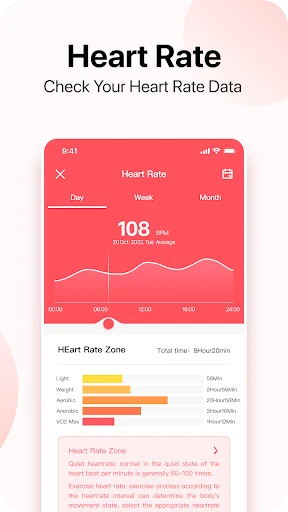
For those of us who are health-conscious, Da Fit doesn’t disappoint. It provides real-time heart rate monitoring and even blood oxygen level measurements. In today’s health-focused world, these features are more than just nice-to-haves; they’re essentials. Plus, the app gives you insights into your health trends over time, helping you make informed decisions about your lifestyle.
How Well It Talks to Your Other Tech
Syncing Da Fit with your phone and other apps is seamless. It plays well with both Android and iOS, ensuring you won’t have any compatibility headaches. Whether you’re syncing workout data to your favorite fitness app or sharing your achievements on social media, Da Fit makes it effortless.
Wrapping Up the Da Fit Experience
In conclusion, Da Fit is a versatile and user-friendly app that packs a punch in terms of functionality. It’s perfect for anyone looking to keep track of their health and fitness without the fuss. While it might not have all the bells and whistles of some high-end fitness apps, it more than makes up for it with its ease of use and reliable performance.
So, if you’re ready to take charge of your fitness journey, give Da Fit a try. It’s like having a fitness coach, sleep expert, and style advisor all rolled into one. With Da Fit, staying on top of your health has never been easier or more fun. Happy tracking


- Developer
- MO YOUNG LTD
- Version
- v2.8.6-77-gcf85baa085
- Installs
- 50,000,000+
- Android Version
- 5.0
- Content Rating
- Everyone
- Price
- Free
- User-friendly interface
- Wide range of watch faces
- Accurate step tracking
- Long battery life
- Affordable price
- Limited app integrations
- Occasional sync issues
- Basic sleep tracking
- No GPS without phone
- Limited customization options