Gboard - the Google Keyboard icon

Gboard - the Google Keyboard

Tools

Related searches

Gboard - the Google Keyboard

Gboard - the Google Keyboard

When it comes to typing on your phone, having a solid and feature-rich keyboard makes a huge difference. That's where Gboard comes in—it's Google's keyboard app, and it's way more than just a tool for tapping out messages. If you're looking for a keyboard that's quick, dependable, and loaded with cool features, then you're in the right place. Let's dive into what makes it so great.

Why You'll Love Gboard

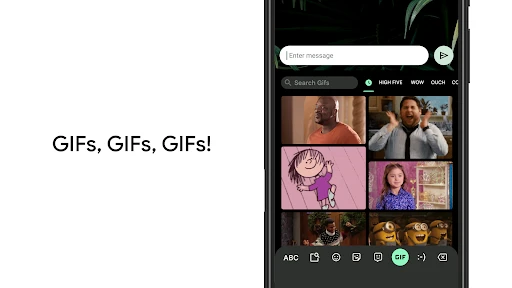
Let's face it, the standard keyboard that comes with your phone is often pretty basic. Gboard changes all that. It doesn't just give you a smooth typing experience; it also bundles in a ton of features that make texting and searching super easy. With Google search built directly into the keyboard and a swipe-to-type function, this app really has your back. Oh, and it has its own emoji and GIF search too. It's like Google figured out exactly what we wanted before we even knew it ourselves.

The Coolest Features

First up is the most standout feature: having Google Search right there. Ever been mid-conversation and needed to check a fact or find a place? With Gboard, you can search without ever leaving your chat app. Just hit the 'G' button and look up whatever you need. It's incredibly handy for finding a good place to eat or checking movie showtimes on the fly.

Then there's glide typing, which is a total game-changer. If you haven't tried it, this lets you type by swiping your finger across the letters. It's remarkably precise and perfect for typing with one hand, especially when you're busy or on the move.

And we can't forget voice typing. This is a lifesaver when your hands are full. The speech recognition is really sharp and usually understands you perfectly the first time, which is a massive win.

Making It Your Own and Language Options

Another thing that's awesome about Gboard is how much you can customize it. You can pick different themes, change the key borders, and even tweak the keyboard's height to fit how you type. On top of that, the app works with a huge number of languages, which is perfect if you use more than one language regularly.

Switching between languages is also a snap. Just a quick tap on the globe icon on the keyboard, and you're set. If you often jump between languages, this feature will make your life a whole lot easier.

Wrapping Up

In the end, Gboard - the Google Keyboard is a fantastic app that really does what it says. It's speedy, effective, and stuffed with features that turn typing on your phone from a task into a pleasure. Whether you send a ton of messages, love using different languages, or just like to personalize your stuff, Gboard has you covered. So why not check it out? You might discover it's the keyboard you've been missing all along.

Gboard - the Google Keyboard screenshot Gboard - the Google Keyboard screenshot Gboard - the Google Keyboard screenshot Gboard - the Google Keyboard screenshot Gboard - the Google Keyboard screenshot
Gboard - the Google Keyboard icon
Gboard - the Google Keyboard
Developer
Google LLC
Version
Varies With Device
Installs
10,000,000,000+
Android Version
Varies With Device
Content Rating
Everyone
Price
Free
Pros
  • Fast and responsive typing experience.
  • Seamless integration with Google services.
  • Supports multiple languages and dialects.
  • Excellent text prediction and correction.
  • Highly customizable keyboard settings.
Cons
  • Occasional lag on older devices.
  • Limited themes compared to competitors.
  • Gesture typing can be inaccurate.
  • Requires Google account for full features.
  • May consume more battery on some devices.

Ratings

4.5

Similar Apps

All Video Downloader & Player

All Video Downloader & Player

4.7
Get
Jet VPN: VPN Fast & Secure

Jet VPN: VPN Fast & Secure

4.6
Get
فیلتر شکن قوی پرسرعت Raad VPN

فیلتر شکن قوی پرسرعت Raad VPN

4.7
Get
فیلتر شکن قوی پرسرعت نور

فیلتر شکن قوی پرسرعت نور

4.5
Get
X Browser - Private & Fast

X Browser - Private & Fast

4.8
Get
Copy My Data: Transfer Content

Copy My Data: Transfer Content

4.2
Get
Phone Cleaner - AI Cleaner

Phone Cleaner - AI Cleaner

4.8
Get
Ai Browser - Smarter & Safer

Ai Browser - Smarter & Safer

4.7
Get
فیلتر شکن قوی پرسرعت Homa Vpn

فیلتر شکن قوی پرسرعت Homa Vpn

4.7
Get
XTranslate - Photo, Voice, PDF

XTranslate - Photo, Voice, PDF

4.7
Get

Frequently Asked Questions

What features does Gboard offer that make it stand out from other keyboards?

Gboard, developed by Google, offers a wide array of features that set it apart from other keyboards. It provides seamless integration with Google Search, allowing users to search and share directly from the keyboard. Additionally, it supports multilingual typing, glide typing, voice typing, and offers a vast selection of emojis, GIFs, and stickers. The keyboard is highly customizable, with themes and layout adjustments, and includes advanced features like predictive text and autocorrect to enhance the typing experience.

How does Gboard handle privacy and data security?

Gboard takes user privacy seriously and implements robust measures to protect data. While it does collect some data to improve performance and user experience, such as personalized suggestions, it does not store keystroke data or upload it to Google servers. Users have control over what information is shared, and Gboard offers options to customize privacy settings within the app. The collected data is used solely for enhancing functionality and is not shared with third parties.

Is Gboard compatible with all devices and operating systems?

Gboard is compatible with a wide range of devices and is available for both Android and iOS. It supports most Android devices running version 5.0 (Lollipop) and above, and iOS devices running iOS 10.0 or later. The app is designed to work seamlessly across different screen sizes and resolutions, providing an optimized typing experience regardless of the device in use. Regular updates ensure compatibility with the latest operating system versions and devices.

Can I customize the appearance and functionality of Gboard?

Yes, Gboard offers extensive customization options to tailor both its appearance and functionality to user preferences. Users can choose from various themes, including light and dark modes, and can even create their own custom themes. The keyboard layout can be adjusted, and users can enable or disable features such as glide typing, voice input, and multilingual support. These personalization options make Gboard a versatile tool for enhancing the typing experience.

What accessibility features does Gboard offer for users with disabilities?

Gboard includes several accessibility features designed to assist users with disabilities. It supports voice typing, which allows users to dictate text instead of typing manually. The keyboard is compatible with screen readers, providing spoken feedback for visually impaired users. Additionally, Gboard offers a floating keyboard option for easier access and reachability, and supports high contrast themes for better visibility. These features ensure that Gboard remains accessible to a diverse range of users.