
Inky - Run Inkscape on Android
Inky: Run Inkscape on Android
Inky: Run Inkscape on Android
As a graphic designer who's always on the move, I was super excited to hear about Inky. If you're anything like me, you know how important it is to have your go-to design tools available wherever you are. Inky aims to bring the full power of Inkscape, a popular vector graphics editor, straight to your Android phone or tablet. It sounds pretty amazing, right? Let's take a closer look and see if it really delivers.
Setting Up Inky on Your Device
Getting Inky up and running is really simple. Just pop over to the Google Play Store, and with a few taps, you're all set. The app is nice and light, so it won't slow down your device, which is great news for anyone not using the latest model.
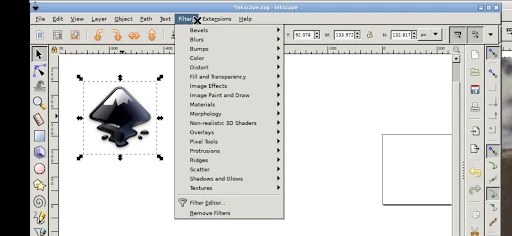
When you first open the app, the layout will feel familiar if you've used Inkscape on a computer. The team did a good job keeping the feel of the desktop version, which is reassuring for experienced users. For beginners, it might take a little time to get used to, but that's half the adventure, isn't it?
Notable Features of the App
Inky is loaded with features that make it a strong tool for creating vector graphics from anywhere. A feature I really appreciate is the node editing. It's very user-friendly and allows for fine-tuning, which is essential when you need your lines and curves to be perfect.
The app also includes layers, which helps you keep your projects organized. You can try out different design ideas without worrying about ruining your main work. Believe me, having layers available on a mobile device feels like a major step forward.
And we can't overlook the wide variety of file formats you can use to save and export your work. Whether you're sharing a quick preview with a client or getting a final design ready for printing, Inky can handle it.
The Mobile Design Experience
One of the biggest benefits of using Inky is the ability to design whenever and wherever you want. Whether you're killing time at a coffee shop or on a train ride, you have a portable design studio right in your hand. I've started sketching out concepts during my daily commute, which has turned what was usually wasted time into something productive.
That said, working on a smaller screen can be tricky, especially if you're accustomed to a large desktop monitor. But with some patience, you'll get the hang of it. Also, Inky works with a stylus, which can really improve your precision and control.
Wrapping Up the Inky Review
Inky - Run Inkscape on Android is a reliable app that successfully connects desktop and mobile graphic design. It has a few minor oddities, but the sheer convenience it provides is hard to ignore. Whether you design for a living or just like to create graphics for fun, Inky is absolutely worth a look.
So, the next time you have a creative idea while you're out, just pull out your phone and try Inky. It could easily turn into your most-used design app.

- Developer
- UserLAnd Technologies
- Version
- 24.11.27
- Installs
- 10,000+
- Android Version
- 5.0
- Content Rating
- Everyone
- Price
- $1.99
- Seamlessly runs Inkscape on Android.
- Supports SVG and various file formats.
- Offers touchscreen-friendly interface.
- Regular updates with new features.
- Compatible with stylus for precision.
- May lag on older devices.
- Limited advanced features for pros.
- Occasional crashes during heavy tasks.
- Requires substantial storage space.
- Interface can be overwhelming for newbies.