iRobot Home (Classic)
Have you ever wished for a personal robot assistant that could take care of your home cleaning needs?
Have you ever wished for a personal robot assistant that could take care of your home cleaning needs?
Getting Your New Helper Ready to Go
First things first, let's talk about getting started with the iRobot Home app. Installing the app was a breeze, available on both Android and iOS platforms, and before I knew it, I was setting up my Roomba. The app guided me through the process with clear instructions, so even if you're not tech-savvy, you’ll manage just fine. Once connected, the app opens a portal to a world of automated cleaning possibilities.
Handy Tools That Simplify Cleaning
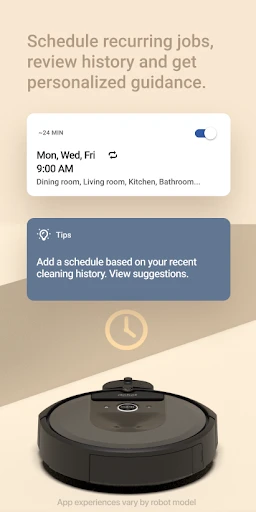
One of the standout features of the iRobot Home app is its scheduling capability. I can program my Roomba to clean at specific times, which is perfect for those of us with busy schedules. Just set it and forget it! And let’s not forget the convenience of starting a cleaning session with just a tap on my phone, even when I'm not at home.
The app also provides detailed cleaning reports. After each session, I can check where my Roomba has cleaned and how long it took. This feature is particularly useful to ensure that every nook and cranny of your home is spotless. Plus, it’s pretty fascinating to see the map of your home get filled in as your Roomba goes about its business.
Tailoring the Clean to Your Liking
Customization is key with the iRobot Home app. You can set cleaning preferences like the number of cleaning passes, final edge clean, and even enable dirt detect, which focuses on the dirtiest areas. This level of control ensures that your cleaning is as thorough as you want it to be. And for those with smart homes, the app integrates seamlessly with Google Assistant and Amazon Alexa, so you can control your Roomba with your voice.
More Than Just a Vacuum Controller
While I primarily used the app with a Roomba vacuum, it’s worth noting that the iRobot Home app also supports other iRobot devices like the Braava jet mopping robots. This means you can manage multiple devices from one app, making it a hub for all your iRobot cleaning gadgets.
One of my favorite features is the push notifications. The app will alert you when your Roomba gets stuck or needs maintenance, which is super handy. It’s like having a little cleaning assistant that keeps you in the loop about your home’s cleaning status.
Final Thoughts: Should You Download It?
So, is the iRobot Home app worth downloading? Absolutely, if you’re looking to simplify your cleaning routine and have more control over when and how your home is cleaned. It’s intuitive, packed with features, and genuinely makes life easier. Plus, who doesn’t love the idea of coming home to a freshly vacuumed floor without lifting a finger?
In conclusion, the iRobot Home app is a game-changer for anyone who wants to automate their cleaning tasks. Whether you’re a tech enthusiast or someone just looking for a helping hand with chores, this app is sure to impress. Go ahead, give it a try, and watch as your home becomes impeccably clean with minimal effort on your part!




- Developer
- iRobot
- Version
- Varies With Device
- Installs
- 10,000,000+
- Android Version
- Varies With Device
- Content Rating
- Everyone
- Price
- Free
- User-friendly interface for easy navigation.
- Remote control of cleaning schedules.
- Real-time notifications and updates.
- Integration with smart home devices.
- Customizable cleaning preferences.
- Requires stable Wi-Fi connection.
- Limited features without subscription.
- Occasional connectivity issues.
- Requires compatible iRobot models.
- May drain phone battery quickly.