My Verizon icon

My Verizon

Tools

Related searches

The My Verizon app is your gateway to managing all things Verizon

The My Verizon app is your gateway to managing all things Verizon

Effortless Account Management

First things first, managing your account is a total breeze with this app. Gone are the days of being stuck on the phone with customer service for every little question. Right from your phone, you can check your bill, make a payment, see how much data you've used, and even switch your plan—all with just a few taps. The layout is super straightforward, so you won't feel lost trying to find what you need.

Data Usage and Controls

For me, the best part is the live data tracker. You can set up warnings to let you know when you're getting close to your limit, which is a huge help if you don't have an unlimited plan. The app even shows you a detailed list of which apps are using the most data. It's like having a little data coach right in your pocket. This feature has definitely saved me from surprise overage charges more than a few times.

Deals and Rewards

Everyone loves a good perk, right? The My Verizon app hooks you up with special offers and rewards through Verizon Up. I've personally gotten discounts on things like event tickets, gift cards, and even vacation deals. It's a cool bonus that makes your plan feel more valuable. The app also sends you alerts when new deals pop up, so you'll always be in the know.

Support at Your Fingertips

If you ever run into trouble, help is available 24/7 right in the app. You can start a chat with a customer service rep directly, which is a massive time-saver compared to waiting on hold. Whether you have a question about your bill or your plan, support is just a tap away. Honestly, having help that easy to get is a game-changer.

Final Thoughts

To sum it up, the My Verizon app is a must-have for any Verizon customer. It makes handling your account simple, keeps you in the loop on your data, gives you access to great deals, and puts support right in your hand. If you haven't tried it yet, you're missing out on the easiest way to manage your service. Go ahead and download it—you'll be glad you did

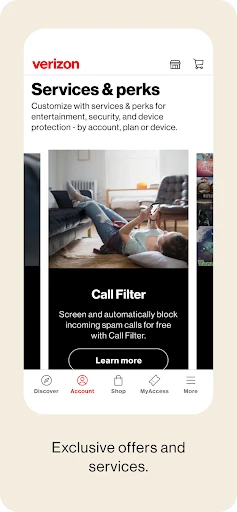
My Verizon screenshot My Verizon screenshot My Verizon screenshot My Verizon screenshot My Verizon screenshot
Developer
Verizon Consumer Group
Version
20.9.1
Installs
100,000,000+
Android Version
7.0
Content Rating
Everyone
Price
Free
Pros
  • Easy bill payment options.
  • Seamless data usage tracking.
  • Fast customer service responses.
  • User-friendly interface design.
  • Secure and reliable app performance.
Cons
  • Occasional app crashes.
  • Limited features for prepaid users.
  • Frequent login issues.
  • Slow app updates.
  • High data usage.

Ratings

4.6

Similar Apps

aTranslator - Text & Voice

aTranslator - Text & Voice

4.8
Get
فیلتر شکن قوی پرسرعت Rooster

فیلتر شکن قوی پرسرعت Rooster

4.8
Get
PDF Reader App : Read All PDF

PDF Reader App : Read All PDF

4.5
Get
Phone Cleaner - AI Cleaner

Phone Cleaner - AI Cleaner

4.8
Get
Google Authenticator

Google Authenticator

3.6
Get
PDF Editor - PDF Reader

PDF Editor - PDF Reader

4.1
Get
Authenticator App - SafeAuth

Authenticator App - SafeAuth

4.3
Get
Photo Recovery, File Recovery

Photo Recovery, File Recovery

4.4
Get
Tesla Proxy Pro - Safe & Fast

Tesla Proxy Pro - Safe & Fast

4.4
Get

Frequently Asked Questions

What is My Verizon app used for?

The My Verizon app is a comprehensive tool for Verizon customers, allowing them to manage their accounts seamlessly. Users can view and pay bills, monitor data usage, adjust account settings, and explore new services or plan upgrades directly from the app. It aims to simplify account management with 24/7 access and user-friendly features.

Is the My Verizon app free to download and use?

Yes, the My Verizon app is free to download and use for all Verizon customers. It provides a convenient way to manage your Verizon account without any additional charges. However, note that any data usage incurred while using the app will be counted against your data plan, unless connected to Wi-Fi.

How secure is the My Verizon app?

The My Verizon app is designed with robust security measures to protect user information. It uses encryption and secure login methods to safeguard personal data. Users are encouraged to enable two-factor authentication for added security. Verizon regularly updates the app to address any potential vulnerabilities and enhance protection.

What should I do if My Verizon app is not working properly?

If the My Verizon app is not functioning properly, first try restarting your device or reinstalling the app. Ensure your device's operating system is updated to the latest version. If issues persist, contact Verizon customer support for assistance. They can provide troubleshooting steps or further technical support.

Can I manage multiple accounts with the My Verizon app?

Yes, the My Verizon app allows users to manage multiple accounts from a single interface. Whether you have multiple phone lines or different types of services, you can easily switch between accounts within the app. This feature is particularly useful for families or businesses managing several lines or services.