
Offline Music Player - Mixtube
Your New Favorite Music Companion: Offline Music Player - Mixtube
Your New Favorite Music Companion: Offline Music Player - Mixtube
Ever been on a road trip, cruising through endless highways, when suddenly, you hit a patch of no signal and your music app decides to take a break? Well, let me introduce you to the savior of such moments - Offline Music Player - Mixtube. This app promises to keep your tunes rolling without the need for an internet connection, and I’ve taken it for a spin to see if it lives up to the hype.
Your Music, No Internet Needed
First up, let's dive into its offline superpower. This app lets you save your favorite songs directly to your device so you can play them no matter where you are. Forget about songs stuttering or eating up your mobile data. I found this super useful on my daily commute, especially in those annoying dead zones. Downloading a song is simple—just a few taps and it's yours. And the best part? The audio sounds fantastic, even when you're completely offline.
A Look That's Easy on the Eyes
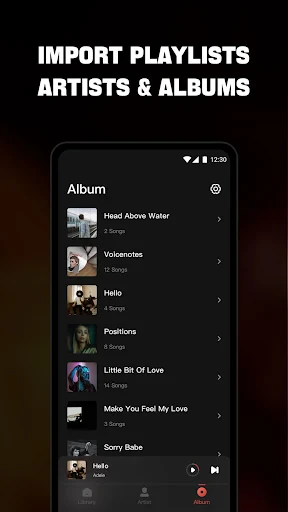
The app has a neat and simple layout that anyone can figure out in seconds. When you open Mixtube, a straightforward home screen shows you your playlists, downloaded songs, and what you last listened to. Making new playlists is simple, and keeping them in order is just as easy. I really liked how the app avoids any mess, keeping the focus entirely on your music.
Another nice touch is that you can change the pictures for your playlists. It's a small detail, but it makes your music collection feel more like your own. Finding a specific song or artist is also quick and painless with the speedy search bar.
What It Can Do and How Well It Works
In terms of performance, Mixtube operates without any hiccups or delays. It can play a wide range of audio file types, so almost any song you have will work. A feature I really enjoyed is the built-in sound tuner, which lets you adjust the music to fit your preferences. If you love deep bass or a more even sound, you can make it happen.
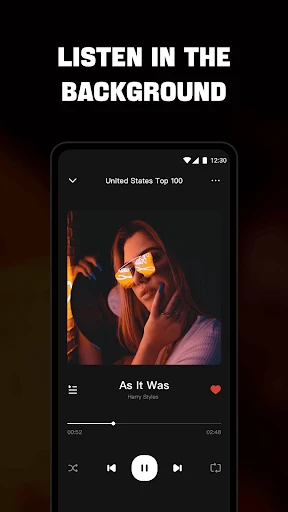
Plus, Mixtube keeps playing even when you switch to another app, so your music never has to stop. This is ideal for people like me who like to scroll through feeds while listening to their favorite albums.
Wrapping It Up
All in all, Offline Music Player - Mixtube is a fantastic pick for anyone who wants to listen to music without needing the internet. Its easy-to-use design, great set of features, and dependable performance make it an essential app for any music fan. Whether you're on a journey, at the gym, or just relaxing, Mixtube makes sure your go-to songs are always ready to play.
In a time when we're always online, it's really nice to have an app that lets you unplug but still have fun. So, if you haven't checked it out yet, give Mixtube a shot. It could easily turn into your go-to music app.



- Developer
- Mixtube Music player
- Version
- 4.6.2
- Installs
- 10,000,000+
- Android Version
- 6.0
- Content Rating
- Everyone
- Price
- Free
- User-friendly interface and easy navigation.
- Allows background play while using other apps.
- Supports multiple audio formats for convenience.
- No internet required for music playback.
- Customizable playlists for personalized experience.
- Limited cloud music integration options.
- Ads can be intrusive during usage.
- Lacks advanced equalizer settings.
- No support for lyrics display.
- Occasional app crashes reported by users.