Pydroid 3 - IDE for Python 3 icon

Pydroid 3 - IDE for Python 3

Education

Related searches

Ah, Python! The go-to language for many of us when it comes to coding. And if you're like me, always on the lookout for the best tools to code on-the-go, then you might have stumbled upon Pydroid 3. Let me tell you, this app is a game-changer for Python enthusiasts who want to carry their coding environment in their pocket.

Ah, Python! The go-to language for many of us when it comes to coding. And if you're like me, always on the lookout for the best tools to code on-the-go, then you might have stumbled upon Pydroid 3. Let me tell you, this app is a game-changer for Python enthusiasts who want to carry their coding environment in their pocket.

Your First Steps with Pydroid 3

The first thing you'll notice about Pydroid 3 is how simple it is to get going. After you grab the app from the store, you're basically all set to jump right into Python. It's built to run smoothly on Android phones and tablets, and it really does! The layout is straightforward and easy to understand, so even if you're just starting out, you won't get lost.

The Cool Features You'll Love

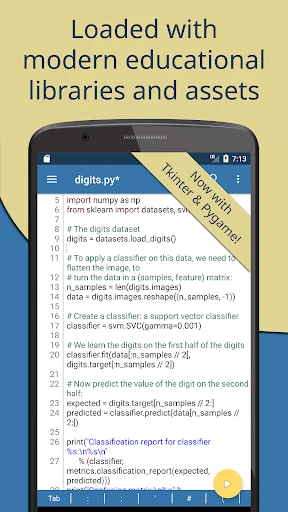
A feature I'm totally hooked on is the offline Python 3 interpreter. That's correct—you can run your code without being online, which is ideal for commutes or when you're just not near Wi-Fi. Plus, it comes ready to use with a bunch of important libraries like NumPy, SciPy, and Matplotlib, which are super handy for data science work.

Another great thing is how simple it is to add more libraries. The app has its own pip package manager built right in, so you can install any extra packages you want. It's pretty much like having a tiny computer right in the palm of your hand!

Who It's Great For: Learners and Experts Alike

No matter if you're a student just getting into Python or a pro developer, Pydroid 3 has something for you. For students, the app is an awesome way to get coding practice in without needing a computer. The interactive console is also a brilliant tool for trying out small bits of code quickly. For the pros, it's a useful app for testing and sketching out ideas in a flash. And we can't forget the educational mode, which gives you extra hints and tips to help you learn.

I'm also a big fan of the syntax highlighting and code prediction, which really speed up your coding. It even lets you fold sections of code, which is a lifesaver when you're dealing with bigger projects. It's all these small touches that come together to make coding a breeze.

A Few Drawbacks and Wrapping Up

Okay, so even though Pydroid 3 is really powerful, it does have a couple of weak spots. Since it's a mobile app, it obviously isn't as strong as a full computer IDE. Some really heavy-duty work might feel a little slow. But for most everyday coding, it works perfectly well.

To sum it up, if you need a dependable and mobile-friendly Python IDE, you should definitely take a look at Pydroid 3. Its portability and tons of features make it an essential tool for anyone who codes in Python. So, why not download it, give it a shot, and boost your Python skills!
Pydroid 3 - IDE for Python 3 screenshot Pydroid 3 - IDE for Python 3 screenshot Pydroid 3 - IDE for Python 3 screenshot Pydroid 3 - IDE for Python 3 screenshot Pydroid 3 - IDE for Python 3 screenshot
Pydroid 3 - IDE for Python 3 icon
Pydroid 3 - IDE for Python 3
Developer
Lider Soft KZ
Version
Varies With Device
Installs
10,000,000+
Android Version
Varies With Device
Content Rating
Everyone
Price
Free
Pros
  • Intuitive user interface for beginners.
  • Supports various Python libraries.
  • Runs Python 3 scripts smoothly.
  • Offline Python compiler capability.
  • Integrated terminal for real-time coding.
Cons
  • Limited features in free version.
  • Occasional lagging on older devices.
  • Ads can be intrusive at times.
  • Might require additional setup for libraries.
  • No support for Python 2.

Ratings

4.4

Similar Apps

Khan Academy Kids

Khan Academy Kids

4.7
Get
Seek by iNaturalist

Seek by iNaturalist

3.3
Get
PBS Parents Play & Learn

PBS Parents Play & Learn

4
Get
Sign Language ASL Pocket Sign

Sign Language ASL Pocket Sign

4.8
Get
Question.AI - Chatbot&Math AI

Question.AI - Chatbot&Math AI

4
Get
EPA 608 Practice Test

EPA 608 Practice Test

0
Get
Dog Scanner: Breed Recognition

Dog Scanner: Breed Recognition

4.2
Get
Talkpal - AI Language Learning

Talkpal - AI Language Learning

4.2
Get
Ling - Learn Languages Now

Ling - Learn Languages Now

4.7
Get
Grammar Check by AI Writing

Grammar Check by AI Writing

4.5
Get
AnkiDroid Flashcards

AnkiDroid Flashcards

4.8
Get
Brainly: AI Homework Helper

Brainly: AI Homework Helper

4.5
Get

Frequently Asked Questions

What is Pydroid 3 and what can it be used for?

Pydroid 3 is a powerful integrated development environment (IDE) specifically designed for running Python 3 on Android devices. It allows users to write, compile, and execute Python scripts directly on their smartphones or tablets. Ideal for both beginners learning Python and experienced developers who want to code on the go, Pydroid 3 supports various Python libraries and frameworks, making it a versatile tool for educational purposes or quick prototyping.

Is Pydroid 3 suitable for beginners learning Python?

Yes, Pydroid 3 is an excellent choice for beginners who are learning Python. The app provides a user-friendly interface with features like syntax highlighting, code prediction, and an offline Python 3 interpreter, which help make the learning process smoother. Additionally, it includes educational examples and tutorials, which are particularly useful for those new to programming. Beginners can easily experiment with Python scripts and see immediate results, enhancing their learning experience.

Does Pydroid 3 support external Python libraries and packages?

Absolutely, Pydroid 3 supports a wide range of external Python libraries and packages. Users can install additional libraries using PIP (Python Package Index), which is integrated into the app. This capability allows developers to work on more complex projects involving libraries like NumPy, Pandas, Matplotlib, and many others. This feature significantly enhances the app's utility, making it suitable for various Python development activities, from simple scripts to data analysis and machine learning tasks.

Can Pydroid 3 be used offline?

Yes, Pydroid 3 can be used offline, which is one of its key advantages. It includes a built-in Python 3 interpreter, allowing users to write and execute Python code without needing an internet connection. This makes it particularly useful for users who want to practice coding during commutes or in areas with limited connectivity. However, downloading new libraries or packages requires an internet connection, so users should plan accordingly if they need additional resources.

What are the system requirements for installing Pydroid 3?

To install Pydroid 3, your Android device should be running at least Android 4.4 or higher. The app is optimized for both smartphones and tablets, but performance may vary based on the device's specifications. It is recommended to have a device with at least 2GB of RAM for smooth operation, especially when working with large libraries or complex projects. Ensuring your device meets these requirements will provide a better experience when using the app.