

Sherwin-Williams Color Expert™
My Experience with the Sherwin-Williams Color Expert™ App
My Experience with the Sherwin-Williams Color Expert™ App
So, I’ve recently had the chance to play around with the Sherwin-Williams Color Expert™ app, and let me tell you, it’s like having a pocket-sized professional color consultant right at your fingertips. In the world of home decor and design, choosing the perfect color scheme can often feel overwhelming, but this app truly makes it so much easier. Let’s dive into what makes this app a fabulous tool for both amateur DIY-ers and seasoned interior designers alike.
A Breeze to Navigate and Use
First off, the app’s user interface is incredibly intuitive. From the moment you open it up, you’re greeted with a sleek design that prioritizes ease of use. No more fumbling around trying to figure out how to get started. The navigation is straightforward, with clear categories and options that lead you exactly where you need to go. Whether you’re selecting a new color for your living room walls or experimenting with a bold hue for your kitchen cabinets, finding your way around the app is a breeze.
Finding Colors from the World Around You
One of my favorite features has to be the color matching tool. You can literally take a photo of anything that inspires you, and the app will match it to the nearest Sherwin-Williams paint color. Spotted a gorgeous sunset that you wish you could bottle up and bring home? Snap a pic and let the app do its magic. It’s like having the entire Sherwin-Williams palette right in your pocket!
Endless Ideas for Your Home
Beyond just color matching, the app offers a plethora of inspiration. There are curated color collections and trend insights that keep you updated on what’s hot in the world of interior design. Plus, the app features a range of articles and tips to help you make informed decisions about your color choices. It’s not just about picking a color; it’s about understanding what that color can do for your space.
See Your New Color Before You Buy
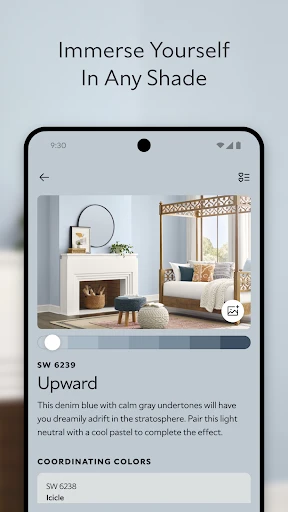
Another standout feature is the virtual painting tool. This allows you to see how different colors will look on your walls before you even lift a brush. Simply upload a photo of your room, and the app will let you digitally paint it with any color you choose. It’s a game-changer for those of us who need to visualize things before making a commitment. No more buying sample pots of paint and cluttering up your garage!
Connecting You to the Store
If you’re someone who likes to streamline your home improvement projects, you’ll love how the app integrates with Sherwin-Williams’ in-store services. You can easily find the nearest store, check out the available inventory, and even contact a store associate directly from the app. It’s all about making the painting process as seamless as possible.
Final Thoughts on This Handy Tool
All in all, the Sherwin-Williams Color Expert™ app is a must-have tool for anyone looking to refresh their home with a splash of color. It’s packed with features that cater to both novices and pros, making the daunting task of choosing paint colors not just manageable but actually enjoyable. So, if you’re planning a home makeover or just dreaming about one, give this app a try. You might just find yourself inspired to start that painting project you’ve been putting off. Happy decorating!




- Developer
- Sherwin-Williams
- Version
- 1.1.3-release-1.1.3-4820
- Installs
- 100,000+
- Android Version
- 8.0
- Content Rating
- Everyone
- Price
- Free
- Comprehensive color palette available.
- User-friendly interface design.
- Includes virtual room painting.
- Expert color advice feature.
- Syncs with physical store purchases.
- Limited to Sherwin-Williams products.
- Requires stable internet connection.
- Occasional app crashes reported.
- Color accuracy varies on screens.
- No offline mode available.


