signNow: Sign & Fill PDF Docs icon

signNow: Sign & Fill PDF Docs

Productivity

Related searches

SignNow: Your On-the-Go Document Signing Hero

SignNow: Your On-the-Go Document Signing Hero

Ever found yourself in a situation where you’re scrambling to sign an important document, but you’re nowhere near a printer or scanner? Yeah, we’ve all been there. But fear not, because signNow is here to save the day. This nifty app has become my go-to for all things related to signing and managing documents on the go.

Getting the App Up and Running

Jumping into signNow is a breeze. Once you download it, the app greets you with a clean and intuitive interface. Trust me, even if you’re not tech-savvy, you’ll find your way around in no time. The app is available on both Android and iOS, so no worries about compatibility. Plus, you can sync it across all your devices, which means you can start something on your phone and finish it on your tablet or computer. Sweet, right?

Effortless Handling of Your Paperwork

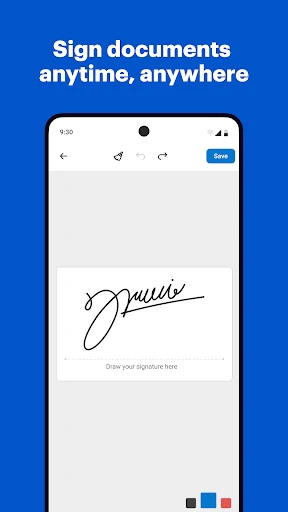
Now, let’s talk about what makes this app shine—the document management features. With signNow, you can easily import documents from your email, camera roll, or cloud storage. Once you’ve got your document loaded up, adding your signature is as easy as pie. You can draw it, upload an image, or even use a saved signature. And if you’re like me and your handwriting isn’t exactly pretty, the app’s got you covered with its smooth signature creation tool.

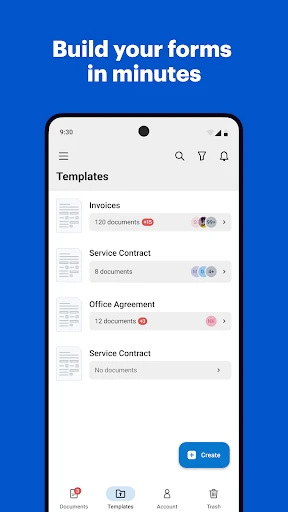
One feature I particularly love is the ability to create document templates. If you frequently send out similar forms or contracts, creating a template will save you loads of time. You can also invite others to sign documents, and the app will notify you when they’ve done so. It’s like having a personal assistant keeping track of your paperwork.

Keeping Your Files Safe and Secure

In today’s digital age, security is a big deal. I was pleased to find that signNow takes this seriously. The app uses advanced encryption to ensure your documents are safe and sound. Plus, they comply with industry-leading security standards like SOC 2 Type II and GDPR. So, you can rest easy knowing your sensitive information is in good hands.

Wrapping It All Up

To wrap it up, signNow has been a game-changer for me. It’s a reliable, user-friendly app that simplifies document management and signing. Whether you’re a busy professional, a student, or just someone who hates dealing with paper, this app is a must-have in your digital toolkit. It’s like having a portable office in your pocket. So, if you haven’t already, give signNow a whirl and say goodbye to the hassle of traditional document signing.
signNow: Sign & Fill PDF Docs screenshot signNow: Sign & Fill PDF Docs screenshot signNow: Sign & Fill PDF Docs screenshot signNow: Sign & Fill PDF Docs screenshot signNow: Sign & Fill PDF Docs screenshot
signNow: Sign & Fill PDF Docs icon
signNow: Sign & Fill PDF Docs
Developer
SignNow
Version
9.2.2
Installs
1,000,000+
Android Version
8.1
Content Rating
Everyone
Price
Free
Pros
  • User-friendly interface simplifies document signing.
  • Supports various document formats for flexibility.
  • Secure encryption ensures document confidentiality.
  • Offline mode available for signing without internet.
  • Integrates with cloud services for easy access.
Cons
  • Limited free version with restricted features.
  • Occasional syncing issues with cloud services.
  • Requires account registration for full features.
  • No bulk signing feature for multiple documents.
  • Mobile app lacks some desktop functionalities.

Ratings

3.6

Similar Apps

DeepSeek - AI Assistant

DeepSeek - AI Assistant

4.2
Get
All Document Reader & Editor

All Document Reader & Editor

4.5
Get
AI PDF Reader-All File Readers

AI PDF Reader-All File Readers

4.3
Get
pdfFiller Edit, fill, sign PDF

pdfFiller Edit, fill, sign PDF

4
Get
Notepad, Notebook, Notes app

Notepad, Notebook, Notes app

4.6
Get
MateAI-AI Chat Bot Assistant

MateAI-AI Chat Bot Assistant

3.7
Get
AI Chatbot - Nova

AI Chatbot - Nova

4.1
Get
All Document Hub

All Document Hub

4.2
Get
Smart Home Manager

Smart Home Manager

4.5
Get
Document Reader & Viewer

Document Reader & Viewer

4.6
Get
Google NotebookLM

Google NotebookLM

4
Get

Frequently Asked Questions

What is signNow and what can it do for me?

signNow is a versatile app designed to streamline the process of signing and managing PDF documents. It allows users to sign, fill, and send documents electronically, eliminating the need for physical paperwork. With signNow, users can easily upload PDFs, add their electronic signature, and send documents to others for signing, making it an ideal tool for businesses and individuals who frequently deal with contracts and forms.

Is signNow secure for handling my sensitive documents?

Yes, signNow prioritizes the security of your documents. The app employs advanced encryption and security measures to protect your data, ensuring that your documents remain confidential and tamper-proof. Additionally, signNow is compliant with industry standards such as GDPR and eIDAS, providing users with peace of mind when handling sensitive information.

Can I use signNow offline?

signNow offers offline capabilities, allowing users to prepare and sign documents even without an internet connection. This feature is particularly useful for professionals who are frequently on the go or in areas with limited connectivity. Users can fill and sign documents offline and then sync the changes once they reconnect to the internet, ensuring uninterrupted productivity.

How does signNow integrate with other applications and services?

signNow is designed to integrate seamlessly with a variety of applications and services, enhancing its utility for users. It supports integrations with popular cloud storage services like Google Drive, Dropbox, and OneDrive, allowing you to easily import and export documents. Additionally, signNow can integrate with business tools such as Salesforce and Microsoft Dynamics, streamlining workflows and improving efficiency.

Is there a cost associated with using signNow?

signNow offers a range of pricing plans to cater to different needs, from individual users to large enterprises. While there is a free version available with basic features, advanced functionalities such as bulk sending, advanced security options, and integrations require a paid subscription. Users can choose from various plans based on their requirements, making it a flexible option for managing document workflows.