VN - Video Editor & Maker
Let's dive into the world of video editing with the VN - Video Editor & Maker app, a nifty little tool that has been making waves among content creators. Whether you're looking to put together a quick montage for your Instagram story or aiming to create a cinematic masterpiece, VN promises to be your go-to editing suite right on your mobile device. But does it live up to the hype? Let's find out!
Let's dive into the world of video editing with the VN - Video Editor & Maker app, a nifty little tool that has been making waves among content creators. Whether you're looking to put together a quick montage for your Instagram story or aiming to create a cinematic masterpiece, VN promises to be your go-to editing suite right on your mobile device. But does it live up to the hype? Let's find out!
Getting Your Feet Wet with VN
First things first, downloading the VN app is a breeze. Available on both Android and iOS, it doesn’t take up much space and installs faster than you can say "action". Once you open the app, you're greeted with a clean and intuitive interface. It’s not cluttered with unnecessary tabs or overwhelming options, which is perfect for both beginners and seasoned editors.
Cool Tools You'll Love to Use
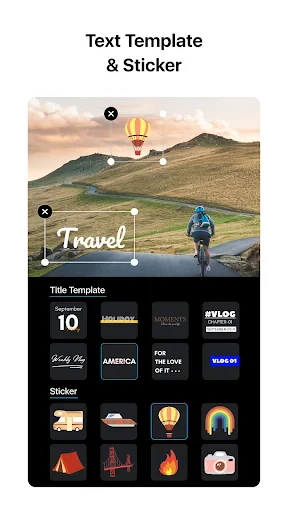
One of the coolest features of VN is its multi-layer timeline, which is usually something you'd expect from high-end software on desktops. This allows you to layer multiple clips, text, music, and even special effects effortlessly. And speaking of effects, VN offers a plethora of them. From cool transitions to snazzy filters, the app has it all. You can easily customize your videos to match the vibe you're going for.
The app also supports 4K exports, which is a big win if you're looking to keep the quality top-notch. Editing in VN feels like a professional experience, thanks to features like keyframe animation, curve shifting, and speed adjustments. It’s like having a mini editing studio in your pocket!
How It Feels to Use the App
Using VN is a smooth ride. The app runs efficiently without any noticeable lag, even when handling larger files or intricate edits. The developers have done a commendable job optimizing it for mobile devices. Navigating through the app is straightforward, and the drag-and-drop functionality makes editing a breeze.
Another aspect worth mentioning is the community support and tutorials available within the app. If you ever find yourself stuck or in need of inspiration, there's a treasure trove of resources to explore. Plus, the app is ad-free, which is a huge relief when you're in the middle of an editing flow.
The Final Verdict on VN
In my experience, VN - Video Editor & Maker is definitely worth a shot, especially if you're keen on editing videos on the go. It bridges the gap between professional editing software and mobile apps beautifully. The fact that it packs so many features without any cost is just the cherry on top.
So, whether you’re a vlogger, a social media enthusiast, or just someone who loves to capture life's moments creatively, VN could be your new best friend in the editing realm. It's easy to use, powerful, and most importantly, fun. Give it a try and unleash your inner Spielberg!




- Developer
- Ubiquiti Labs, LLC
- Version
- 2.5.0
- Installs
- 100,000,000+
- Android Version
- 7.0
- Content Rating
- Teen
- Price
- Free
- User-friendly interface for easy editing
- Wide range of filters and effects
- Supports multiple video formats
- Fast rendering with high-quality output
- No watermarks on exported videos
- Limited free version features
- Occasional app crashes
- Ads in the free version
- Large app size
- Requires a stable internet connection