Voice Recorder Sound Recorder
Voice Recorder Sound Recorder App
Voice Recorder Sound Recorder App
Ever been in a spot where you just needed to quickly capture some audio? Maybe it's a class lecture, a sudden song idea, or just a reminder for yourself. Having a dependable voice recorder right on your phone can be a total game-changer. That's exactly what the Voice Recorder Sound Recorder app aims to be.
A Look at What It Offers
The first thing you'll notice about this app is how straightforward and easy it is to use. You really don't need to be a tech expert to get the hang of it. With a single tap, you can start, pause, or stop a recording. The best part is that it keeps things clean and simple, without flooding your screen with confusing buttons. The whole point is to make recording as easy as pie.
What really makes this app special is that it can record in all sorts of different formats. Do you need an MP3, a WAV file, or maybe an AAC? It's got you covered. This is super useful when you need to move your files between different gadgets or programs. On top of that, the app delivers high-quality sound, so every word or note comes through clearly.
How It Performs and Feels to Use
When it comes to how well it works, this Voice Recorder app truly stands out. I've tested plenty of apps that promise great sound quality, but many don't deliver, particularly when there's a lot of background noise. This app, however, has a noise cancellation feature that really makes a difference. It does a great job of cutting down on distracting sounds, which is perfect whether you're using it for work or just for yourself.
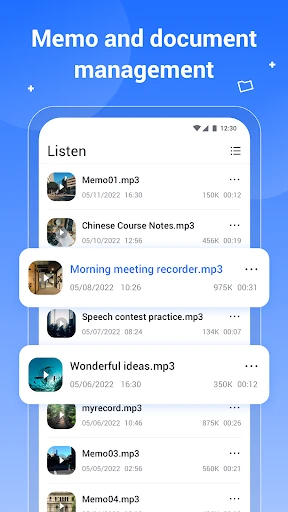
Another great thing is how it helps you organize your recordings. After you've made your recordings, the app lets you keep them all in order. You can name each one, so you don't have to waste time searching through a huge list of files to find that one important recording. Believe me, this feature saves you a lot of time and frustration.
Working Across Devices and Sharing Files
Now, let's discuss how well it works with different devices. The Voice Recorder Sound Recorder app works on both Android and iOS phones, and it runs well on most of them. I didn't have any trouble switching between my phone and my tablet, and the app kept everything in sync without a hitch. This ability to work across different platforms means you can get to your recordings whenever and wherever you need them.
Sharing your recordings is also really simple. Whether you're emailing a file to someone or saving it to the cloud, the app gives you several ways to share. It's ideal for working with a team or just sending a cool idea to a friend. The built-in sharing tools mean you don't have to go through a complicated process to get your audio where you want it to go.
Wrapping Up the Review
To sum it all up, the Voice Recorder Sound Recorder app is an essential tool for anyone who needs a dependable way to record audio. Its easy-to-use design, high-quality sound capture, and smooth sharing features help it rise above the competition. Whether you're a student, a reporter, or someone who makes music, this app has something valuable to offer you.
So, the next time you need to grab a quick audio clip, why not try this app? It's like carrying a professional recording studio in your pocket. And really, who wouldn't want that kind of convenience?


- Developer
- Health Dev LLC
- Version
- 1.2.8
- Installs
- 1,000,000+
- Android Version
- 10
- Content Rating
- Everyone
- Price
- Free
- High-quality audio recording
- User-friendly interface
- Supports various audio formats
- Easy file management
- Reliable performance
- Limited editing features
- Ads in free version
- No cloud sync
- Basic design
- No advanced audio settings