Volvo Cars
Getting Behind the Wheel with the Volvo Cars App
Getting Behind the Wheel with the Volvo Cars App
Alright, folks! Today, I’m checking out something that really gets my tech side excited – the Volvo Cars app. If you love cool gadgets and making life easier, especially with your car, this app could become your new favorite thing. So let’s take a ride together as I share my own experience with this clever bit of technology!
Getting Started is a Snap
The very first thing that hit me after downloading the Volvo Cars app was its clean and user-friendly look. Seriously, what a great first impression! It feels like they borrowed some smart design ideas. Getting it ready was super simple – just a few taps and you're all set. It links up with your Volvo without any fuss, and suddenly your phone turns into the co-pilot you didn't know you were missing.
Cool Tools You'll Actually Use
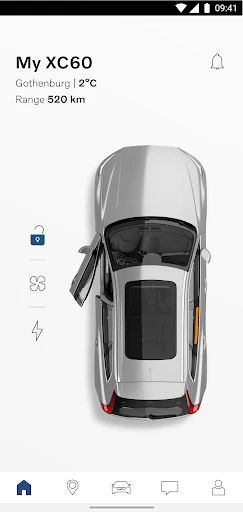
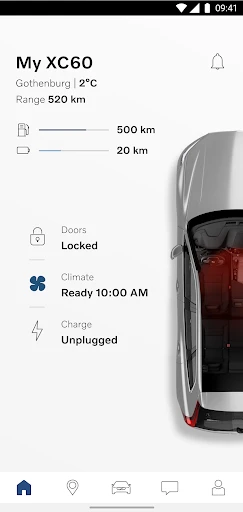
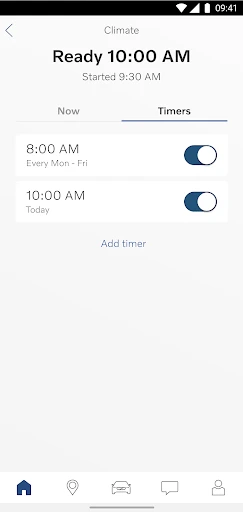
Once you're in, the app is packed with handy tools. The Remote Start is a game-changer on those icy mornings when you can't face a freezing car. One quick press, and your car is warming up before you walk out the door. And then there's the Climate Control. It’s like having someone get your car to the perfect temperature before you get in. Pretty slick, huh?
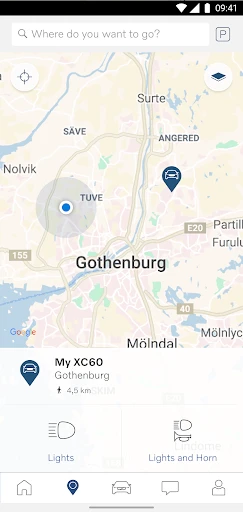
Another feature I really love is the Vehicle Locator. Honestly, who hasn't done the endless walk around a parking lot trying to find their car? This app ends that. Just open the locator, and it points you right to your vehicle. No more awkward moments in a crowded lot!
Your Car's Personal Safety Monitor
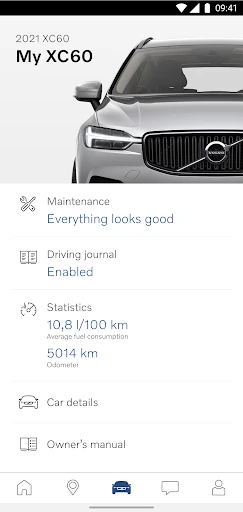
Volvo is famous for safety, and this app keeps that tradition going. It gives you live info on your car's condition, from tire pressure to how much fuel you have, so you're always in the loop. You can even book your service appointments right through the app. It's like having a personal assistant who's totally focused on your car's well-being – and let's be real, who wouldn't want that?
Making Every Drive Better
The app does more than just safety and convenience; it actually makes driving more enjoyable. The Navigation is top-notch, with live traffic info and suggestions for faster routes. There's even the ability to connect with smart home gadgets, letting you link your car to your home system. Think about telling your house to turn on the lights as you drive up – how cool is that?
The Final Verdict
So, is the Volvo Cars app worth getting? From my experience, one hundred percent! If you drive a Volvo, this app is essential. It's like having a tech-smart friend who always has your back. With its easy-to-use design, tons of features, and a strong focus on safety, it's obvious Volvo is heading into the future with a lot of style. So, if you own a Volvo or are thinking about it, you should definitely give this app a look. You can thank me later!
And that's it, everyone, my personal take on the Volvo Cars app. It's been a fun trip checking out all it can do. Until next time, stay tech-savvy and keep on driving
- Developer
- Volvo Cars
- Version
- 5.55.0
- Installs
- 1,000,000+
- Android Version
- 8.0
- Content Rating
- Everyone
- Price
- Free
- User-friendly interface for easy navigation.
- Comprehensive car status and diagnostics.
- Remote control for locking and climate.
- Integrated maps with real-time traffic.
- Efficient fuel consumption tracking.
- Limited features on older car models.
- Occasional connectivity issues.
- Requires stable internet for updates.
- Subscription needed for premium features.
- App size is relatively large.