Wikipedia
Your Pocket Encyclopedia: A Look at the Wikipedia App
Your Pocket Encyclopedia: A Look at the Wikipedia App
Ever found yourself in the middle of a heated debate about some obscure topic and wished you had an encyclopedia right in your pocket? Well, let me introduce you to Wikipedia, the app that has got you covered. If you’re like me and love to dive into random rabbit holes of information, then this app will feel like a playground.
Your Gateway to a World of Info
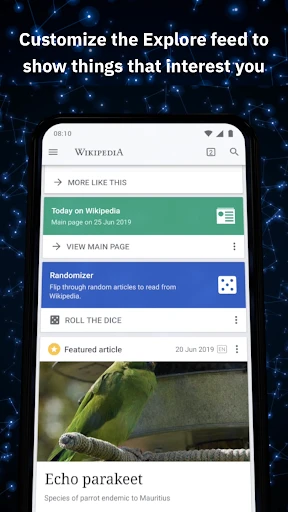
Wikipedia isn't just another app; it's a gateway to a world of information. Imagine having a library that fits in your palm, and that's exactly what Wikipedia offers. The app is designed for both Android and iOS platforms, making it accessible to almost everyone. With a sleek and user-friendly interface, navigating through millions of articles becomes a breeze.
Handy Features You'll Love
One of my favorite features is the ability to save articles for offline reading. Perfect for those long commutes or when you’re stuck in a no-WiFi zone. The app also supports multiple languages, which is a huge plus if you're multilingual or trying to learn a new language. You can switch languages with just a few taps, opening up a whole new world of information.
Another neat feature is the "Nearby" option, which shows you Wikipedia articles related to your current location. It's like having a personal tour guide that tells you the history and significance of places around you. Trust me, it’s a game-changer when you're traveling.
My Journey with the App
Using Wikipedia has been nothing short of enlightening. I often find myself starting with one article and, before I know it, I've jumped through a dozen more. It’s like a journey through a web of knowledge, where each link takes you deeper into the subject matter. Plus, the app’s clean design makes this exploration enjoyable without any unnecessary distractions.
I've also noticed that the app doesn't drain my phone's battery as much as other resource-intensive apps do. That's a win in my book! Plus, it's free. Yes, free. You get access to a vast repository of information without spending a dime, though donations are encouraged to keep the platform running.
Why You Should Download It Now
In a world where information is power, Wikipedia stands out as a powerful tool that democratizes knowledge. Whether you’re a student, a professional, or just someone with an insatiable curiosity, this app is a must-have. It’s like having a wise friend who knows a little bit about everything.
So, if you haven't downloaded Wikipedia yet, what are you waiting for? Dive into the endless sea of knowledge and let your curiosity guide you. Trust me, you won't regret it


- Developer
- Wikimedia Foundation
- Version
- 2.7.50532-r-2025-05-20
- Installs
- 50,000,000+
- Android Version
- 5.0
- Content Rating
- Everyone
- Price
- Free
- Comprehensive information source
- Constantly updated content
- Free and easily accessible
- Supports multiple languages
- Community-driven and editable
- Can contain inaccuracies
- Sometimes lacks depth
- Ads may disrupt reading
- Complex topics oversimplified
- Not always academically reliable