Zoom Workplace
Zoom Workplace: Your Ultimate Guide to Seamless Remote Collaboration
Zoom Workplace: Your Ultimate Guide to Seamless Remote Collaboration
Zoom Workplace has rapidly become a staple in the professional toolkit of remote workers, digital nomads, and businesses across the globe. If you’re looking for a robust, reliable, and easy-to-use platform to streamline your communication needs, let me take you on a little tour of why Zoom Workplace might just be the solution you've been searching for.
Getting Your Zoom Workplace Up and Running
First things first, downloading Zoom Workplace is a breeze. It's available on both Android and iOS platforms, and the installation process is as straightforward as it gets. Once you’ve got it up and running, the intuitive interface makes it easy for anyone to jump right in, whether you're tech-savvy or not.
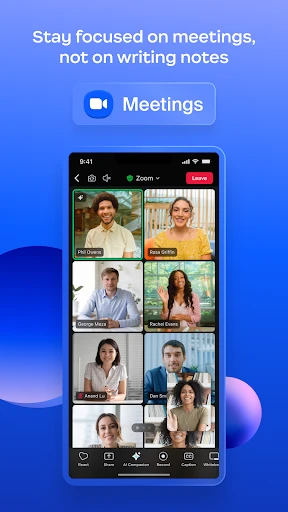
The app offers a plethora of features designed to make virtual collaboration as seamless as possible. From HD video conferencing to screen sharing and even a built-in calendar for scheduling meetings, Zoom Workplace covers all bases. You can host meetings with up to 100 participants, which is more than enough for most small to medium-sized businesses.
Handy Tools You'll Love
One of the standout features of Zoom Workplace is its breakout rooms. This feature is a game-changer for educators and trainers who need to break participants into smaller groups for discussions or activities. It’s like having multiple mini-meetings within your main session—super handy for workshops and brainstorming sessions.
Another notable feature is the virtual background option. This is not just for fun—though I must admit, it's quite entertaining to have a beach backdrop while stuck at home—but it also helps in maintaining privacy, especially if you’re working from a shared space.
Playing Nice with Other Apps
Zoom Workplace doesn’t just stop at offering excellent standalone features; it also integrates smoothly with other productivity tools like Slack, Google Calendar, and Microsoft Teams. This means you can streamline your workflow without having to switch back and forth between apps constantly.
Moreover, the app’s security features have been significantly improved over time. End-to-end encryption ensures that your meetings remain confidential, which is a relief for businesses dealing with sensitive information.
Wrapping Up: Is Zoom Workplace For You?
In conclusion, Zoom Workplace is more than just a video conferencing tool. It’s a comprehensive platform that enhances productivity and keeps teams connected across distances. Whether you're working from home, managing a remote team, or conducting online classes, this app has got you covered.
While there are many communication tools out there, Zoom Workplace stands out for its ease of use, reliability, and the sheer range of features it offers. If you haven’t tried it yet, I’d say it’s worth giving it a shot. Who knows, it might just become your go-to app for all things work-related
- Developer
- zoom.com
- Version
- 6.4.5.29471
- Installs
- 1,000,000,000+
- Android Version
- 8.0
- Content Rating
- Everyone
- Price
- Free
- User-friendly interface
- High-quality video calls
- Seamless screen sharing
- Integration with calendars
- Reliable connection
- Requires strong internet
- Security concerns
- Limited free version
- Occasional lag
- Complex for beginners