1Password: Password Manager icon

1Password: Password Manager

Productivity

Related searches

1Password: Password Manager

1Password: Password Manager

Getting Started with 1Password

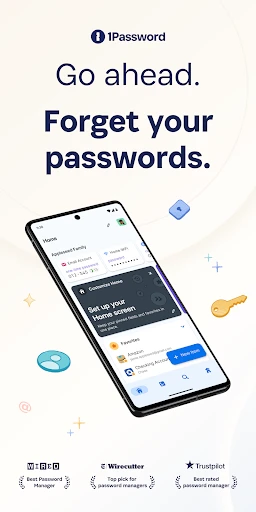
First things first, getting 1Password up and running is super simple. I was really impressed with how user-friendly everything is. After you install the app, it walks you through the setup process step-by-step. You just create one master password (this is the last one you'll ever have to memorize) and that's it, you're all set!

Features That Make Life Easier

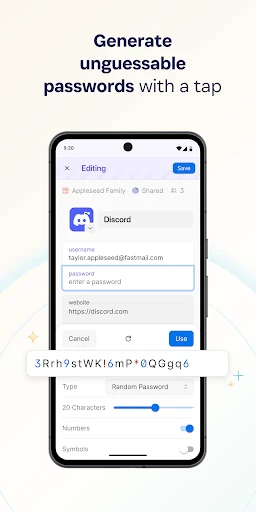
Now, let's get into what this app can do. My favorite part is that it holds more than just passwords; it can keep your credit card details, private notes, and important files safe too. The automatic password creator is a real game-changer – it comes up with super strong passwords that are really hard to hack.

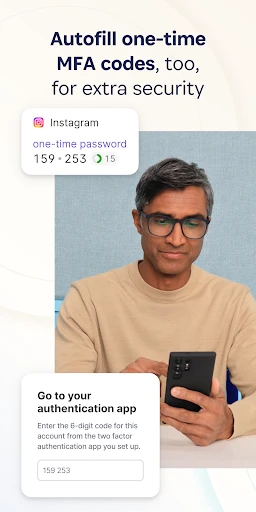
The app also syncs perfectly across all your gadgets. I tried it on my Android phone and my iPad, and all my info was right there on both. You don't have to stress about not being able to access your accounts on different devices anymore. It also works great with web browsers, so it fills in your usernames and passwords for you automatically.

Is It Secure?

Of course, security is a major worry with any password manager. 1Password doesn't mess around here; it uses top-notch end-to-end encryption. This means your data gets scrambled on your own device before it's even sent to their servers. It made me feel a lot better knowing that not even the people who made the app can see my private information.

Another cool tool is the Watchtower feature. It keeps an eye out for you and lets you know if any websites you use have been hacked or if you're using any weak passwords, helping you stay on top of your digital safety.

Final Thoughts

In today's world, keeping your online life secure is more important than ever, and a good password manager is a must-have. 1Password: Password Manager is more than just a digital vault for passwords; it's a complete security tool that makes your online experience smoother and safer. It does cost money, but the convenience and the sense of security you get are totally worth the price.

So, if you're fed up with trying to remember dozens of passwords or you're concerned about online security, you should definitely try 1Password. It's like having your own personal bodyguard for everything you do online. And honestly, who would say no to that?
1Password: Password Manager screenshot 1Password: Password Manager screenshot 1Password: Password Manager screenshot 1Password: Password Manager screenshot 1Password: Password Manager screenshot
1Password: Password Manager icon
1Password: Password Manager
Developer
AgileBits
Version
8.10.76
Installs
1,000,000+
Android Version
9
Content Rating
Everyone
Price
Free
Pros
  • Easy-to-use interface.
  • Cross-platform compatibility.
  • Secure password generation.
  • Biometric login support.
  • Strong encryption methods.
Cons
  • Premium features require subscription.
  • Limited free version features.
  • Initial setup can be time-consuming.
  • Occasional sync issues.
  • Dependent on internet for access.
Ratings

4.6

Similar Apps

DeepSeek - AI Assistant

DeepSeek - AI Assistant

4.2
Get
1Password: Password Manager

1Password: Password Manager

4.6
Get
PDF Reader Point

PDF Reader Point

4.3
Get
Clock Launcher: Set Alarms

Clock Launcher: Set Alarms

4.1
Get
Junk File Cleanup

Junk File Cleanup

4.8
Get
AI Chat Smith Smart Assistant

AI Chat Smith Smart Assistant

4.4
Get
NETGEAR Nighthawk WiFi Router

NETGEAR Nighthawk WiFi Router

4.4
Get
Wix - Website Builder

Wix - Website Builder

3.9
Get

Frequently Asked Questions

What platforms is 1Password compatible with?

1Password is a versatile password manager that is compatible with multiple platforms, including Android, iOS, Windows, and macOS. This cross-platform support ensures that users can access their passwords and secure information from any device, providing seamless integration and a consistent experience whether on a smartphone, tablet, or computer.

How does 1Password enhance security for my accounts and information?

1Password enhances security by storing all your passwords and sensitive information in a secure, encrypted vault. This means that your data is protected against unauthorized access. Additionally, 1Password generates strong, unique passwords for each of your accounts, further safeguarding you from potential breaches and ensuring that your online presence remains secure.

Can I share passwords with family or team members using 1Password?

Yes, 1Password offers options for sharing passwords securely with family or team members. With 1Password Families or 1Password Teams, you can create shared vaults where members can access, add, or edit passwords as needed. This makes it easier for families to manage shared accounts and for teams to collaborate securely while keeping all sensitive data protected.

What happens if I forget my 1Password master password?

If you forget your 1Password master password, it's crucial to understand that this password is the key to accessing your encrypted vault. 1Password does not store your master password, meaning they cannot recover it for you. It’s recommended to use a memorable phrase and store it in a secure location to prevent being locked out of your account.

Does 1Password offer a free trial or a free version?

1Password provides a free trial for new users, allowing them to explore its features and benefits before committing to a subscription. While there isn't a completely free version, the trial period helps you understand how 1Password can fit into your security needs. After the trial, users can choose from individual, family, or team plans, each offering various features tailored to different needs.