

BlueDriver OBD2 Scan Tool
My Personal Mechanic in a Pocket: The BlueDriver OBD2 Scan Tool
My Personal Mechanic in a Pocket: The BlueDriver OBD2 Scan Tool
Getting to Know Your BlueDriver
First things first, let's chat about the setup. The BlueDriver is seriously simple to get going. All you need is the small scanner itself and your smartphone. Just plug the BlueDriver into your car's OBD2 port (you'll typically find it under the dashboard near the steering wheel), and then pair it with your phone using Bluetooth. It's a total breeze! No messy cables or complicated steps to worry about.
Standout Features You'll Love
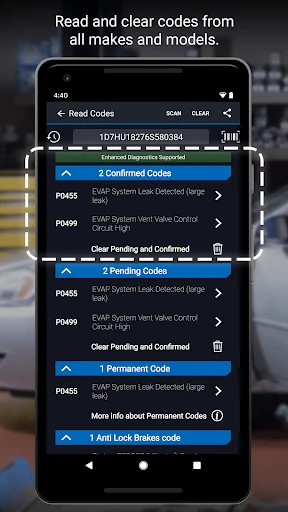
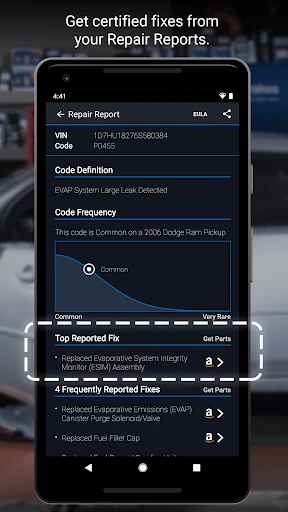
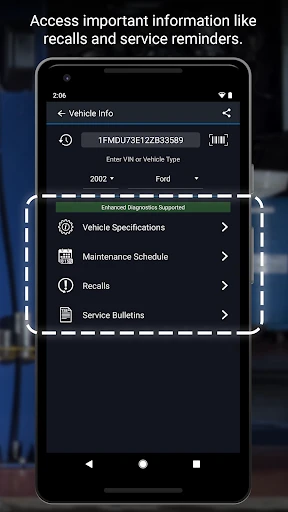
This nifty gadget is loaded with cool functions that make it essential. The BlueDriver app, which you can get for both Android and iPhone, has a super user-friendly layout that even a complete beginner can figure out easily. It gives you a full suite of diagnostics, from pulling up and resetting check engine light codes to generating easy-to-understand repair reports.
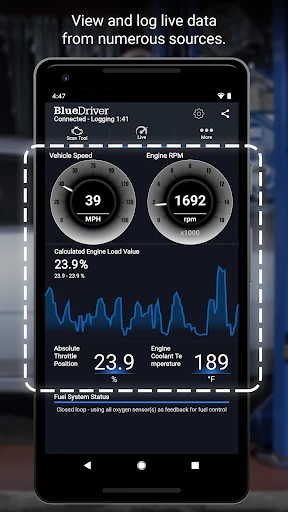
One of the most impressive things I've seen is the live data feature. You can watch your car's performance as it happens. It shows you real-time info like engine RPM and fuel system status, giving you a detailed look under the virtual hood. This is perfect for anyone who likes to get hands-on with their car or just wants to monitor their vehicle's well-being.
What Makes BlueDriver Special
I've tried a few other OBD2 scanners before, but BlueDriver really shines for a few key reasons. For starters, it's the only one I've found that gives you the same deep-level data that professional mechanics use. Seriously! You get enhanced diagnostics for specific brands like Ford, GM, Chrysler, and Toyota. It's like having a mini expert right there, telling you all your car's hidden details.
On top of that, the app gets regular updates with new functions and improvements, so your tool never becomes outdated. It's not just a one-time buy; it's an investment that keeps on giving you confidence.
Built to Last and Easy to Use
Looking at its physical design, the BlueDriver is small, solid, and well-made. It doesn't have that flimsy, cheap plastic feel that makes you think it might break easily. And thanks to its compact size, it's a snap to stash away in your glove box or even carry in your pocket.
When it comes to using it, the experience is fantastic. The app's design is clean and simple to navigate. Whether you're a car fanatic or just someone looking to avoid expensive garage visits, BlueDriver makes understanding your car something anyone can do.
Wrapping It All Up
After spending time with the BlueDriver OBD2 Scan Tool, I can honestly say it transforms how you handle car upkeep. It puts you in the driver's seat for maintenance, saving you from repeated mechanic appointments. It's dependable, simple to operate, and full of features that offer a deep dive into your vehicle's condition.
So, if you're a car lover wanting to keep everything in perfect tune, or just a driver who appreciates smart tech, the BlueDriver is absolutely worth a look. It's like having your own personal support team for your car, ready to assist whenever you need it.
- Developer
- Lemur Vehicle Monitors
- Version
- 8.0
- Installs
- 1,000,000+
- Android Version
- 8.0
- Content Rating
- Everyone
- Price
- Free
- User-friendly interface for easy navigation.
- Comprehensive diagnostic reports.
- Wireless connectivity via Bluetooth.
- Compatible with both Android and iOS.
- Regular updates with new features.
- Limited vehicle coverage.
- Occasional connectivity issues.
- Subscription required for advanced features.
- Interface can be slow.
- Requires a stable internet connection.


