Zocdoc - Find and book doctors
Have you ever found yourself frantically searching for a doctor when you’re feeling under the weather? Well, if you’re anything like me, that’s a situation you’d rather avoid. Enter Zocdoc, an app that promises to simplify the process of finding and booking medical appointments. I’ve given it a whirl, and here’s what I discovered.
Have you ever found yourself frantically searching for a doctor when you’re feeling under the weather? Well, if you’re anything like me, that’s a situation you’d rather avoid. Enter Zocdoc, an app that promises to simplify the process of finding and booking medical appointments. I’ve given it a whirl, and here’s what I discovered.
Your Pocket-Sized Healthcare Assistant
Zocdoc is like having a personal assistant in your pocket when it comes to healthcare. The app is available for both Android and iOS, and its main goal is to help you find doctors, dentists, and other healthcare providers in your area. It’s not just about finding them, though; Zocdoc also lets you book appointments directly through the app.
A Smooth and Simple Look
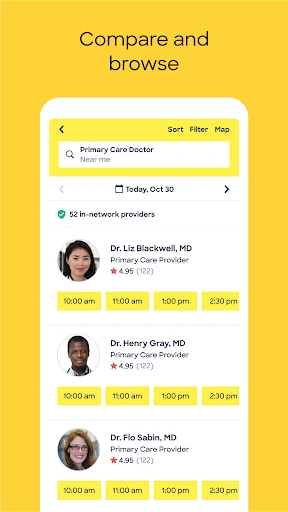
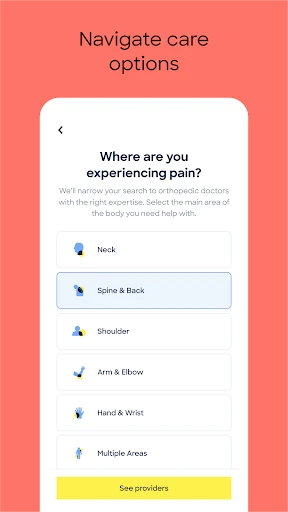
First things first, let’s talk about the app’s design. Zocdoc is super user-friendly, with a sleek design that makes navigation a breeze. When you open the app, you’re greeted with a clean interface that’s easy on the eyes. The search function is intuitive, allowing you to filter results by location, specialty, insurance, and even availability. It’s like having a mini healthcare concierge right on your phone!
Effortless Appointment Scheduling
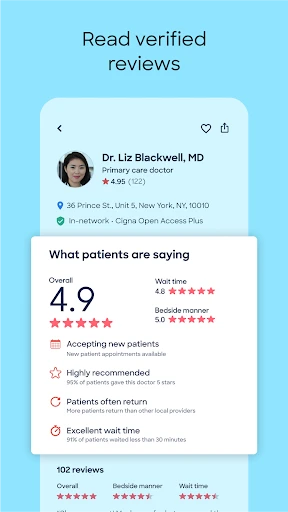
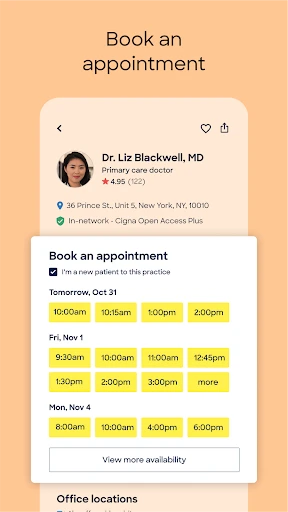
I have to say, the booking process is where Zocdoc really shines. Once you’ve selected a doctor, you can see their available times and book an appointment with just a few taps. Plus, you can read verified reviews from other patients, which can be a real lifesaver when you’re choosing a new healthcare provider. It’s reassuring to know that others have had good experiences before you commit.
See Open Slots Instantly
One of my favorite features is the real-time availability. This means you can see open slots in a doctor’s schedule as they become available, which is perfect if you need an appointment ASAP. No more back-and-forth calls with the receptionist – just check the app and book your slot!
Keeping Your Medical Info Organized
Zocdoc also allows you to keep track of your medical appointments and history, which is a huge plus. You can access your past and upcoming appointments, and even fill out your medical forms before you arrive at the doctor’s office. It’s all about making the process as smooth and hassle-free as possible.
Final Impressions
All in all, Zocdoc is a game-changer for anyone looking to take the headache out of booking medical appointments. It’s a simple, efficient, and incredibly helpful tool for managing your healthcare needs. Whether you’re new to an area or just looking to switch up your healthcare providers, Zocdoc has got you covered. So why not give it a try? You might just find that it’s the healthcare sidekick you never knew you needed.

- Developer
- Zocdoc, Inc.
- Version
- 3.191.0
- Installs
- 1,000,000+
- Android Version
- 8.0
- Content Rating
- Everyone
- Price
- Free
- Easy booking process for various medical specialists.
- User-friendly interface with intuitive navigation.
- Provides detailed doctor profiles and patient reviews.
- Option to filter doctors by insurance and location.
- Appointment reminders and notifications are available.
- Limited to areas where partner doctors are available.
- Some users report occasional app crashes.
- Insurance filter may not be comprehensive.
- Appointment availability may vary by doctor.
- Requires internet connection to access features.