Noteshelf - Notes, Annotations
Your All-in-One Digital Notebook: Noteshelf
Your All-in-One Digital Notebook: Noteshelf
Ever find yourself switching between different apps just to take notes, mark up PDFs, or write down a quick idea? Let me tell you about Noteshelf. Think of it as that reliable notebook you always have with you, but supercharged with all the benefits of modern tech. Here’s a look at why Noteshelf could be the perfect note-taking sidekick for you.
Your Digital Workspace
Right from the start, the interface is a winner. Noteshelf welcomes you with a clean, tidy dashboard that’s a breeze to use. Whether you're a digital creative or someone who likes things straightforward, you'll find the layout simple to get around. Starting a new notebook takes just one tap, and you can personalize it with various covers and paper types. It’s like having a personal stationery store right on your device!
Master Your Markups
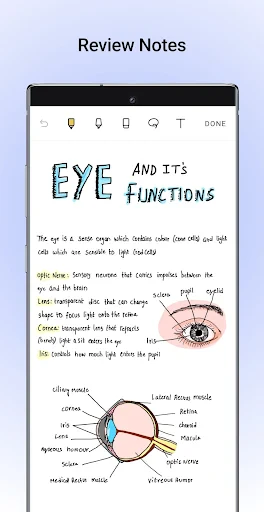
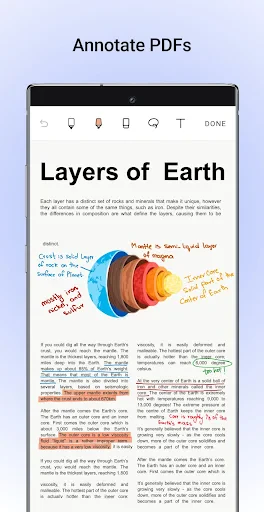
A truly standout feature is how you can annotate documents. Have a PDF or a file that needs reviewing? Just bring it into the app and start marking it up. You can highlight important sections, jot down comments, or sketch directly onto the page. It’s ideal for students going over class materials or professionals working through documents. You can easily switch between typing and writing by hand. And of course, it works beautifully with an Apple Pencil or other styluses, giving you a fluid and natural writing feel.
Your Notes, Everywhere
These days, you need your notes to be available on all your gadgets. Noteshelf gets this and provides smooth syncing with services like iCloud and Dropbox. So whether you're using an iPad, an iPhone, or an Android device, your notes are always within reach. Forget about sending notes to your own email or stressing over backing things up manually.
Never Miss a Word with Recordings
Been in a meeting or lecture where things moved too fast to write everything down? Noteshelf has a solution with its audio recording feature. You can record the audio while you take notes, and later, play it back to catch anything you might have missed. This is a total lifesaver for students and working professionals, making sure you capture every important point.
Make It Uniquely Yours
Making an app your own is a big part of staying productive, and Noteshelf excels here. You can pick from a variety of paper styles—like lined, graph, or blank—and choose your pen colors and thickness. The app lets you customize your note-taking to fit your personal style. If you're into digital planning, there are also lots of planner templates to help you keep everything on track.
In summary, Noteshelf is a powerful, all-in-one note-taking app that gathers every tool you could need in a single spot. Whether you're studying, working, or just like to write things down, this app is definitely worth a look. With its easy-to-use design, strong feature set, and ability to work across different platforms, it stands out in the crowded field of digital notebooks. So, why not take it for a spin? It might just become your favorite app for all things notes


- Developer
- Fluid Touch
- Version
- 9.0.7
- Installs
- 100,000+
- Android Version
- 9
- Content Rating
- Everyone
- Price
- $7.99
- Intuitive user interface for easy navigation.
- Wide variety of note-taking tools.
- Seamless syncing across devices.
- Supports multiple file formats for import.
- Advanced organization features.
- Premium features require subscription.
- Occasional syncing issues reported.
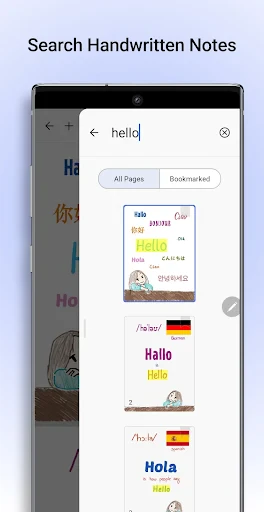
- Limited handwriting recognition.
- No collaborative editing feature.
- Resource-intensive on older devices.