Network Analyzer Pro
Network Analyzer Pro: Your Trusty Sidekick for Network Exploration
Network Analyzer Pro: Your Trusty Sidekick for Network Exploration
When it comes to diving deep into the nooks and crannies of your network, Network Analyzer Pro is the app that promises to be your trusty sidekick. I got my hands on this app recently, and let me tell you, it was quite the experience. If you're like me and tend to geek out over network stats, this might just be what you've been looking for.
So, first things first, firing up Network Analyzer Pro gives you a clean, straightforward interface that doesn't try to confuse you with tech jargon right off the bat. It's like the app is saying, "Hey, I know you're here to get things done, so let's keep it simple." And I appreciate that. No one wants to deal with unnecessary complexities when all you want is a comprehensive overview of your network.
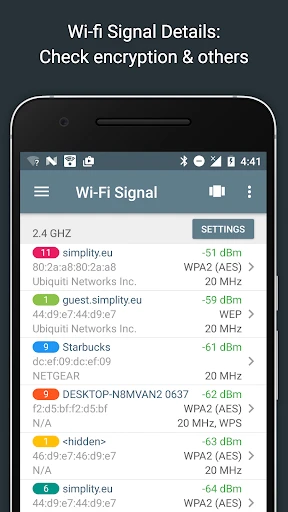
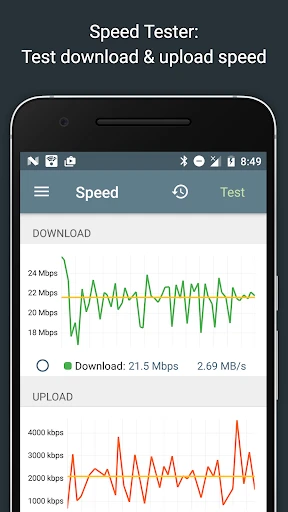
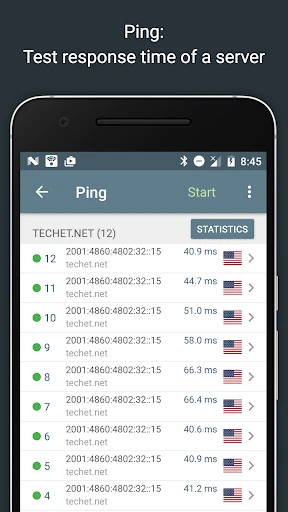
Now, onto the features. Network Analyzer Pro is packed with tools that cater to both casual users and network pros. You get the basics like WiFi signal measurement and speed tests, which are super handy when you're trying to figure out why your Netflix is buffering at the worst possible time. But it doesn’t stop there. The app also lets you dig deeper with network diagnostic tools, including DNS lookup, ping, and traceroute. It’s like having a Swiss Army knife for network troubleshooting right in your pocket.
One feature I found particularly cool is the LAN scanner. It scans your local network to list all connected devices, which is great for those moments when you suspect someone might be leeching off your WiFi. The level of detail it provides is impressive, showing you IP addresses, manufacturers, and even the Bonjour name if applicable.
The usability of Network Analyzer Pro is top-notch. The app is smooth and doesn't lag, which is crucial when you're trying to diagnose network issues in real-time. The developers clearly put a lot of thought into the user interface, making sure it's intuitive even for those who aren’t network engineers.
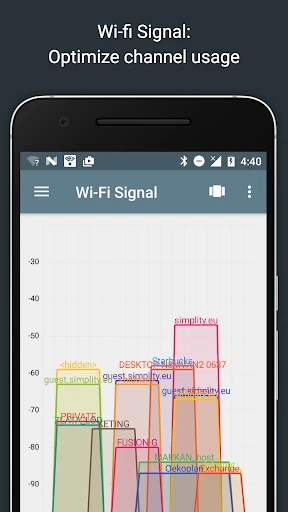
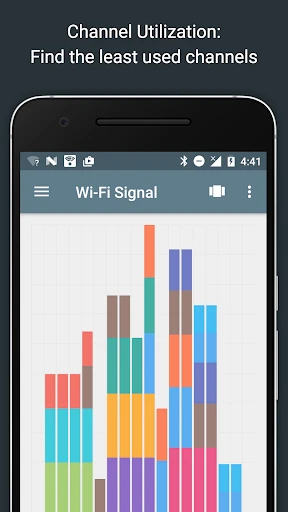
Another nice touch is the visual representation of network data. It’s not just numbers and codes; you get graphs and charts that make the data digestible and easy to interpret. This makes it accessible for users who might not be as tech-savvy but still want to understand what's going on with their network.
If you’re wondering if this app is for you, here’s the lowdown. Network Analyzer Pro is ideal for anyone who wants to keep an eye on their network performance, be it at home or work. Whether you're a tech enthusiast, a network administrator, or just someone who wants to make sure their internet is running smoothly, this app has something for you.
On the downside, some of the more advanced features might be a bit much for the average user. If you're not familiar with network terminology, there might be a bit of a learning curve. But hey, isn't that part of the fun?
In conclusion, Network Analyzer Pro is a powerful tool for anyone serious about understanding their network's intricacies. It’s user-friendly yet packed with features that can satisfy even the most demanding techies. If you’re on the fence about trying it out, I’d say go for it. You might just find it’s the app you never knew you needed.
- Developer
- Jiri Techet
- Version
- 4.0
- Installs
- 100,000+
- Android Version
- 9
- Content Rating
- Everyone
- Price
- $3.99
- Accurate network diagnostics
- User-friendly interface
- Wide range of network tools
- Ad-free experience
- Frequent updates
- Requires technical knowledge
- Limited free features
- No dark mode
- Occasional bugs
- Limited customer support