AlfaOBD
Unleashing the Power of Your Vehicle
Unleashing the Power of Your Vehicle
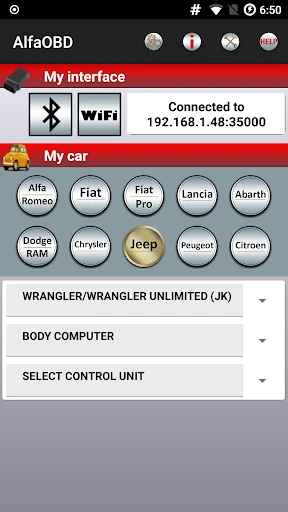
Alright, gearheads and tech fans, let's talk about a cool find: AlfaOBD. If you drive an Alfa Romeo, Fiat, Chrysler, Dodge, or Jeep, this app could be a total game-changer. Whether you love fixing things yourself or just want to know your car inside and out, AlfaOBD is definitely worth a look.
What AlfaOBD Can Do For You
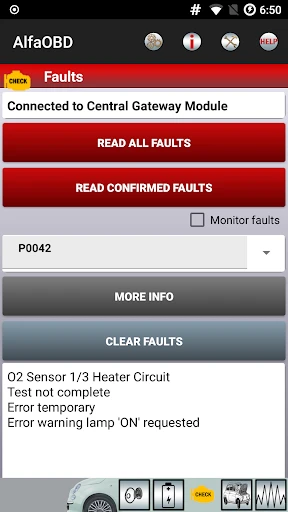
Ever wonder what's really going on under your car's hood? Or maybe you've had a pesky warning light come on and wished you could make it disappear? That's where AlfaOBD comes in. This app turns your Android or iOS phone into a powerful diagnostic tool. It has a simple, user-friendly interface and offers features you'd normally only find in a professional mechanic's shop.
Key Features That Set It Apart
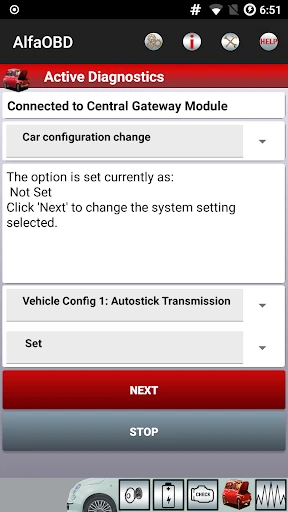
First off, AlfaOBD does more than just read engine codes. It goes much further, letting you program the ECU, monitor live data, and even activate different components. Imagine testing your car's actuators or resetting a service reminder with just a few taps on your screen. Pretty cool, right?
One feature that really stood out is the ability to customize your car's settings. You can adjust the daytime running lights or set new tire pressure limits. AlfaOBD basically hands you the controls, like having a mini auto shop right in your pocket.
What You'll Need to Begin
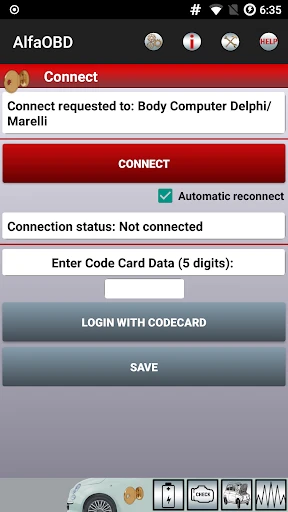
Before you get too excited, you'll need a couple of things to start. The app itself is quite affordable, but you also need an OBD-II adapter. This is a small gadget that plugs into your car's OBD port and talks to your smartphone. There are many options available, so just make sure you pick one that works with AlfaOBD.
The setup is simple. Download the app from the Google Play Store or Apple App Store, plug in your OBD-II adapter, and you're ready. The app walks you through the process easily, and before you know it, you'll be exploring your car's electronic brain.
Why AlfaOBD Is a Top Choice
What makes AlfaOBD stand out from other diagnostic apps is its focus on the Fiat Chrysler Automobiles family. It's specially designed for Alfa Romeo, Fiat, Chrysler, Dodge, and Jeep models, so it's fine-tuned for their specific systems. This means you get detailed, vehicle-specific information, not just generic data.
Another great thing about AlfaOBD is its user community. There's a lively online forum where people share advice, tricks, and help each other out. It's like having a worldwide network of fellow car fans ready to lend a hand. The app's developers are also active there, regularly updating the software and adding new features based on what users suggest.
Wrapping Up: Is It Worth It?
So, is AlfaOBD worth trying? If you're a car enthusiast or a hands-on owner, absolutely! It's a powerful tool that closes the gap between drivers and their vehicles, offering insights and functions that used to be only for professional garages. With AlfaOBD, you can take charge of your car's diagnostics and personalization. Just remember—with great power comes great responsibility, so use it wisely!
In short, AlfaOBD is like a Swiss Army knife for your car's electronics. It's versatile, powerful, and super useful. If you're eager to really understand your vehicle's inner workings, give AlfaOBD a try. You might discover it's the tool you've been searching for.

- Developer
- AlfaOBD Autodiag
- Version
- 2.4.1.0
- Installs
- 50,000+
- Android Version
- 4.0.3
- Content Rating
- Everyone
- Price
- $49.00
- Comprehensive diagnostic tool for vehicle systems
- Supports a wide range of car makes and models
- User-friendly interface with clear instructions
- Regular updates with new features and fixes
- Offline functionality for remote diagnostics
- Requires a compatible OBD device to function
- Might be overwhelming for novice users
- Limited customer support options
- Some features require in-app purchases
- Interface may seem outdated to some users