Circuit Route Planner
Circuit Route Planner: A Driver's Best Friend for Smarter Deliveries
Circuit Route Planner: A Driver's Best Friend for Smarter Deliveries
Hey there! So, today I’m diving into Circuit Route Planner, an app that’s been making waves among delivery drivers and anyone who needs to optimize their routes. Let me take you through my experience with it.
Upon firing up Circuit Route Planner, what struck me first was its clean and intuitive interface. I mean, nobody wants to wrestle with clunky menus when they’re on a tight schedule, right? This app seems to get that. It’s all about getting you from point A to B (and C, D, E… you get the picture) as efficiently as possible.
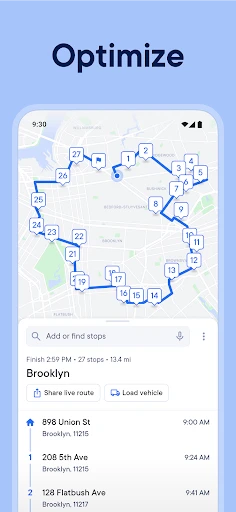
Setting up the app was a breeze. After a quick download, I was prompted to enter my stops. You can either import them from a spreadsheet, which is super handy if you’ve got a long list, or manually punch them in. Now, here’s the kicker – the app lets you input up to 150 stops! For someone who’s got a ton of deliveries, this is a game changer. And yes, it integrates smoothly with Google Maps, Waze, and even Apple Maps.
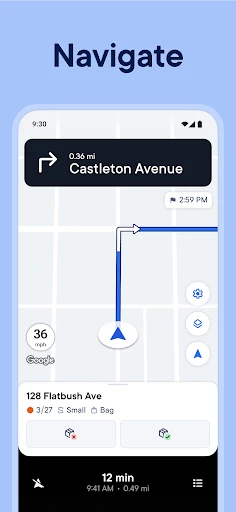
The optimization feature is where the magic happens. With a single tap, Circuit Route Planner calculates the most efficient route. This means less time driving around in circles and more time sipping on your favorite coffee or catching up on your favorite show. Plus, it’s got a built-in GPS that keeps you on track without any hiccups.
So, I decided to put it to the test on a busy Friday. I had a dozen places to hit, and let me tell you, navigating city traffic is not my favorite sport. But with Circuit Route Planner, I zipped through my list like a pro. The app even considered traffic conditions, which meant fewer unexpected delays.
Another nifty feature is the ability to set priority stops. Let’s say you’ve got a package that absolutely must be delivered by noon. You can mark it as a priority, and the app will ensure it’s at the top of your route. It’s these little things that make a big difference, especially when you’re trying to beat the clock.
After a week of using Circuit Route Planner, it’s safe to say I’m hooked. It’s not just about saving time – it’s about making my day a whole lot easier. Whether you’re a delivery driver, a sales rep, or just someone who hates wasting time on the road, this app is worth checking out.
In a nutshell, Circuit Route Planner is like having a personal assistant who’s a whiz at logistics. It’s reliable, efficient, and incredibly user-friendly. So, if you’re tired of zig-zagging all over town, give it a shot. Who knows? You might find yourself with a little extra time to enjoy the finer things in life. Cheers to smarter routes and happier days!



- Developer
- Circuit Routing Limited
- Version
- 3.47.0
- Installs
- 10,000,000+
- Android Version
- 6.0
- Content Rating
- Everyone
- Price
- Free
- Optimizes delivery routes efficiently.
- User-friendly interface for easy navigation.
- Supports multiple stops in one route.
- Reduces fuel consumption and travel time.
- Real-time traffic updates.
- Premium features require a subscription.
- Limited offline functionality.
- Occasional bugs in app updates.
- Requires constant GPS access.
- Lacks integration with all map services.