
Color Portfolio
Unpacking the Vibrancy of Color Portfolio
Unpacking the Vibrancy of Color Portfolio
Hey everyone, color lovers! Ever stand in a room completely stuck on what color could turn it from boring to amazing? Meet Color Portfolio, the app that's going to be your go-to buddy for all things color. I tested this app myself, and here's my honest opinion on how it performs.
First Look and Getting Around
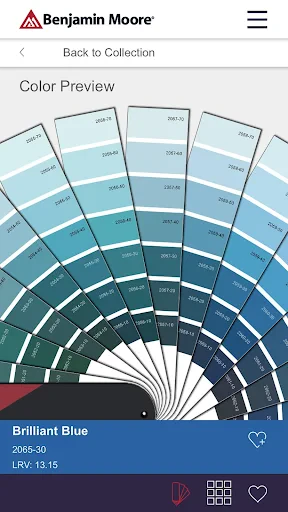
Jumping into Color Portfolio, the first thing you'll notice is its clean and easy-to-use design. It doesn't matter if you're a pro designer or just someone wanting to spruce up your home office, finding your way around the app is super simple. Everything is well-organized and right where you'd expect it to be. Honestly, you don't need any special training to start using it right away.
When you open the app, you're met with a warm and welcoming set of colors that makes you want to start playing around immediately. It has a huge library of colors to pick from, which is a lifesaver for anyone who, like me, can never decide on a shade.
Handy Tools and Cool Functions
One of the coolest things about Color Portfolio is its augmented reality feature. That's right—you can point your phone's camera at any wall and see how a new color would look on it instantly. It's like magic for your home makeover plans! This tool is a huge time-saver and helps you skip the frustrating process of buying a dozen sample pots.
Another great feature is that you can build your own custom color sets. You can make and save personal palettes, which is ideal for when you're exploring different looks. Also, you can grab colors straight from your photos, meaning you can get ideas from anywhere—a picture from your last holiday could inspire your next room redesign!
How It Feels to Use: Any Hiccups?
For the most part, using the app is a smooth experience, but it does have a couple of small issues. Sometimes the augmented reality can be a little slow or jumpy, particularly if you're using an older phone. It's not a major problem, but it's something to consider if your device isn't the latest model.
On the positive side, the app generally works very well, with fast loading screens and no choppiness when moving between different sections. Also, if you do run into trouble, their help team is quite quick to respond, which is always a good sign.
The Bottom Line: Should You Download It?
So, is Color Portfolio an app you'll wonder how you lived without? I think yes. It's an incredibly useful tool not only for experts but for anyone who wants to add more color to their world. Whether you're doing a big home remodel or a small craft project, this app provides the resources you need to choose colors with confidence. With all its helpful functions and straightforward design, it's easy to get hooked on Color Portfolio.
To sum it up, if you're tired of guessing which colors will work, you should definitely check out Color Portfolio. It's like carrying your own color expert in your pocket. Have fun painting!



- Developer
- Benjamin Moore & Co.
- Version
- 2.3.5
- Installs
- 100,000+
- Android Version
- 7.1
- Content Rating
- Everyone
- Price
- Free
- User-friendly interface for easy navigation
- Wide range of color palettes available
- Supports high-resolution color images
- Integrates well with design software
- Offers offline access to color data
- Limited free version features
- Occasional app crashes reported
- Requires regular updates for new features
- May consume significant device storage
- Lacks interactive tutorials for beginners