Google Docs
My Trusty Sidekick: A Look at Google Docs
My Trusty Sidekick: A Look at Google Docs
Google Docs has been my trusty sidekick for quite some time now, and I have to say, it's been an absolute game-changer in how I handle my documents. Whether you're a student, a professional, or just someone who dabbles in a bit of writing here and there, Google Docs offers a suite of features that cater to all your document needs without breaking a sweat.
Your First Steps in Google Docs
From the moment you start using Google Docs, you'll notice how user-friendly it is. The interface is clean and intuitive, making it a breeze to navigate. You don't need to be a tech guru to figure it out. Just sign in with your Google account, and you're good to go! Plus, it’s free, which is always a bonus in my book.
Teamwork Without the Hassle
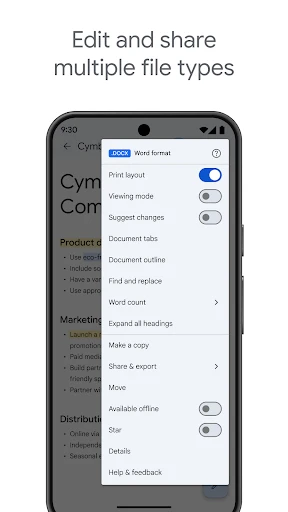
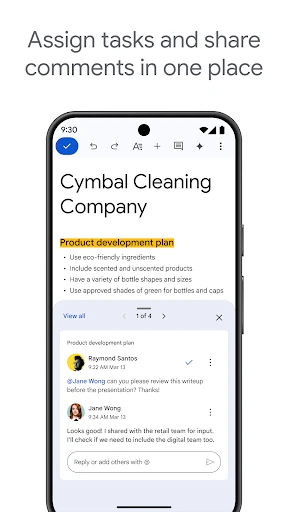
One of the standout features of Google Docs is its collaboration capabilities. I've used it countless times for group projects and team meetings, and it has never let me down. You can share documents with others and work on them simultaneously, which is such a lifesaver. No more emailing back and forth with different versions of the same document. Just click "Share," and you can invite others to view, comment, or edit the document. It's that simple.
And let’s talk about real-time editing. Watching changes happen in real-time as your collaborators type away is nothing short of magical. It’s like having everyone in the same room, even if you’re miles apart.
Tools to Supercharge Your Work
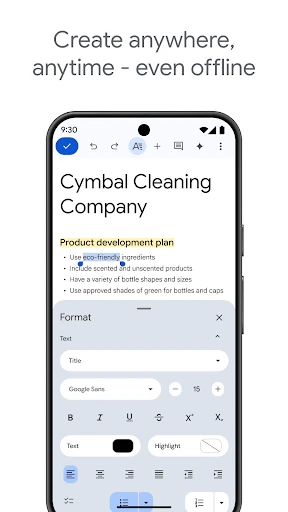
Google Docs isn’t just about typing words on a page. It offers a variety of tools to enhance productivity. For instance, the voice typing feature is fantastic when you're on the go or when your hands are just too busy to type. The formatting options are extensive, allowing you to customize your documents to your liking.
Another handy feature is the version history. Ever accidentally delete a chunk of text or wish you could go back to an earlier draft? Google Docs has you covered. Just head over to "File" and "Version History," and you can view and restore previous versions of your document. It's like having a time machine for your writing!
Work From Anywhere, On Anything
What I love about Google Docs is that it’s accessible from anywhere. Whether you’re on your laptop, tablet, or phone, your documents are just a click away. It's all stored in the cloud, so you don't have to worry about losing your work if your device decides to throw a tantrum.
Moreover, Google Docs seamlessly integrates with other Google services like Google Drive, Sheets, and Slides. It’s like having a whole office suite right at your fingertips, ready to tackle whatever task you throw its way.
In conclusion, Google Docs is a powerhouse tool that has transformed the way I work with documents. Its collaborative features, accessibility, and robust set of tools make it an essential app for anyone looking to boost their productivity. Whether you’re drafting a simple letter or working on a complex project, Google Docs has got you covered. So, give it a try, and see how it can revolutionize your document workflow


- Developer
- Google LLC
- Version
- Varies With Device
- Installs
- 1,000,000,000+
- Android Version
- Varies With Device
- Content Rating
- Everyone
- Price
- Free
- Real-time collaboration feature.
- Access documents offline.
- Cross-platform compatibility.
- Integration with Google Drive.
- Automatic saving of documents.
- Requires internet for full features.
- Limited formatting options.
- Dependency on Google account.
- Privacy concerns with data storage.
- Occasional syncing issues.