Google Drive
Your Digital Lifesaver: An Introduction to Google Drive
Your Digital Lifesaver: An Introduction to Google Drive
Ever found yourself needing a file that's stuck on your home computer while you're miles away? Or maybe your phone is so full of photos and documents it's about to burst? Welcome to the world of Google Drive, a total lifesaver for the forgetful and anyone with a cluttered device.
Why Google Drive is a Game-Changer
So, what's all the fuss about Google Drive? It's not just a simple online storage locker. Think of it more like a virtual helper that's always ready to assist. Because it works so smoothly with other Google apps like Docs, Sheets, and Slides, you can create, edit, and save your work without ever switching programs. Picture yourself finishing up a presentation on your phone during your morning commute. That's the kind of convenience we're talking about!
An Interface That Just Makes Sense
The moment you open Google Drive, you'll see a clean and straightforward layout. You don't need to be a computer expert to find your way around. Everything is right where you'd expect it, from the "New" button for making files and folders to the search bar that finds your stuff in seconds. The best part is that the app looks and feels the same whether you're on a computer, tablet, or phone, so you always know what you're doing.
Teamwork Made Incredibly Simple
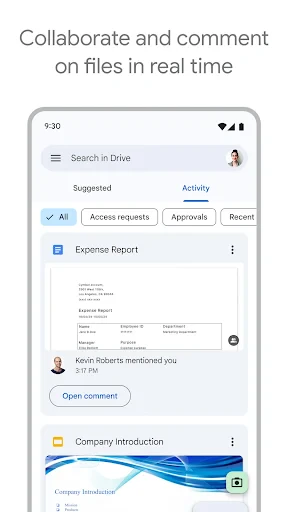
One of its best tricks is how easy it is to share and work with others. You can send a single file or a whole folder to someone with just a couple of taps. If you're tackling a group project or organizing a big family event, everyone can see and work on the same documents at the same time. It’s like having a digital workspace where everyone can contribute without the mess of endless email chains.
Keeping Your Files Safe and Sound
These days, keeping your digital life secure is a big deal, and Google Drive takes that seriously. Your files are scrambled into code when they're being sent and while they're sitting on Google's servers. You can also turn on two-step verification for your account, which is like adding a second lock on your door. It’s a great feeling to know your important files are protected from unwanted visitors.
And we can't forget about the free storage space. Google Drive gives you 15GB for free, which is enough for thousands of photos and documents. If you need more room, there are plenty of low-cost plans to choose from.
In a nutshell, Google Drive is a powerful tool that does much more than just store your files. It provides a complete system for getting things done and working with others. Whether you're a student, a busy professional, or just someone with a lot of pictures, Google Drive makes everything simpler. So the next time you're in a pinch or just want to free up some space, remember that Google Drive is only a click away.



- Developer
- Google LLC
- Version
- Varies With Device
- Installs
- 10,000,000,000+
- Android Version
- Varies With Device
- Content Rating
- Everyone
- Price
- Free
- Easy file sharing and collaboration.
- Integrates well with other Google apps.
- Generous free storage quota.
- Accessible from any device with internet.
- Real-time document editing.
- Limited offline access.
- Requires Google account.
- May have sync issues occasionally.
- Privacy concerns with data storage.
- Advanced features need paid plans.