Aloha Private Browser - VPN icon

Aloha Private Browser - VPN

Productivity

Related searches

Aloha Private Browser - VPN

Aloha Private Browser - VPN

Effortless Browsing and Navigation

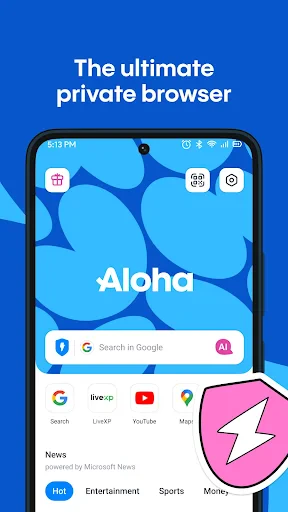
First off, let's talk about the user interface. The Aloha Private Browser welcomes you with a clean, minimalistic design that's a breeze to use. It's the kind of app that feels familiar right away, with no complicated menus to figure out. The browser tabs are neatly organized, and moving between them is as smooth as can be.

Top-Notch Privacy Protection

Now, onto the main event: keeping your business private. Thanks to its built-in VPN, Aloha makes sure your online life stays your own. I tried it out on different public Wi-Fi spots, and it was like I was completely hidden. No one was watching, and no trackers were following me around. Just me and the internet.

And there's a feature to stop all ads. That's right! Say goodbye to those irritating pop-ups and banners. Surfing the web without constant interruptions is a real game-changer.

Save Content for Later Viewing

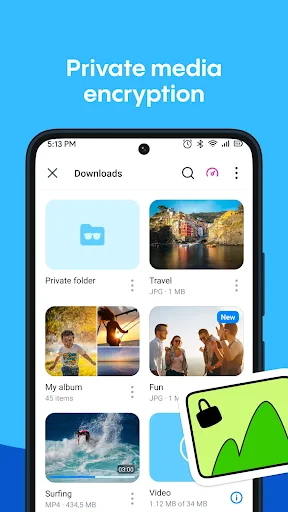
Another awesome feature is being able to download videos and music to watch or listen to later. Whether you're on the subway or somewhere with bad reception, this means your entertainment is always ready. With just a couple of taps, your favorite shows and songs are saved on your device.

Final Thoughts

In today's world, protecting your online privacy is a big deal, and Aloha Private Browser - VPN does a great job as your personal internet bodyguard. It offers more than just safe browsing; it improves your whole time online. So if you want to manage your digital privacy without any hassle, Aloha could be the perfect app for you.

Give it a download, take it for a test run, and you might just find yourself welcoming a brand new way to browse the web.
Aloha Private Browser - VPN screenshot Aloha Private Browser - VPN screenshot Aloha Private Browser - VPN screenshot Aloha Private Browser - VPN screenshot Aloha Private Browser - VPN screenshot
Aloha Private Browser - VPN icon
Aloha Private Browser - VPN
Developer
Aloha Mobile
Version
7.2.0
Installs
10,000,000+
Android Version
10
Content Rating
Everyone
Price
Free
Pros
  • Fast and secure browsing experience.
  • Built-in VPN for enhanced privacy.
  • Ad blocker improves page load speed.
  • User-friendly interface design.
  • Supports multiple tabs efficiently.
Cons
  • Free version has limited VPN locations.
  • Occasional connection drops with VPN.
  • Consumes more battery than normal browsers.
  • Premium features require subscription.
  • Limited customer support options.

Ratings

4.7

Similar Apps

Image to PDF - PDF Maker

Image to PDF - PDF Maker

4.9
Get
Document Reader & PDF Editor

Document Reader & PDF Editor

4.6
Get
Aloha Private Browser - VPN

Aloha Private Browser - VPN

4.7
Get
PDF Reader - PDF Editor

PDF Reader - PDF Editor

4.7
Get
QR Scanner: Barcode Scanner

QR Scanner: Barcode Scanner

4.6
Get
Password Safe and Manager

Password Safe and Manager

4.5
Get
MiXplorer Silver File Manager

MiXplorer Silver File Manager

4.5
Get
minimalist phone: Launcher

minimalist phone: Launcher

4.5
Get
AdBlock for Samsung Internet

AdBlock for Samsung Internet

3.1
Get

Frequently Asked Questions

What is Aloha Private Browser and how does it work?

Aloha Private Browser is a web browser designed to provide users with a secure and private browsing experience. It includes a built-in VPN to mask your IP address and encrypt your internet connection, ensuring your online activities remain confidential. The app also features an ad blocker, download manager, and VR player, making it a comprehensive tool for safe browsing on Android and iOS devices.

Is Aloha Private Browser free to use?

Aloha Private Browser offers both free and premium versions. The free version provides basic features such as private browsing and a limited VPN. However, users can upgrade to Aloha Premium for enhanced features, including unlimited VPN usage, advanced ad blocking, and more customization options. The premium service is available through a subscription model.

How secure is the VPN feature in Aloha Private Browser?

The VPN feature in Aloha Private Browser is designed to provide a high level of security by encrypting your internet traffic and hiding your IP address. This means your online activities are kept private from ISPs, hackers, and other third parties. The VPN uses strong encryption protocols to ensure data security, making it a reliable choice for users looking to protect their online privacy.

Can Aloha Private Browser block ads and trackers?

Yes, Aloha Private Browser includes an integrated ad blocker that helps prevent ads from appearing on websites you visit. Additionally, it blocks trackers, enhancing your online privacy by preventing third-party services from monitoring your browsing behavior. This feature not only speeds up webpage loading times but also reduces data usage, providing a smoother browsing experience.

What devices are compatible with Aloha Private Browser?

Aloha Private Browser is compatible with both Android and iOS devices. It can be downloaded from the Google Play Store for Android users and the Apple App Store for iOS users. The app is designed to operate smoothly on a wide range of devices, offering a user-friendly interface and a seamless browsing experience regardless of the platform.