LumaFusion: Pro Video Editing
Unleashing Creativity with LumaFusion: Pro Video Editing
Unleashing Creativity with LumaFusion: Pro Video Editing
Hey there, fellow video editing enthusiasts! Today, I’m diving into the world of LumaFusion, a powerhouse app that’s been making waves in the video editing community. If you’ve ever dreamt of having a professional video editing suite right in your pocket, then buckle up, because LumaFusion might just be the app you’ve been waiting for.
Your First Look at the App
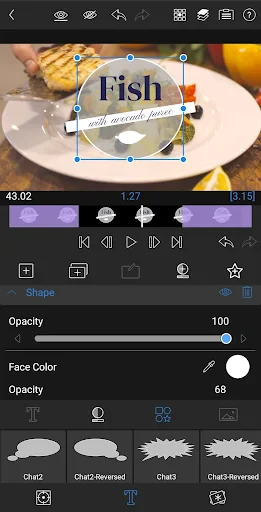
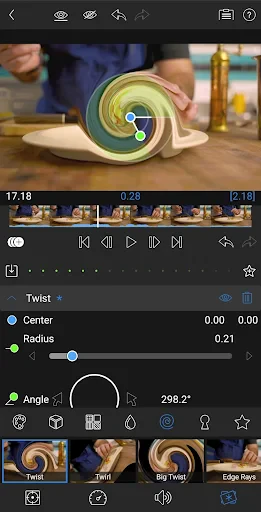
So, I decided to give LumaFusion a whirl after hearing all the buzz, and let me tell you, it didn’t disappoint. The app is available for both Android and iOS, which is a big thumbs up for accessibility. As soon as you launch it, you’re greeted with a sleek and intuitive interface that screams professionalism. It's not your average video editing app, folks. This thing is loaded with features that you’d typically find in desktop software.
Downloading and setting up LumaFusion is a breeze. The app is surprisingly lightweight for all that it offers, which is impressive. Once installed, you’re ready to start your editing journey. And trust me, it’s a journey worth taking!
A Deep Dive into Its Powerful Tools
Alright, let’s get into the nitty-gritty of why LumaFusion stands out. First off, the multi-track editing capability is a game-changer. You can work with up to six video and audio tracks, allowing for some seriously complex edits. Whether you’re a seasoned pro or a newbie, this feature alone opens up a world of possibilities.
Then there’s the color correction tools. I’m talking about real-time previews, scope, and LUTs (Look-Up Tables) that give your videos that cinematic flair. For those who worry about audio, LumaFusion has got you covered with its advanced audio mixing capabilities. You can add voiceovers, soundtracks, and even fine-tune each clip’s audio quality to perfection.
Getting Comfortable with the Interface
Now, let’s talk about the user experience. LumaFusion is pretty user-friendly, but like any professional tool, there’s a bit of a learning curve involved. The app offers a plethora of tutorials and customer support to get you through the initial stages. Once you get the hang of it, editing becomes a breeze.
The app allows for seamless integration with cloud storage services, so you can easily import and export your projects. Plus, with its fast rendering times, you won’t be left twiddling your thumbs waiting for your masterpiece to be ready.
Wrapping Up: Should You Get It?
In conclusion, LumaFusion is an absolute beast when it comes to mobile video editing. It’s packed with features that cater to both beginners and pros alike. While there might be a bit of a learning curve, the payoff is more than worth it. If you’re serious about video editing and want something that provides flexibility, power, and portability, then LumaFusion is definitely worth checking out.
So, are you ready to unleash your creativity with LumaFusion? Give it a shot and see how it transforms your editing game. Happy editing!



- Developer
- LumaTouch
- Version
- 2.0.0
- Installs
- 10,000+
- Android Version
- 10
- Content Rating
- Everyone
- Price
- $19.99
- Intuitive user interface design.
- Supports 4K video editing.
- Wide range of editing tools.
- Multi-track editing capability.
- Affordable compared to competitors.
- Limited audio editing features.
- No Android version available.
- Occasional app crashes.
- High learning curve for beginners.
- Limited export options.