Wifi Password Show: Master Key
Ever been in that awkward situation where you’re at a friend’s place, and you need to hop onto their WiFi, only for them to shrug and say, "I forgot the password"? Well, fret not, because WiFi Password Show: Master Key might just be the app you never knew you needed, until now.
Ever been in that awkward situation where you’re at a friend’s place, and you need to hop onto their WiFi, only for them to shrug and say, "I forgot the password"? Well, fret not, because WiFi Password Show: Master Key might just be the app you never knew you needed, until now.
Unlock the Digital Door
Okay, so here’s the deal. WiFi Password Show: Master Key is essentially a nifty little tool for retrieving saved WiFi passwords on your Android device. Now, before you raise an eyebrow, let me clarify—this app doesn’t hack into networks. It simply displays passwords for networks that your device has previously connected to. So, if you’re someone who jumps from coffee shop to coffee shop, this is like your digital notepad for WiFi credentials.
User-Friendly Interface
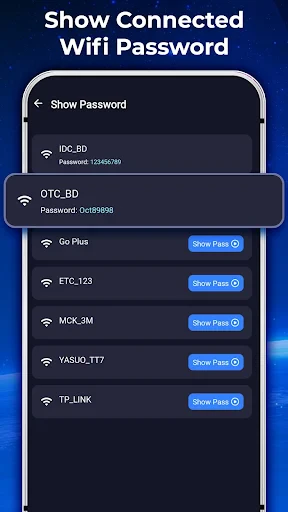
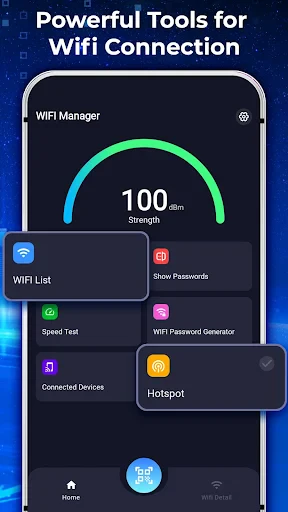
Upon firing up the app, you’re greeted with a straightforward, no-nonsense interface. Everything is where you’d expect it to be, which means even if you’re not the most tech-savvy person out there, you won’t find yourself scratching your head. The app lists all the WiFi networks you’ve connected to, and with a simple tap, voila, there’s your password.
Security Concerns? Let’s Talk
Of course, with any app that deals with passwords, there’s bound to be a question mark hovering around security. Rest assured, WiFi Password Show: Master Key doesn’t require any unnecessary permissions, which is a huge plus in my book. It doesn’t pry into your personal data, and it doesn’t need to root your device—which is a relief because who has time to deal with the risks of rooting these days?
Why It’s a Game Changer
Honestly, the simplicity of this app is what makes it stand out. It’s not trying to be something it’s not. It's just there to make your life a tad bit easier when you need it the most. We've all been in situations where we need a quick WiFi connection, and asking for the password again and again can be a hassle. With this app, you get to save face and avoid those repetitive conversations.
Compatible Across Devices
Another feather in its cap is its compatibility. Whether you’re using a Samsung, Huawei, or any other Android device, this app runs smoothly without any hiccups. It’s like that trusty Swiss Army knife in your digital toolkit—always ready when you need it.
Final Thoughts
In a world where connectivity is king, having an app like WiFi Password Show: Master Key is a blessing. It’s lightweight, efficient, and does exactly what it says on the tin. No more awkward moments, no more fumbling around for passwords. Just quick, easy access to your WiFi networks.
So, if you find yourself constantly on the move and need a seamless way to manage your WiFi connections, give this app a whirl. Trust me, once you’ve tried it, you’ll wonder how you ever lived without it. After all, in the age of digital everything, staying connected shouldn’t be a hassle.

- Developer
- QUEEN CITY
- Version
- 1.5.9
- Installs
- 10,000,000+
- Android Version
- 9
- Content Rating
- Everyone
- Price
- Free
- Easy to navigate interface.
- Quickly retrieves saved WiFi passwords.
- Supports various Android versions.
- No need for root access.
- Lightweight and fast installation.
- Requires WiFi connection for setup.
- Limited to showing saved passwords.
- No password sharing feature.
- Ads can be intrusive.
- Lacks advanced security features.