OBD Auto Doctor: OBD2 Scanner
Your Car's Personal Translator: A Guide to OBD Auto Doctor
Your Car's Personal Translator: A Guide to OBD Auto Doctor
Have you ever felt like your car is speaking a language you just can't understand? Well, that's where OBD Auto Doctor comes into play! It's like having a personal translator for your vehicle right in your pocket. Let me tell you all about it.
What Exactly is OBD Auto Doctor?
The OBD Auto Doctor is a nifty little app that transforms your smartphone into a professional-grade diagnostic tool. It's designed to give you insights into your car's health that you probably never thought you could access on your own. And the best part? You don't need to be a mechanic to use it!
Cool Features You'll Love
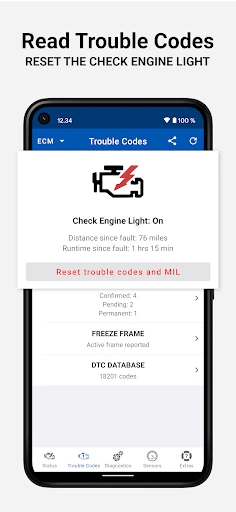
Let’s dive into the features that make this app a must-have for any car owner. First off, it connects with your car’s OBD2 system using a Bluetooth adapter. Once linked, it reads the diagnostic trouble codes (DTCs) and presents them to you in a way that actually makes sense. No more cryptic codes that leave you scratching your head.
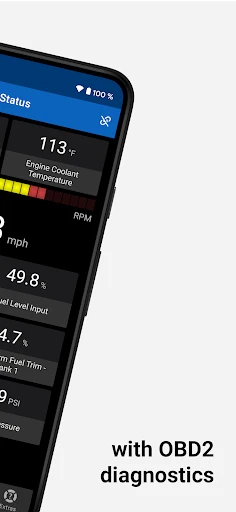
But that’s just the tip of the iceberg. OBD Auto Doctor allows you to monitor real-time data such as engine RPM, fuel consumption, and coolant temperature. It’s like having a dashboard on your phone!
Why This App is a Total Lifesaver
For those of us who dread the "Check Engine" light, this app is a lifesaver. It provides detailed information on what’s causing the light to come on, so you can determine whether it’s something minor or if you need to head straight to the mechanic. Imagine the peace of mind that comes from knowing exactly what's going on with your car without any guesswork.
Plus, it keeps a history of your car's diagnostics. So, if you like to keep track of your vehicle’s health over time, this app’s got you covered. It's like having a medical record for your car!
How to Get Up and Running
Getting started with the app is a breeze. All you need is a compatible OBD2 Bluetooth adapter, which you can find easily online. Once you’ve got that, download the app, connect it to your car, and you’re all set. The interface is user-friendly, and even those who aren’t tech-savvy will find it intuitive. It’s as easy as pie!
So, if you’re someone who loves having control over your car’s health and wants to save a few bucks on unnecessary mechanic visits, OBD Auto Doctor is definitely worth checking out. It’s like giving your car a voice and, trust me, once you start using it, you’ll wonder how you ever lived without it.
In conclusion, this app is perfect for both car enthusiasts and everyday drivers who just want to be in the know about their vehicle. It’s a blend of convenience, efficiency, and peace of mind. So, next time your car tries to "talk" to you, make sure you’ve got OBD Auto Doctor as your translator



- Developer
- Creosys Ltd
- Version
- Varies With Device
- Installs
- 1,000,000+
- Android Version
- Varies With Device
- Content Rating
- Everyone
- Price
- Free
- User-friendly interface simplifies navigation.
- Compatible with most car brands and models.
- Real-time data tracking for accurate diagnostics.
- Customizable dashboard for personalized use.
- Offers detailed reports and explanations.
- Limited features in the free version.
- Occasional connectivity issues with some devices.
- Requires initial setup time for new users.
- Some advanced features need in-app purchases.
- May not support all OBD-II protocols.