Pixel Shimeji - Desktop Pet icon

Pixel Shimeji - Desktop Pet

Personalization

Related searches

Pixel Shimeji - Desktop Pet

Pixel Shimeji - Desktop Pet

Have you ever imagined having a cute little companion roaming around your desktop while you work or browse the web? If that sounds appealing, then you might just fall in love with Pixel Shimeji - Desktop Pet. Available for Android and iOS, this adorable app brings tiny animated characters, known as Shimejis, to your phone screen, providing a new level of interaction and entertainment.

Meet Your New Pixel Buddy

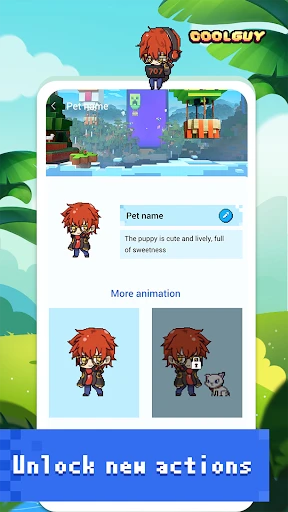
Pixel Shimeji is all about bringing charm and personality to your device. Once installed, the app allows you to select from a variety of Shimeji characters, each with their unique animations and behaviors. Whether it’s a mischievous cat, a playful dog, or even popular anime characters, there’s a Shimeji for everyone.

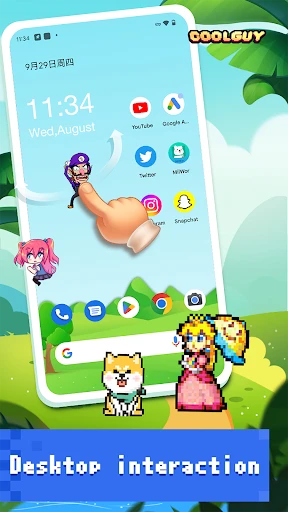
The setup process is straightforward, making it accessible even for those who aren’t tech-savvy. After choosing your Shimeji, it instantly starts frolicking around your screen. These little guys are interactive, meaning they’ll respond to your touches, climb windows, and sometimes even multiply, ensuring that your screen is never dull.

Interaction and Customization

One of the standout features of Pixel Shimeji is the level of customization it offers. Not only can you choose which Shimeji you want, but you can also adjust their size and the number of Shimejis on your screen at any given time. This personalization ensures that your desktop pet experience is truly your own.

Interacting with your Shimeji is half the fun. Tap them, drag them around, or just watch as they perform cute antics on their own. It’s a delightful way to take a quick break from work or study and enjoy a moment of lightheartedness.

Performance and Usability

Despite the constant animations, Pixel Shimeji is designed to be easy on your device’s resources. The app runs smoothly without causing any noticeable lag or battery drain, which is a significant plus for any mobile application. Additionally, the intuitive user interface ensures that even beginners can navigate the app effortlessly.

One thing to note is that while the app is free to download, it does offer in-app purchases. These allow you to unlock premium Shimejis and additional features, which can enhance your experience if you’re willing to spend a little extra.

Final Thoughts

In a world where mobile apps often focus on productivity and efficiency, Pixel Shimeji - Desktop Pet offers a refreshing change of pace. It brings joy, companionship, and a touch of whimsy to your device, making it a charming addition to any smartphone or tablet.

If you’re looking to add a bit of fun to your daily routine, or if you’re simply a fan of adorable animations, Pixel Shimeji is definitely worth a try. Whether you’re using it to entertain yourself during breaks or just to see a cute character on your screen, it’s a delightful app that manages to stand out in a crowded market.

Pixel Shimeji - Desktop Pet screenshot Pixel Shimeji - Desktop Pet screenshot Pixel Shimeji - Desktop Pet screenshot Pixel Shimeji - Desktop Pet screenshot
Pixel Shimeji - Desktop Pet icon
Pixel Shimeji - Desktop Pet
Developer
LAMBDA TECHNOLOGY CO., LIMITED
Version
2.0.9
Installs
10,000,000+
Android Version
7.0
Content Rating
Teen
Price
Free
Pros
  • Cute and interactive desktop pet.
  • Wide variety of characters to choose.
  • Customizable animations.
  • Light on system resources.
  • Regular updates and new content.
Cons
  • May distract from work tasks.
  • Limited functionality beyond fun.
  • Animations may become repetitive.
  • Occasional bugs and glitches.
  • Requires internet for updates.

Ratings

3.8

Similar Apps

Clap to Find My Phone, Whistle

Clap to Find My Phone, Whistle

4.5
Get
ZipLock - Zipper Lock Screen

ZipLock - Zipper Lock Screen

3.4
Get
Pixel 4D™ Live Wallpapers

Pixel 4D™ Live Wallpapers

4.7
Get
Photo Lock App - Hide Pictures

Photo Lock App - Hide Pictures

4.7
Get
ThemeKit - Themes & Widgets

ThemeKit - Themes & Widgets

4.6
Get
3D Parallax Wallpaper

3D Parallax Wallpaper

4.7
Get
Emoji Battery - Battery Icon

Emoji Battery - Battery Icon

4.1
Get
Christmas Spirit - Animated

Christmas Spirit - Animated

4.1
Get
4K Wallpaper - HD Backgrounds

4K Wallpaper - HD Backgrounds

4.3
Get

Frequently Asked Questions

What is Pixel Shimeji - Desktop Pet and how does it work?

Pixel Shimeji - Desktop Pet is a fun and interactive app that allows you to have animated characters, known as Shimejis, roaming around your desktop. Once installed, these adorable pixelated pets can perform various actions, such as climbing windows, interacting with each other, and even multiplying. The app is designed for users who enjoy personalization and adding a touch of whimsy to their computer experience. It operates seamlessly by running in the background, ensuring that your Shimejis are always present without interrupting your regular activities.

Can I customize the Shimejis in Pixel Shimeji - Desktop Pet?

Yes, customization is one of the key features of Pixel Shimeji - Desktop Pet. Users can select from a variety of Shimeji characters, each with unique appearances and behaviors. Additionally, you can adjust their size, speed, and interactions to better fit your desktop environment. The app also supports downloading additional Shimeji packs from the community, allowing for a personalized and ever-evolving desktop experience.

Does Pixel Shimeji - Desktop Pet affect my computer’s performance?

Pixel Shimeji - Desktop Pet is designed to have a minimal impact on your computer’s performance. The app runs efficiently in the background, consuming limited system resources. However, the performance may vary depending on the number of Shimejis active at once and your computer's specifications. Most users report smooth performance without noticeable slowdowns, but it is recommended to monitor resource usage if you encounter any issues.

Is Pixel Shimeji - Desktop Pet safe to use?

Yes, Pixel Shimeji - Desktop Pet is safe to use. It has been thoroughly tested to ensure that it does not contain any malware or viruses. The app is regularly updated to fix any bugs and improve security features. Users are encouraged to download the app from official sources to avoid any potential risks associated with unofficial or modified versions.

How do I uninstall Pixel Shimeji - Desktop Pet if I no longer want it?

Uninstalling Pixel Shimeji - Desktop Pet is straightforward. On Windows, you can remove it via the Control Panel by selecting 'Uninstall a program' and choosing Pixel Shimeji from the list. On macOS, simply drag the app from the Applications folder to the Trash. Ensure that the app is not running during uninstallation. If you experience any issues, consult the official support resources for detailed instructions.