Microsoft Outlook
Diving into Microsoft Outlook: Your Personal Email Maestro
Diving into Microsoft Outlook: Your Personal Email Maestro
If you're anything like me, managing several email accounts for work, personal life, and maybe a few fun hobby subscriptions, then Microsoft Outlook could become your new go-to. It's been a staple for years, and honestly, it's a real expert when it comes to handling email.
Getting Started: A Look at the Layout
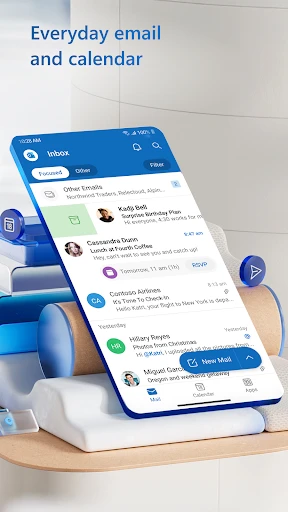
First, let's chat about the layout. When you open Outlook, you'll see a neat and tidy design that makes finding your way around your messages super simple. It feels like walking into a perfectly arranged workspace where you can find anything you need. The colors are gentle on your eyes, which is a big plus for anyone spending a lot of time in front of a computer. The setup is also really straightforward, making it a snap to jump from your inbox to your calendar or your contact list.
Handy Tools to Streamline Your Day
I really have to highlight how Outlook's tools are built to make things easier for you. To begin with, the Focused Inbox is a total lifesaver. It automatically organizes your emails by priority, so the most critical ones are right at the top. No more digging through piles of unwanted promotional emails!
Another clever tool is the Calendar. It works hand-in-hand with your email, letting you set up meetings or create reminders without needing to switch to another application. You can even let coworkers or friends see your calendar, which makes planning that coffee meetup incredibly straightforward.
How It Runs on Your Phone
No matter if you use an Android or an iPhone, Outlook performs really well. The mobile app works smoothly and reacts quickly, even on phones that aren't the latest model. Keeping everything in sync across your devices is effortless, so your emails and schedule are always current, wherever you are. And if you travel frequently, the ability to work offline is a huge help. You can write emails or check your calendar without an internet connection, and it will all update automatically once you're back online.
Keeping Your Information Safe
In our connected world, keeping your information secure is crucial, and Outlook is very focused on this. It provides strong encryption and extra login steps to make sure your emails stay private. What's more, with Microsoft's constant improvements, you can feel confident that your information is guarded against new dangers.
Wrapping Up: Is It For You?
So, should you download Microsoft Outlook? I'd give it a definite thumbs-up! It's more than just an app for email; it's an all-in-one tool that helps you handle your online tasks effectively. Whether you have a demanding job or you just prefer to keep everything in order, Outlook has features you'll appreciate. Give it a shot, and you might discover it's the helper for your emails you've been missing.
Go ahead and download it, take a look at what it can do, and tell me your thoughts. Enjoy your emailing

- Developer
- Microsoft Corporation
- Version
- Varies With Device
- Installs
- 1,000,000,000+
- Android Version
- 9
- Content Rating
- Everyone
- Price
- Free
- Integrates with Microsoft Office Suite seamlessly.
- Robust email organization and filters.
- Calendar integration boosts productivity.
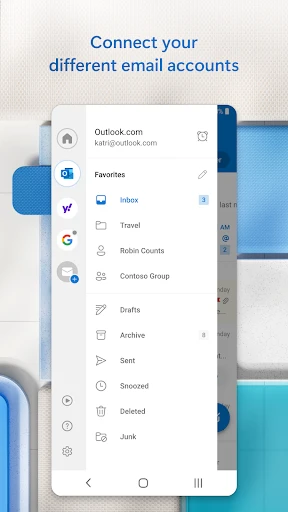
- Supports multiple email accounts easily.
- Reliable security features for emails.
- Can be overwhelming for new users.
- Requires Microsoft account for full features.
- Occasional sync issues reported.
- Limited customization for appearance.
- Resource-intensive on older devices.