Alarm Clock
Waking up in the morning is an eternal struggle for many of us, but the Alarm Clock app is here to make it a tad bit easier. I've spent some quality time with this app, and I must say, it brings a refreshing twist to the mundane task of getting up early. Let's dive into what makes this app stand out in the crowded world of alarm clock apps.
Waking up in the morning is an eternal struggle for many of us, but the Alarm Clock app is here to make it a tad bit easier. I've spent some quality time with this app, and I must say, it brings a refreshing twist to the mundane task of getting up early. Let's dive into what makes this app stand out in the crowded world of alarm clock apps.
A Look That Draws You In
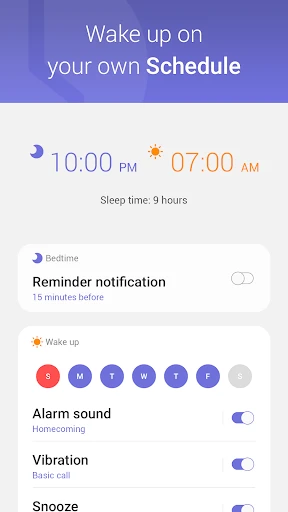
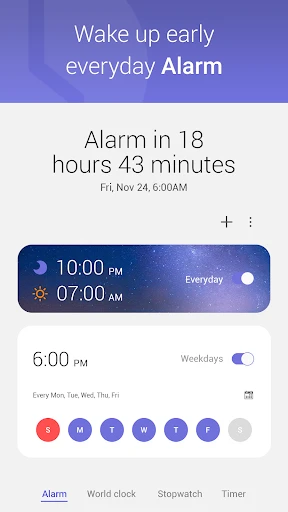
Upon launching the Alarm Clock app, you're greeted with a sleek, user-friendly interface. It's intuitive enough that even the least tech-savvy among us can navigate it with ease. The app’s design is minimalist, yet it packs a punch with its vibrant colors and smooth transitions. It feels like a breath of fresh air compared to the clunky designs of some other alarm apps I've tried.
Make It Uniquely Yours
One of the features I absolutely love is the level of customization this app offers. You can set multiple alarms with different tones, choose from a variety of themes, and even set a gentle wake-up sound that gradually increases in volume. This is perfect for those like me who dread the sudden jolt of a loud alarm.
Another nifty feature is the ability to set "challenges" to turn off the alarm. Whether it's solving a puzzle or completing a mini-game, it ensures that you're fully awake before the alarm stops. I found this particularly effective on those groggy Monday mornings.
More Than Just a Wake-Up Call
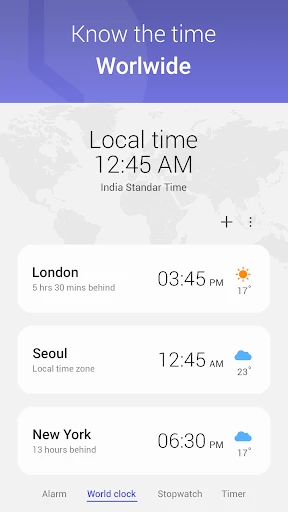
The Alarm Clock app isn't just about waking you up. It includes a range of additional features such as a sleep tracker and a built-in weather forecast. The sleep tracker gives insights into your sleep patterns, helping you optimize your rest time. The weather feature, on the other hand, lets you know what to expect when you step out, all from the comfort of your bed.
Also, for those who love to snooze (guilty as charged!), the app offers a smart snooze function. It monitors your snooze habits and adjusts the alarm accordingly, ensuring you don't run late for your morning appointments.
A Few Small Hiccups
While the app is fantastic, it's not without its flaws. Occasionally, I noticed minor bugs, like the alarm not ringing at the scheduled time. However, these instances were rare and were swiftly addressed by updates from the developers.
Moreover, some features are behind a paywall, which might be a turn-off for users looking for a completely free experience. Nonetheless, the free version still offers a comprehensive range of functionalities that cater to most users' needs.
Overall, the Alarm Clock app is a delightful companion for your mornings. It combines functionality with a touch of fun, ensuring you're not just awake, but ready to seize the day. If you're on the lookout for a new alarm app, I'd definitely recommend giving this one a shot. Sweet dreams, and wake up refreshed
- Developer
- Smart phone app
- Version
- 4.3
- Installs
- 1,000,000+
- Android Version
- 7.0
- Content Rating
- Everyone
- Price
- Free
- Intuitive user interface
- Customizable alarm tones
- Snooze and repeat options
- Automatic night mode
- Weather updates integrated
- Ads in free version
- Limited features without premium
- Consumes battery quickly
- No voice command support
- Occasional notification delays