My Kitchen: 3D Planner
My Kitchen: 3D Planner
My Kitchen: 3D Planner
Ever dreamed of redesigning your kitchen without lifting a hammer? Meet My Kitchen: 3D Planner, the app that turns your kitchen renovation fantasies into a digital reality. Whether you’re a homeowner looking to spruce up your culinary space or just a design enthusiast, this app is like having an entire design studio in your pocket.
Getting Your Digital Kitchen Project Rolling
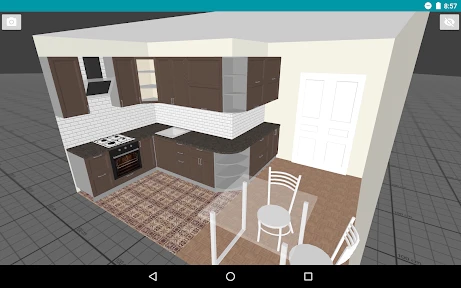
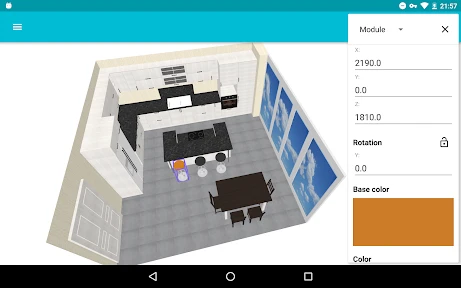
So, what's the deal with My Kitchen: 3D Planner? It’s super simple to dive into. Upon opening the app, you're greeted with a user-friendly interface that walks you through the process step-by-step. Even if you’re a total newbie in design, you’ll feel like a pro in no time. The app lets you input the dimensions of your kitchen and then build it out in a 3D space. It’s like playing a video game where you’re the architect of your dream kitchen!
Awesome Tools for Your Design Adventure
Now, let’s talk features. One of the coolest things about this app is the vast array of design options. You can choose from a plethora of cabinets, countertops, and appliances. Want a marble island in the center? No problem. Prefer a minimalist Scandinavian style? The app’s got you covered. The drag-and-drop functionality is super intuitive, making the design process feel effortless.
What sets this app apart is the realistic 3D rendering. Once you've placed your items, you can view your kitchen from different angles and perspectives. It almost feels like you can walk right into your screen and start cooking. The level of detail is impressive, and it really helps in visualizing how everything will look once it’s all put together.
From Digital Plans to Real-World Success
Beyond just playing around with designs, My Kitchen: 3D Planner is a powerhouse for serious planners. It allows you to experiment with different layouts and configurations, helping you to make informed decisions before making any costly purchases or changes. You can easily see what fits best in your space, ensuring you don’t end up with a fridge that’s too large or cabinets that clash with your overall theme.
Moreover, the app lets you save your designs and even share them with others. This is particularly handy if you’re working with a contractor or interior designer. They can provide feedback directly on your designs, making collaboration a breeze.
Wrapping It All Up
In a nutshell, My Kitchen: 3D Planner is a must-have for anyone looking to revamp their kitchen. It’s fun, easy to use, and incredibly practical. Whether you’re planning a full-scale renovation or just dreaming about one, this app provides the perfect platform to explore endless possibilities. So, why not give it a try and bring your dream kitchen to life?


- Developer
- Ovchinnikov Andrey
- Version
- 1.32.1
- Installs
- 1,000,000+
- Android Version
- 7.0
- Content Rating
- Everyone
- Price
- Free
- User-friendly interface enhances experience.
- Highly detailed 3D kitchen models.
- Customizable design options.
- Real-time changes with instant feedback.
- Offline mode available for convenience.
- Limited free features in the basic version.
- Occasional lag with complex designs.
- Requires a modern device for smooth operation.
- Some features locked behind a paywall.
- No multi-platform sync available.