Penly: Digital Planner & Notes
Penly: Digital Planner & Notes
Penly: Digital Planner & Notes
If you're anything like me, juggling between different planners, notebooks, and calendars can be quite the hassle. Enter Penly: Digital Planner & Notes, an app that promises to bring all your organizational needs into one digital space. I've spent some quality time with this app, and here's my take on it.
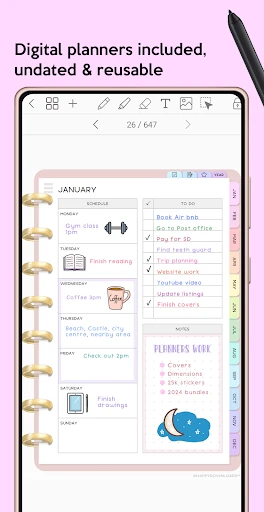
From the moment I opened Penly, I was greeted with a sleek and intuitive interface. It's like walking into a well-organized stationery store, but without the fear of knocking over a pile of notebooks. The app is designed to be user-friendly, making it easy for anyone to dive right in without needing a tutorial. The visual appeal is definitely a plus, with customizable themes that let you personalize your digital planner to match your vibe.
Penly isn't just a digital planner; it's a powerhouse of features. One of my favorite aspects is the ability to create and manage multiple notebooks. Whether you're planning your week, jotting down notes for a project, or keeping track of your workout routine, Penly has got you covered. The app allows you to effortlessly switch between notebooks, and the handwriting feature is a dream for those who miss the tactile feel of writing by hand.
Another standout feature is the integration with cloud services. With Penly, you can sync your notes across devices, ensuring that your important information is always at your fingertips, whether you're on your phone or tablet. It’s perfect for those of us who are constantly on the go.
Using Penly feels like having a personal assistant who never forgets anything. The app is incredibly responsive, with quick load times and smooth transitions. I particularly appreciate the search functionality, which makes finding specific notes a breeze. Plus, the app's ability to handle multimedia content means you can add images and links to your notes, making your digital planner as dynamic as you need it to be.
One minor hiccup I encountered was the initial learning curve. While the app is generally intuitive, the sheer number of features can be overwhelming at first. However, once you get the hang of it, you’ll wonder how you ever managed without it.
Penly: Digital Planner & Notes is perfect for anyone looking to streamline their organizational habits. It's packed with features that cater to both the meticulous planner and the creative mind. Whether you're a student, a professional, or just someone who loves to stay organized, this app is a worthy companion.
In conclusion, Penly offers a blend of functionality and style that’s hard to beat. With its user-friendly interface and comprehensive feature set, it transforms the way you plan and take notes. So if you're ready to ditch the chaos and embrace digital organization, give Penly a try. It might just become your new favorite app.



- Developer
- Penly
- Version
- 1.22.10
- Installs
- 100,000+
- Android Version
- 7.0
- Content Rating
- Everyone
- Price
- $5.99
- User-friendly interface for seamless navigation.
- Wide range of customizable planner templates.
- Syncs across devices for easy access anywhere.
- Robust note-taking features with multimedia support.
- Regular updates with new features and improvements.
- Limited free version with essential features locked.
- Occasional sync issues across multiple devices.
- High learning curve for advanced features.
- Heavy on storage with multimedia-rich notes.
- Some users report feature requests are ignored.